EasyManua.ls Logo

Sony D-555 - Electrical Adjustments; Adjustment Preparation and Checks; Focus Bias Adjustment; Tracking Balance Adjustment

Sony D-555
34 pages
Print Icon
To Next Page IconTo Next Page
To Previous Page IconTo Previous Page
Loading...
D-555/Z555
|
SECTION
3
ELECTRICAL
ADJUSTMENTS
Notes
on
Adjustment
iV
ty
Perform
adjustments
except
for
RECHARGEA-
BLE
VOLTAGE
ADJUSTMENT
and
BATTERY
DISPLAY
ADJUSTMENT
in
service
mode.
Be
sure
to
release
service
mode
after
completing
adjustment.
(Refer
to
‘Service
Mode
(service
program)’’
on
page
5.)
.
Perform
adjustments
in
the
order
given.
.
Use
YEDS-18
disc
(part
No.:
3-702-101-01)
unless
otherwise
indicated.
.
Power
supply
voltage:
DC
9
V
HOLD
switch:
OFF
PREPARATION
Put
the
set
into
service
mode
(see
page
5)
and
per-
form
the
following
checks.
Repair
if
there
are
any
abnormalities.
I.
7
nN
Sled
Motor
Check
Press
the
OPEN
button
and
open
the
top
panel.
.
Press
thep>P|
,
Kd
keys
and
make
sure
that
the
UPF
moves
smoothly,
without
catching,
from
the
inmost
~
outmost
>
inmost
circumference.
p>
:
UPF
moves
outward
kd<q
:
UPF
moves
inward
Focus
Search
Check
.
Press
the
OPEN
button
and
open
the
top
panel.
.
Press
the
P¥B
key.
(Focus
search
is
performed
continuously.)
.
Observe
the
UPF
objective
lens
and
check
that
it
moves
smoothly
up
and
down
with
no
catching
or
noises.
.
Press
the
Mf
key.
Check
that
focus
search
operation
stops.
If
it
does
not
stop,
press
the
Ml
key
again
longer
than
before.
But
disc
motor
continues
rotating
for
a
while
by
inartia.
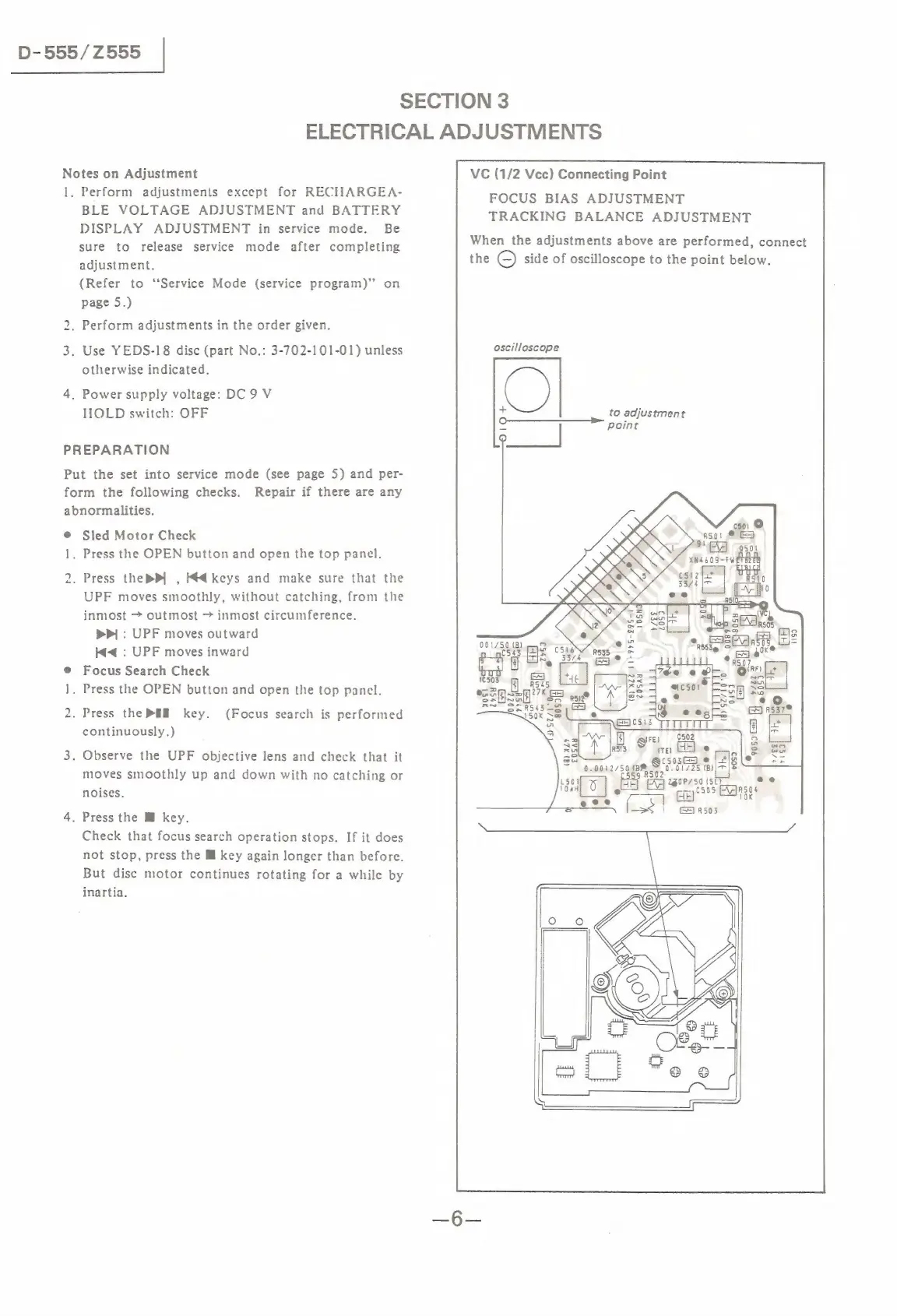
VC
(1/2
Vcc)
Connecting
Point
FOCUS
BIAS
ADJUSTMENT
TRACKING
BALANCE
ADJUSTMENT
When
the
adjustments
above
are
performed,
connect
the
O
side
of
oscilloscope
to
the
point
below.
oscilloscope
to
adjustment
Point
10
lt
:
001/50.(2)
C543
Bz
c
aa
_—
Bis
see
sohl
wwe
R54
35.0
e
%
3|
“Y\-
Fe)
9802
ea
s
ire}
e
°
cso3ae)
@
Jt
90012750
13%
Gisi73s
|
&
2goP75o
(st
eo
Ad
cig
’305
Fats
Q
(_
[pe
K
=SS
|
GerAases

Related product manuals