EasyManua.ls Logo

Sony D-555 - Service Mode Operation; Setting Service Mode; Operating Service Mode; Exiting Service Mode

Sony D-555
34 pages
Print Icon
To Next Page IconTo Next Page
To Previous Page IconTo Previous Page
Loading...
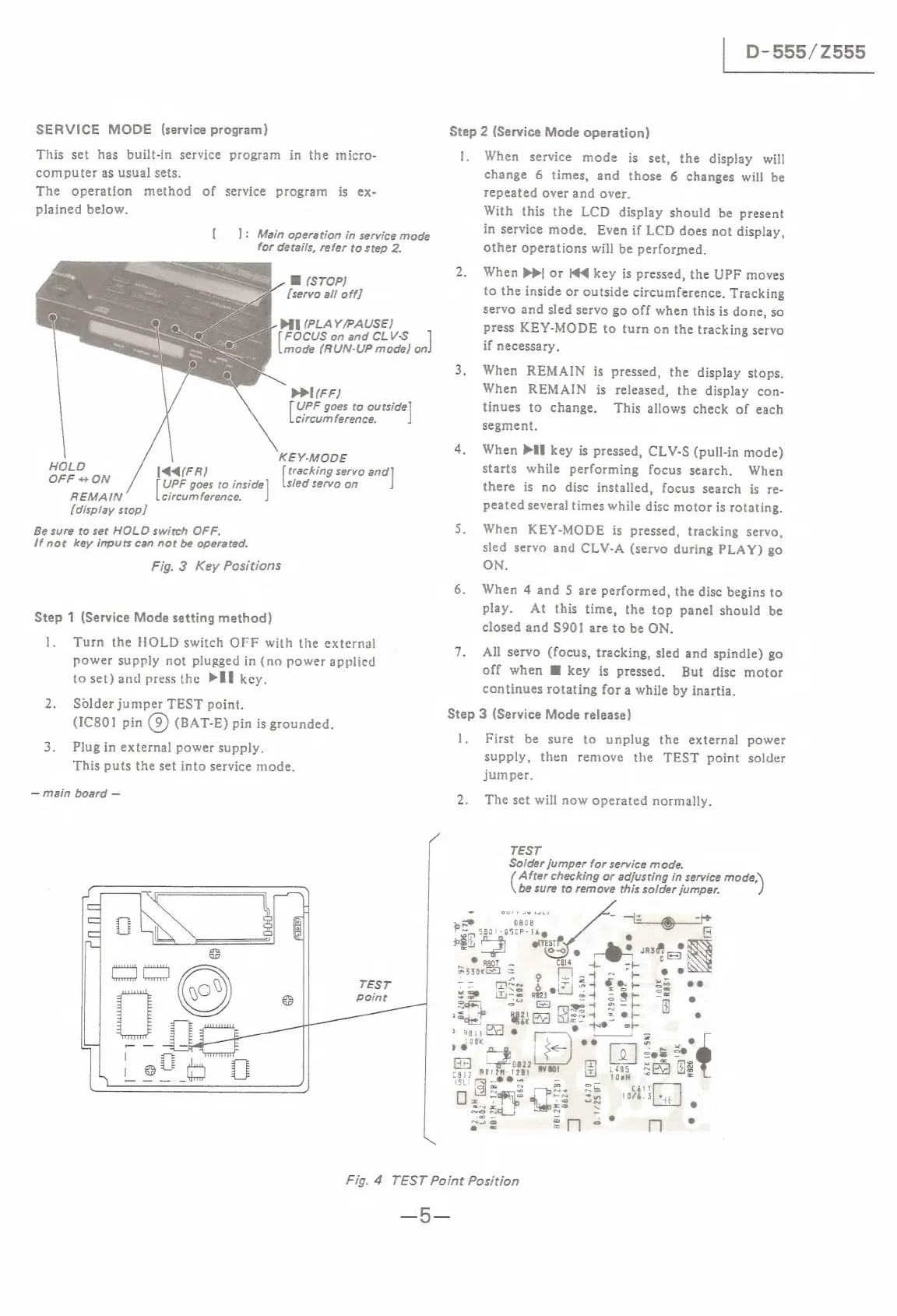
SERVICE
MODE
(service
program)
This
set
has
built-in
service
program
in
the
micro-
computer
as
usual
sets.
The
operation
method
of
service
program
is
ex-
plained
below.
[ads
Main
operation
in
service
mode
for
details,
refer
to
step
2.
@
(STOP)
[servo
all
off]
PIL
(PLAY/PAUSE)
he
OCUS
on
and
CLV-S
]
mode
(RUN-UP
mode)
on
PPI(FF)
el
goes
to
ou
ieee)
circum
ference.
Be
KEY-MODE
Hi
144(FR)
tracking
servo
=a
OFF
«ON
ere
goes
to
jai)
sled
servo
on
REMAIN
circumference.
(display
stop]
Be
sure
to
set
HOLD
switch
OFF.
If
not
key
inputs
can
not
be
operated.
Fig.
3
Key
Positions
Step
1
(Service
Mode
setting
method)
1.
Turn
the
HOLD
switch
OFF
with
the
external
power
supply
not
plugged
in
(no
power
applied
to
set)
and
press
the
PUT
key.
2.
Solder
jumper
TEST
point.
(IC801
pin
(9)
(BAT-E)
pin
is
grounded.
3.
Plugin
external
power
supply.
This
puts
the
set
into
service
mode.
main
board
L
|
D-555/Z555
Step
2
(Service
Mode
operation)
1,
When
service
mode
is
set,
the
display
will
change
6
times,
and
those
6
changes
will
be
repeated
over
and
over.
With
this
the
LCD
display
should
be
present
in
service
mode,
Even
if
LCD
does
not
display,
other
operations
will
be
performed.
2.
When
DP
or
Kd
key
is
pressed,
the
UPF
moves
to
the
inside
or
outside
circumference.
Tracking
servo
and
sled
servo
go
off
when
this
is
done,
so
press
KEY-MODE
to
turn
on
the
tracking
servo
if
necessary.
3.
When
REMAIN
is
pressed,
the
display
stops.
When
REMAIN
is
released,
the
display
con-
tinues
to
change.
This
allows
check
of
each
segment.
4.
When
Pil
key
is
pressed,
CLV-S
(pull-in
mode)
starts
while
performing
focus
search.
When
there
is
no
disc
installed,
focus
search
is
re-
peated
several
times
while
disc
motor
is
rotating.
5.
When
KEY-MODE
is
pressed,
tracking
servo,
sled
servo
and
CLV-A
(servo
during
PLAY)
go
ON.
6.
When
4
and
5
are
performed,
the
disc
begins
to
play.
At
this
time,
the
top
panel
should
be
closed
and
S901
are
to
be
ON.
7.
All
servo
(focus,
tracking,
sled
and
spindle)
go
off
when
M
key
is
pressed.
But
disc
motor
continues
rotating
for
a
while
by
inartia.
Step
3
(Service
Mode
release)
1,
First
be
sure
to
unplug
the
external
power
supply,
then
remove
the
TEST
point
solder
jumper.
2.
The
set
will
now
operated
normally.
TEST
Solder
jumper
for
service
mode.
sited
checking
or
adjusting
in
service
a
be
sure
to
remove
this
solder
jumper.
i
24
fa
-
e
st.
a
eS
&*
sas
®@
p07
Cal4
obs
330K)
=
°
feel
-
ee
ee
ae
&
.
Mis
}
oir
a4
fo
--y
om
DiS
Re3
sy
38
“=
©
co"
Sl
pqaedt
st
8
1
a
a4
=e
e
wie
BEE4
©
\
e
be
s e
weee
Glass
@
ses
=
9822
ra
g
Eh
teg?
AVEO
as
Sd
BES
ee.
=
AKO
Ds,
ie
=
Rete
ms
1
See
J
P&S
2
og
a
Sq
|
heb
23
a
ae
S
=
©
®
a2
=f]
Mm
Fig.
4
TEST
Point
Position
_5—

Related product manuals