EasyManua.ls Logo

Sony D-99 - Section 2 SERVICING NOTES; Handling the Optical Pick-up Block; Before Replacing the Optical Block; Flexible Circuit Board Repairing

Sony D-99
23 pages
Print Icon
To Next Page IconTo Next Page
To Previous Page IconTo Previous Page
Loading...
@
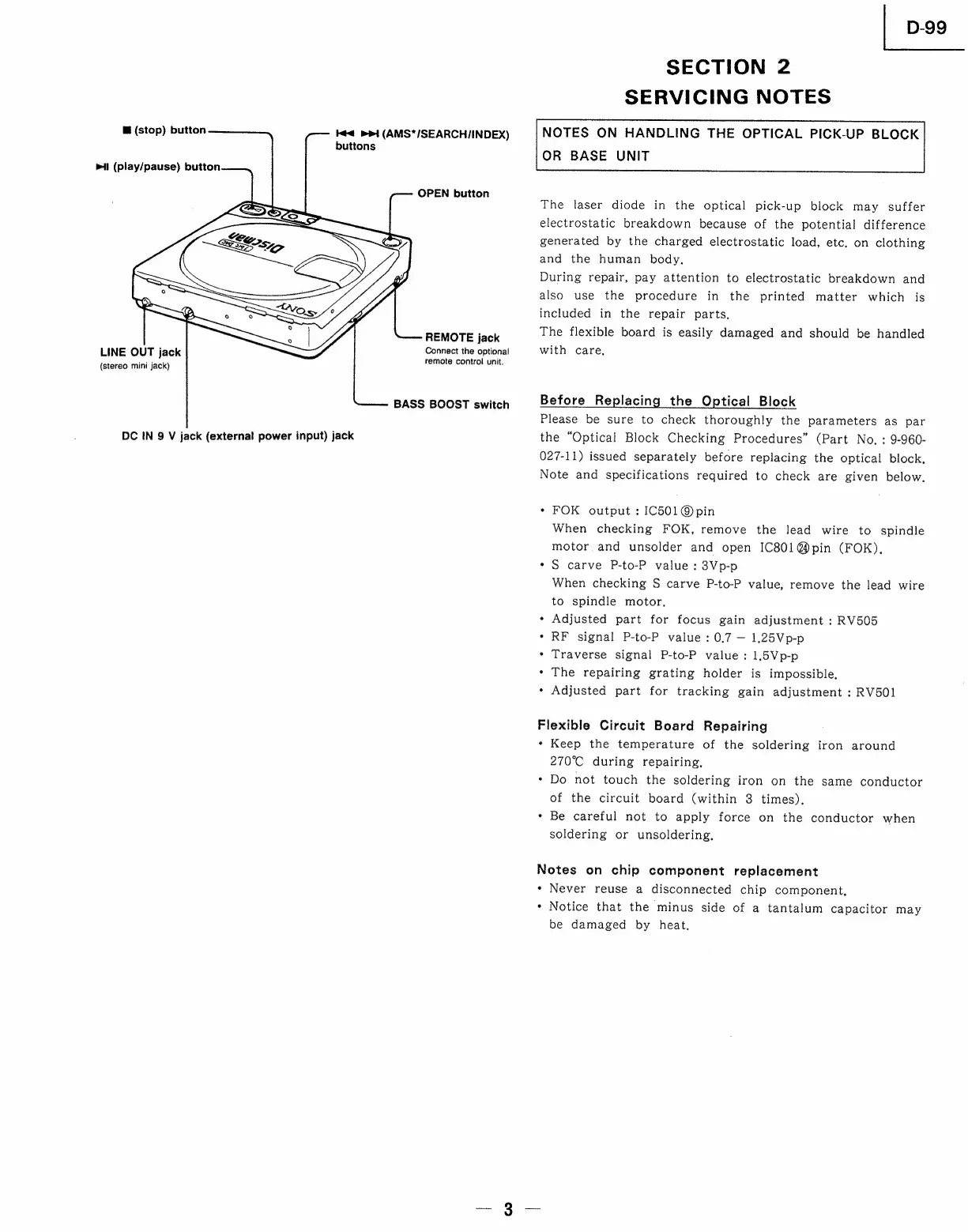
(stop)
button
Ke
mrt
(AMS*/SEARCH/INDEX)
buttons
ml
(play/pause)
button
OPEN
button
REMOTE
jack
Connect
the
optional
remote
control
unit.
LINE
OUT
jack
{stereo
mini
jack)
BASS
BOOST
switch
DC
IN
9
V
jack
(external
power
input)
jack
D-99
SECTION
2
SERVICING
NOTES
NOTES
ON
HANDLING
THE
OPTICAL
PICK-UP
BLOCK
OR
BASE
UNIT
The
laser
diode
in
the
optical
pick-up
block
may
suffer
electrostatic
breakdown
because
of
the
potential
difference
generated
by
the
charged
electrostatic
load,
etc.
on
clothing
and
the
human
body.
During
repair,
pay
attention
to
electrostatic
breakdown
and
also
use
the
procedure
in
the
printed
matter
which
is
included
in
the
repair
parts,
The
flexible
board
is
easily
damaged
and
should
be
handled
with
care,
Before
Replacing
the
Optical
Block
Please
be
sure
to
check
thoroughly
the
parameters
as
par
the
“Optical
Block
Checking
Procedures”
(Part
No.
:
9-960-
027-11)
issued
separately
before
replacing
the
optical
block,
Note
and
specifications
required
to
check
are
given
below.
e
FOK
output
:
IC501@pin
When
checking
FOK,
remove
the
lead
wire
to
spindle
motor
and
unsolder
and
open
IC801@pin
(FOK),
*
S
carve
P-to-P
value
:
3Vp-p
When
checking
S
carve
P-to-P
value,
remove
the
lead
wire
to
spindle
motor,
*
Adjusted
part
for
focus
gain
adjustment
:
RV505
*
RF
signal
P-to-P
value
:
0.7
1.25Vp-p
*
Traverse
signal
P-to-P
value:
1.5Vp-p
*
The
repairing
grating
holder
is
impossible,
*
Adjusted
part
for
tracking
gain
adjustment
:
RV501
Flexible
Circuit
Board
Repairing
*
Keep
the
temperature
of
the
soldering
iron
around
270°C
during
repairing,
Do
not
touch
the
soldering
iron
on
the
same
conductor
of
the
circuit
board
(within
3
times),
Be
careful
not
to
apply
force
on
the
conductor
when
soldering
or
unsoldering,
°
Notes
on
chip
component
replacement
*
Never
reuse
a
disconnected
chip
component,
*
Notice
that
the
minus
side
of
a
tantalum
capacitor
may
be
damaged
by
heat,

Related product manuals