EasyManua.ls Logo

Sony D-99 - Service Mode Operations; Laser Diode Emission Check Procedures; Service Mode Setting Method; Service Mode Operation Steps

Sony D-99
23 pages
Print Icon
To Next Page IconTo Next Page
To Previous Page IconTo Previous Page
Loading...
D-99
NOTES
ON
LASER
DIODE
EMISSION
CHECK
The
laser
beam
on
this
model
is
concentrated
so as
to
be
focused
on
the
disc
reflective
surface
by
the
objective
lens
in
the
Optical
pick-up
block,
Therefore,
when
checking
the
laser
diode
emission,
observe
more
than
30cm
away
from
the
objective
lens,
Laser
Diode
Check
Procedure
The
laser
diode
on
this
set
will
not
emit
unless
the
top
panel
is
closed
and
S901
is
turned
on,
The
laser
diode
will
always
emit
even
if
focus
search
is
not
performed
in
service
mode,
Procedure
1
(service
mode
or
normal
operation)
Check
the
laser
diode
emission
with
the
eye.
1,
Open
top
panel,
2,
Turn
on
S901
in
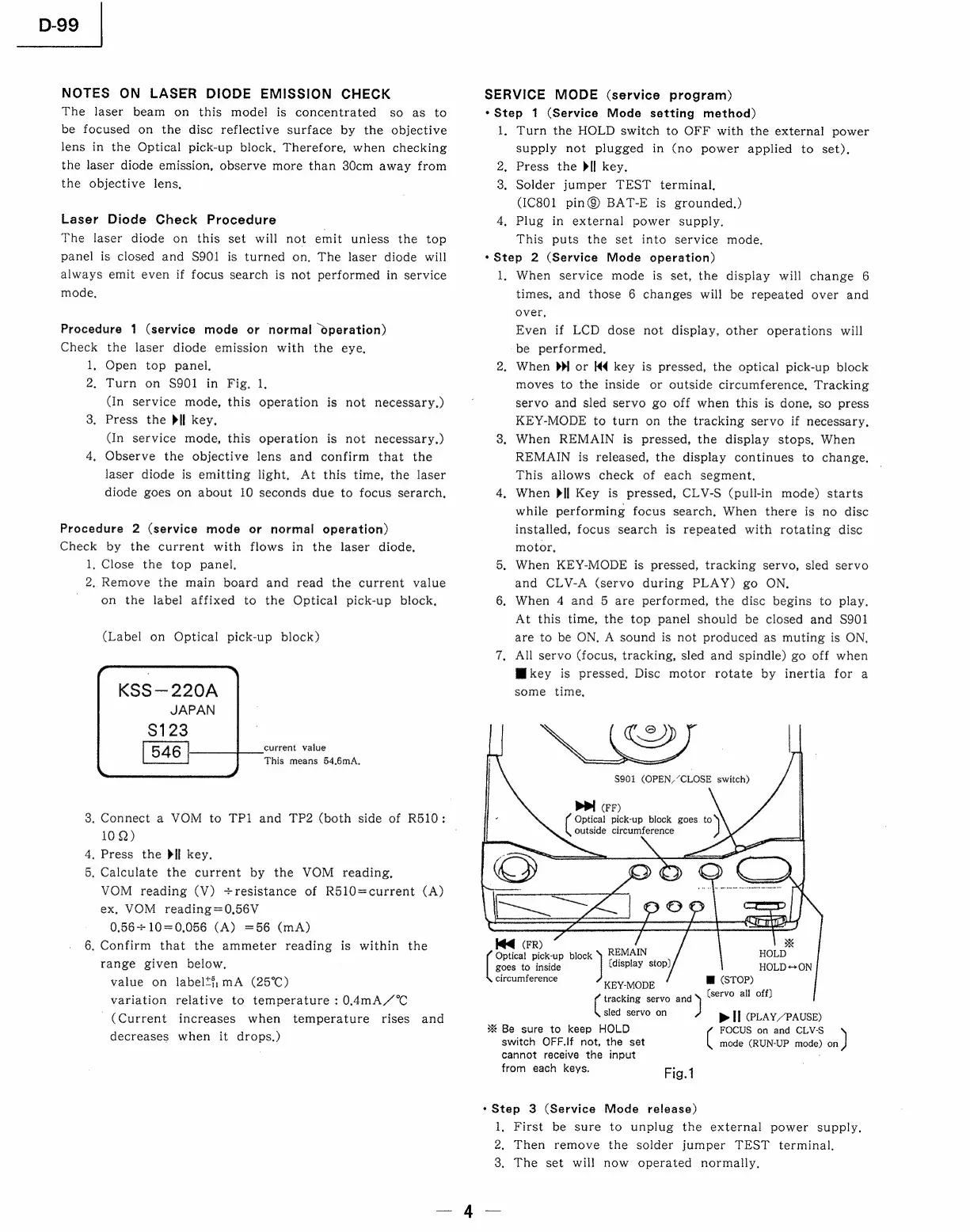
Fig.
1,
(In
service
mode,
this
operation
is
not
necessary.)
3.
Press
the
Pll
key.
(In
service
mode,
this
operation
is
not
necessary.)
4,
Observe
the
objective
lens
and
confirm
that
the
laser
diode
is
emitting
light,
At
this
time,
the
laser
diode
goes
on
about
10
seconds
due
to
focus
serarch,
Procedure
2
(service
mode
or
normal
operation)
Check
by
the
current
with
flows
in
the
laser
diode,
1,
Close
the
top
panel.
2.
Remove
the
main
board
and
read
the
current
value
on
the
label
affixed
to
the
Optical
pick-up
block,
(Label
on
Optical
pick-up
block)
KSS—220A
JAPAN
$123
546
current
value
This
means
54.6mA,
3.
Connect
a
VOM
to
TPl
and
TP2
(both
side
of
R510:
10Q)
.
Press
the
Dil
key.
.
Calculate
the
current
by
the
VOM
reading,
VOM
reading
(V)
+resistance
of
R510=current
(A)
ex,
VOM
reading=0,56V
0,56+10=0,056
(A)
=56
(mA)
6.
Confirm
that
the
ammeter
reading
is
within
the
range
given
below,
value
on
labelt#,;mA
(25°C)
variation
relative
to
temperature
:0.4mA//°C
(Current
increases
when
temperature
rises
and
decreases
when
it
drops.)
or
&
SERVICE
MODE
(service
program)
*Step
1
(Service
Mode
setting
method)
1,
Turn
the
HOLD
switch
to
OFF
with
the
external
power
supply
not
plugged
in
(no
power
applied
to
set),
2.
Press
the
Dll
key.
3.
Solder
jumper
TEST
terminal,
(IC801
pin@
BAT-E
is
grounded.)
4,
Plug
in
external
power
supply.
This
puts
the
set
into
service
mode,
*Step
2
(Service
Mode
operation)
1,
When
service
mode
is
set,
the
display
will
change
6
times,
and
those
6
changes
will
be
repeated
over
and
over,
Even
if
LCD
dose
not
display,
other
operations
will
be
performed,
2,
When
Dp
or
Kd
key
is
pressed,
the
optical
pick-up
block
moves
to
the
inside
or
outside
circumference,
Tracking
servo
and
sled
servo
go
off
when
this
is
done,
so
press
KEY-MODE
to
turn
on
the
tracking
servo
if
necessary.
3.
When
REMAIN
is
pressed,
the
display
stops,
When
REMAIN
is
released,
the
display
continues
to
change.
This
allows
check
of
each
segment,
4,
When
}>lIl
Key
is
pressed,
CLV-S
(pull-in
mode)
starts
while
performing
focus
search,
When
there
is
no
disc
installed,
focus
search
is
repeated
with
rotating
disc
motor,
5,
When
KEY-MODE
is
pressed,
tracking
servo,
sled
servo
and
CLV-A
(servo
during
PLAY)
go
ON,
6.
When
4
and
5
are
performed,
the
disc
begins
to
play.
At
this
time,
the
top
panel
should
be
closed
and
S901
are
to
be
ON,
A
sound
is
not
produced
as
muting
is
ON,
7,
All
servo
(focus,
tracking,
sled
and
spindle)
go
off
when
Mikey
is
pressed.
Disc
motor
rotate
by
inertia
for
a
some
time,
Cay,
$901
(OPEN,“CLOSE
switch)
PPI
Fr)
Optical
pick-up
block
goes
to
outside
circumference
goes
to
inside
(display
stop)
circumference
(FR)
[see
pick-up
a
REMAIN
W@
(STOP)
)
(servo
all
off]
KEY-MODE
Cee
servo
and
sled
servo
on
p>
II
(PLAY/PAUSE)
%
Be
sure
to
keep
HOLD
FOCUS
on
and
CLV-S
switch
OFF.|f
not,
the
set
(
mode
(RUN-UP
mode)
sie)
cannot
receive
the
input
from
each
keys.
Fig.1
*Step
3
(Service
Mode
release)
1,
First
be
sure
to
unplug
the
external
power
supply.
2,
Then
remove
the
solder
jumper
TEST
terminal,
3,
The
set
will
now
operated
normally,
4

Related product manuals