Playback
Playing a CD
1
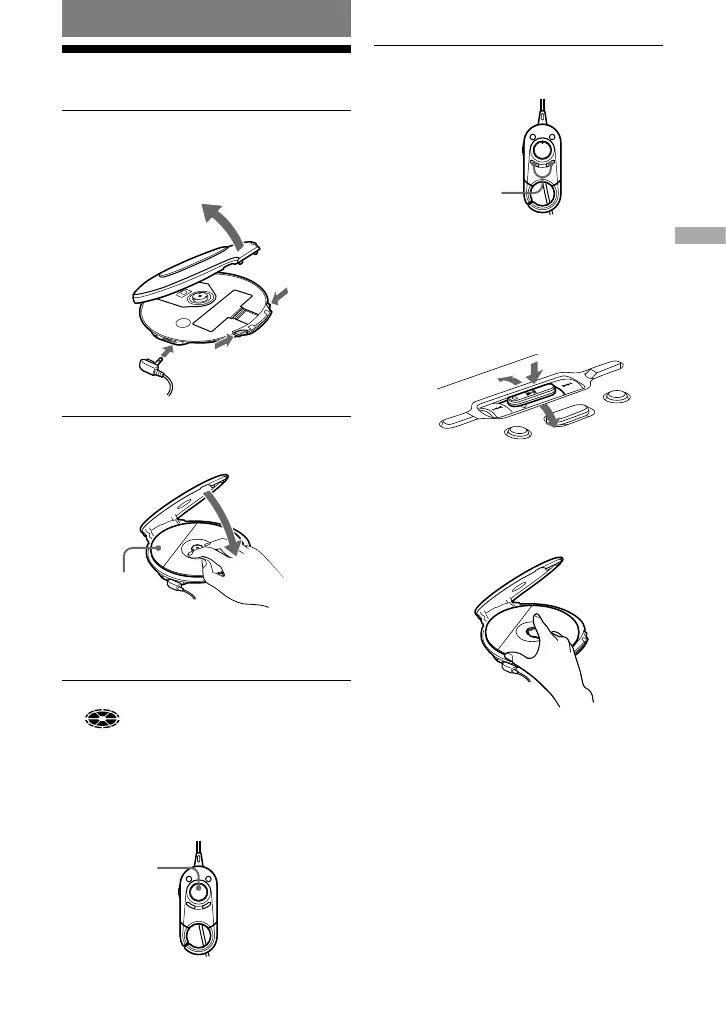
Squeeze the OPEN switch from both
sides to open the player lid.
Connect the earphones/headphones with
the remote to the player beforehand.
to
(headphones)
Earphones/headphones
with the remote
OPEN switch
2
Place the CD on the tray and close
the lid.
Label side up
The OPERATION lamp lights up
repetitively in red, green and orange, in
turn.
3
Press on the remote.
(disc) moves, and the player starts
playback.
Color of the OPERATION lamp changes
according to the format type of the music
source (
page 5) being played. Red:
CD-DA format, Green: ATRAC3plus
format and Orange: MP3 format.
On the CD player
After placing the CD on the tray in step 2,
press on the jog lever and adjust the
volume by flicking the jog lever toward VOL
+ or –.



 To Next Page