Customizing sound quality
You can adjust sound quality for each
frequency range individually, checking the
shape of the wave on the display.
1
Select “EQUALIZER” in step 3 and
“CUSTOM” in step 4 of the player
operation for “Selecting the sound
quality” (
page 21).
2
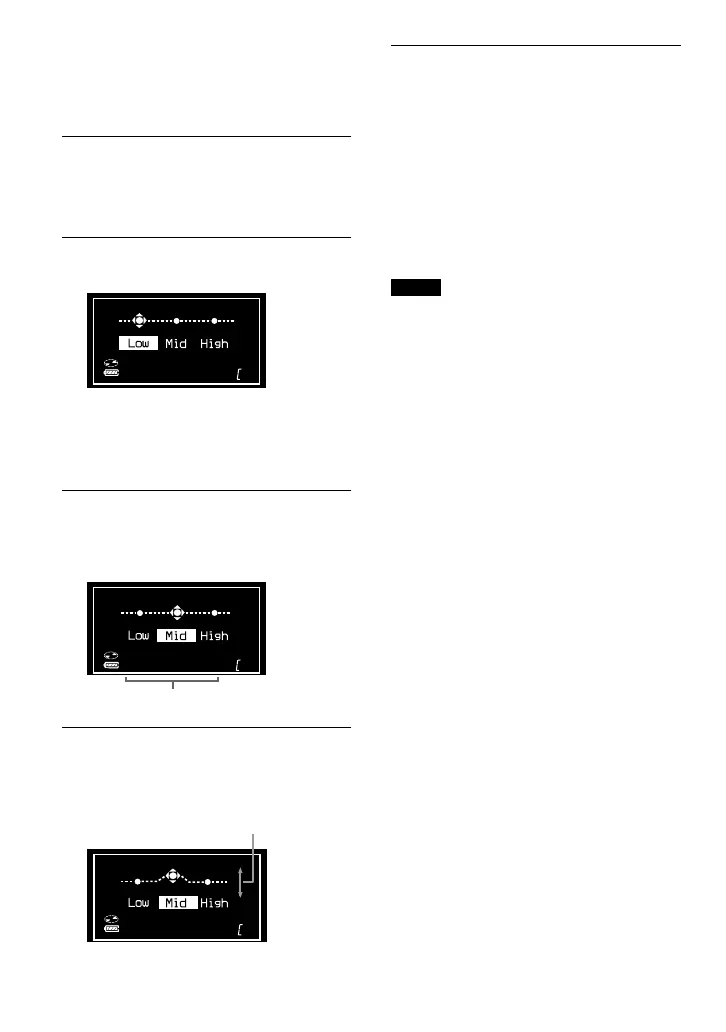
Press or for 2 seconds or
more to select the frequency range.
“Low” is displayed first.
There are 3 frequency ranges; “Low”
(low range audio), “Mid” (middle range
audio), and “High” (high range audio).
3
Press or repeatedly to
select the shape of the wave.
There are 3 shapes stored in memory for
each frequency range.
Frequency range
4
Flick the jog lever toward / to
select the sound volume.
The sound volume can be adjusted in 7
levels.
Sound volume
5
Repeat steps 2 to 4 to make
adjustments for the remaining 2
frequency ranges, and then press
on the jog lever.
To return to the previous screen
On the CD player, press .
To cancel the adjustment operation
On the CD player, press for 2 seconds or
more.
Notes
• If the sound is distorted by your sound settings
when you turn up the volume, turn the volume
down.
• If you feel a difference in sound volume between
the “CUSTOM” sound setting and other sound
settings, adjust the volume to your preference.
22 GB
D-NE520.GB_U/CA.2-541-662-11(1)



 To Next Page