13
1
2
3
4
5
6
7
8
9
q;
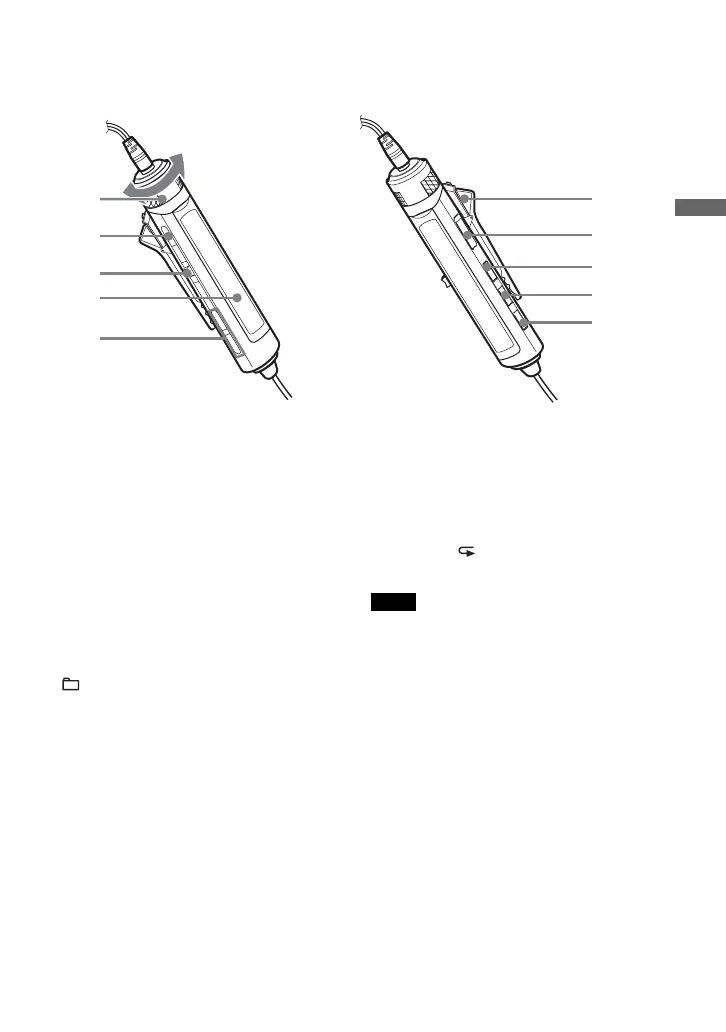
Remote control
For details, see the pages in parentheses.
1 VOL (volume) +/– control (16, 26, 28)
Turn to adjust the volume.
2 x (stop) button (16, 26, 28, 36)
3 Jog lever (. u/ENT >) (16,
21 - 23, 25 - 31)
u (play/pause)/ENT (enter):
Press during stop to start play, and press
during play to pause play. When
selecting menu items, press to enter the
selection.
Flick toward . or >: AMS, rewind,
fast forward.
4 Display (14, 17)
5 ( group) +/– buttons (16, 23, 24)
6 Clip (14)
7 HOLD switch (28)
Slide the switch in the direction of the
arrow (a yellow mark appears) to disable
the buttons on the remote control.
8 DISPLAY button (26 - 31, 36)
9 P MODE/ button (19 - 24)
q; SOUND button (25, 36)
Note
Use only the supplied remote control. You cannot
operate this CD player with the remote control
supplied with other CD players.
Getting started
(Continued)





 To Next Page