6
D-SJ301
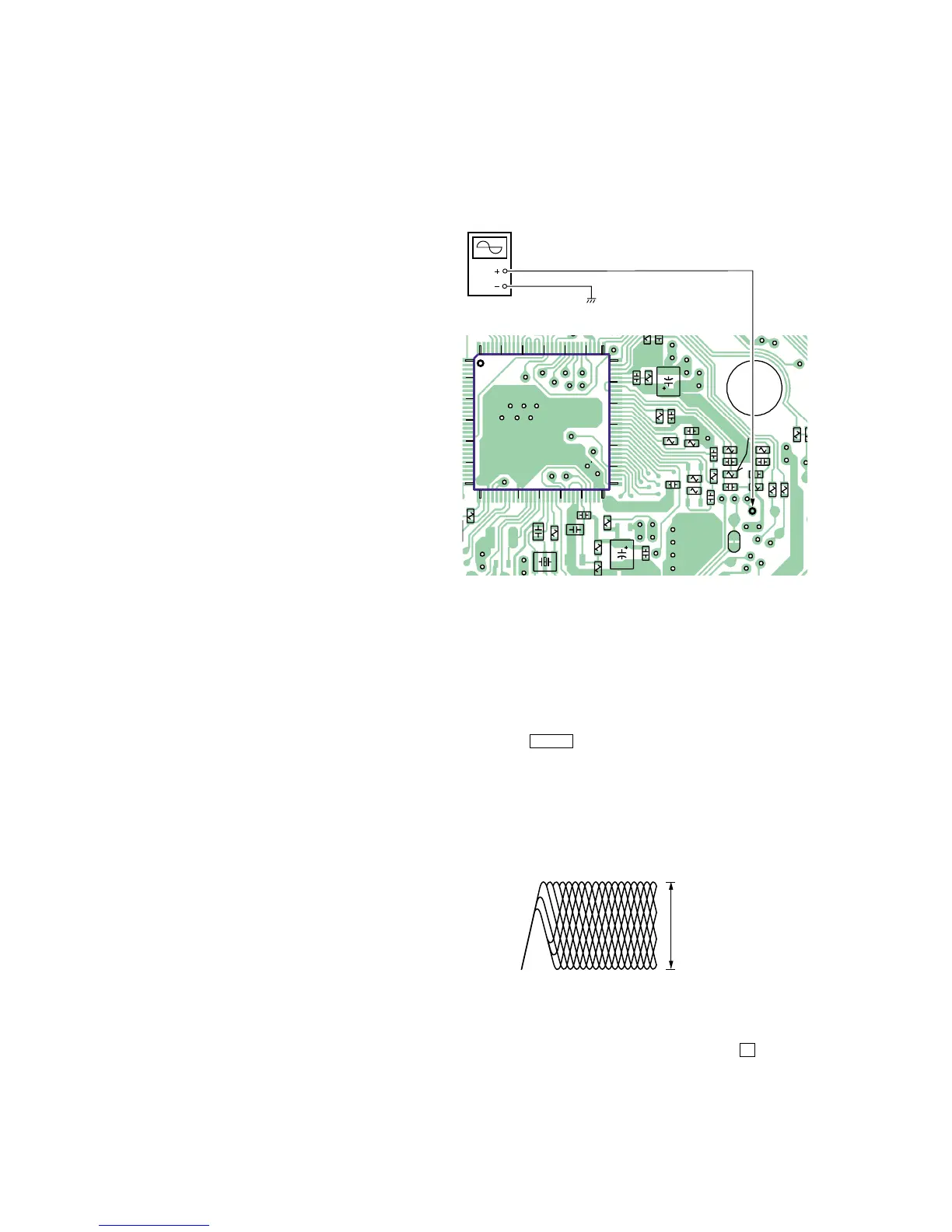
Focus bias Check
Condition:
• Hold the set in horizontal state.
Connection:
Procedure:
1. Connect the oscilloscope to the test point TP630(RF) on the
MAIN board.
2. Set a disc. (YEDS-18)
3. Press the >B button.
4. Check the oscilloscope waveform is as shown below.
A good eye pattern means that the diamond shape (◊) in the cen-
ter of the waveform can be clearly distinguished.
RF Signal reference Waveform (Eye Pattern)
To watch the eye pattern, set the oscilloscope to AC range and
increase the vertical sensitivity of the oscilloscope for easy
watch-ing.
5. Stop revolving of the disc motor by pressing the x button.
SECTION 4
ELECTRICAL ADJUSTMENTS
The CD section adjustments are done automatically in this set.
Precautions for Check
1. Perform check in the order given.
2. Use YEDS-18 disc (Part No.: 3-702-101-01) unless otherwise
indicated.
3. Power supply voltage requirement : DC4.5 V in DC IN jack.
(J401)
VOLUME button : Minimum
HOLD switch : OFF
[MAIN BOARD] (SIDE B)
RF level
0.4 to 0.65 Vp-



 To Next Page