38
T
ALL
PROGRAM
1.
– – – –
ALL CLEAR
2.
– – – –
3.
– – – –
4.
– – – –
5.
– – – –
6.
– – – –
3
:
– – – –
–
:
– – – –
PROGRAM
1. CD
–
02
ALL CLEAR
2.
– – – –
3.
– – – –
4.
– – – –
5.
– – – –
6.
– – – –
ALL
T
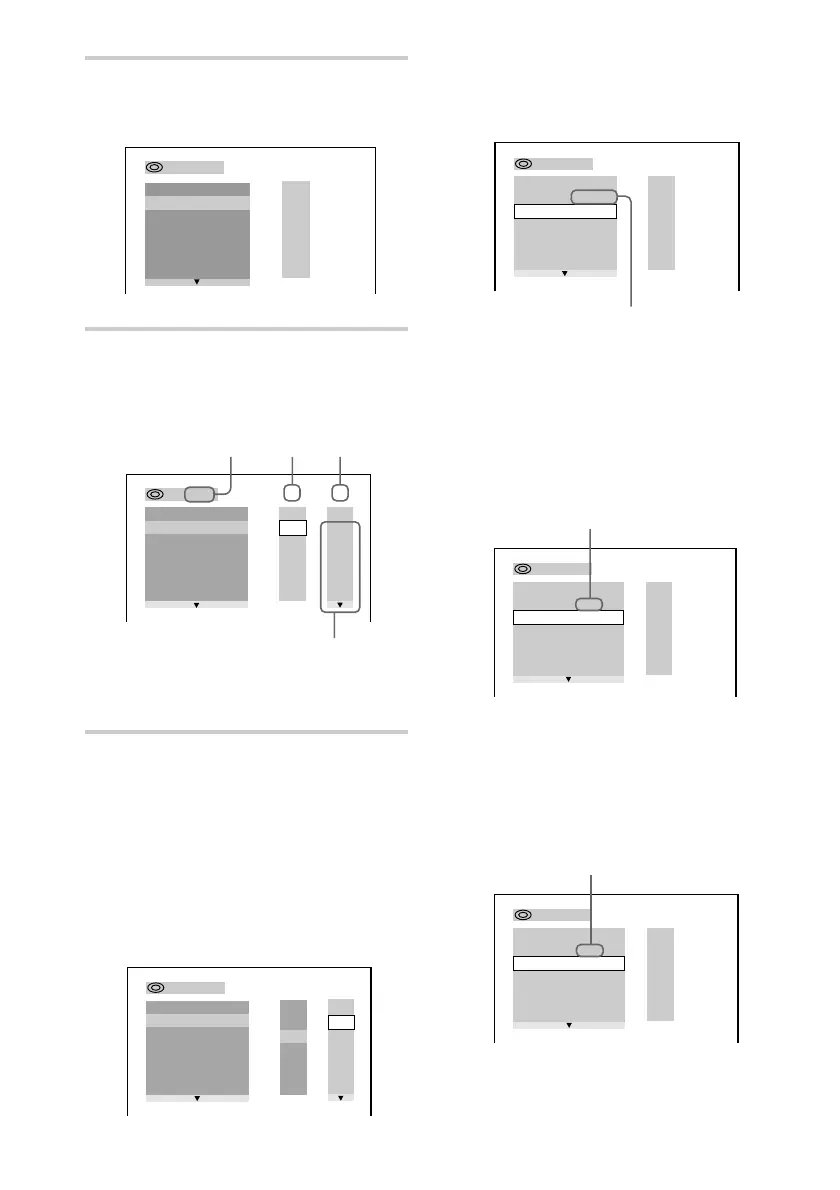
Next, press X/x or the number buttons
to select “03” under “C,” then press
ENTER.
xWhen playing a VIDEO CD or
CD
For example, select track “02.”
Press X/x or the number buttons to
select “02” under “T,” then press
ENTER.
xWhen playing a SACD
For example, select track “002.”
Press X/x or the number buttons to
select “002” under “T,” then press
ENTER.
Selected track
PROGRAM
1.
– – – –
ALL CLEAR
2.
– – – –
3.
– – – –
4.
– – – –
5.
– – – –
6.
– – – –
T
C
ALL
01
02
03
04
05
06
ALL
01
02
03
04
05
3
:
DVD
Chapters recorded on a disc
Chapter
Title
2 Press ENTER, then press X/x to
select the disc.
3 Press c.
The cursor moves to the title or track
(in this case, “01”).
* “?” appears when the system has not loaded
the disc information in the memory.
4 Select the title, chapter, or track
you want to programme.
xWhen playing a DVD
For example, select chapter “03” of
title “02.”
Press X/x or the number buttons to
select “02” under “T,” then press
ENTER.
Selected title and chapter
PROGRAM
1.
– – – –
ALL CLEAR
2.
– – – –
3.
– – – –
4.
– – – –
5.
– – – –
6.
– – – –
C
ALL
03
04
05
06
T
ALL
01
02
03
04
05
02
01
3
:
DVD
T
ALL
PROGRAM
1. DVD
–
0 2
–
0 3
ALL CLEAR
2.
– – – –
3.
– – – –
4.
– – – –
5.
– – – –
6.
– – – –
–
:
– – – –
Disc type*
PROGRAM
1. SACD
–
002
ALL CLEAR
2.
– – – –
3.
– – – –
4.
– – – –
5.
– – – –
6.
– – – –
ALL
T
Selected track











 To Next Page