INTRODUCTION
7
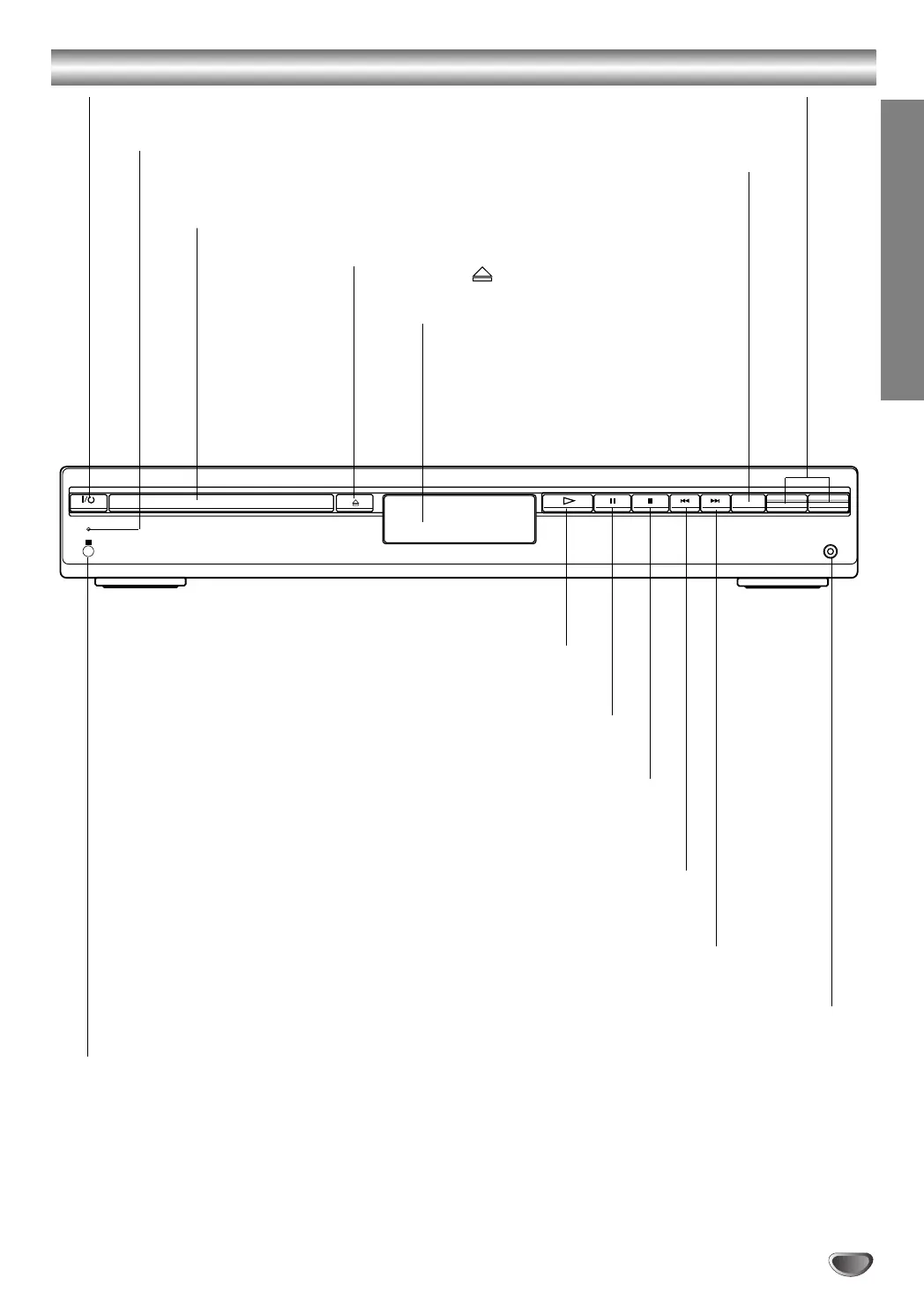
Front Panel Controls
STANDBY
IR
- PRESET +
-
VOLUME +
FUNCTION
PHONES
PAUSE (
XX
)
Pause playback of a disc temporarily.
OPEN/CLOSE ( )
Opens or closes the disc tray.
Remote Sensor
Point the DVD receiver remote control here.
Display window
Disc Tray
Insert a disc here.
@ / 1 (POWER) indicator
Switches the DVD Receiver ON and OFF.
STOP (
xx
)
Stops playback of a disc.
PLAY (
H)
To play back a disc.
Forward SKIP (
TT
)
DVD: Go to NEXT chapter/track.
RADIO:
To select preset station you want.
Reverse SKIP (
SS
)
DVD: Go to beginning of current chapter/track or to previous
chapter/track.
RADIO:
To select preset station you want.
VOLUME Control
Press “+” to increase volume or press “-” to
decrease the volume.
STANDBY indicator
Lights red when the receiver
is in Standby mode (off).
FUNCTION
To select the Receiver’s source.
(FM, AM, VIDEO, TV or
CD/DVD)
PHONES
To connect headphones.



 To Next Page