32
GB
Setting the shuffle mode in
the Control Menu
You can select either normal shuffle or album
shuffle (MP3 only).
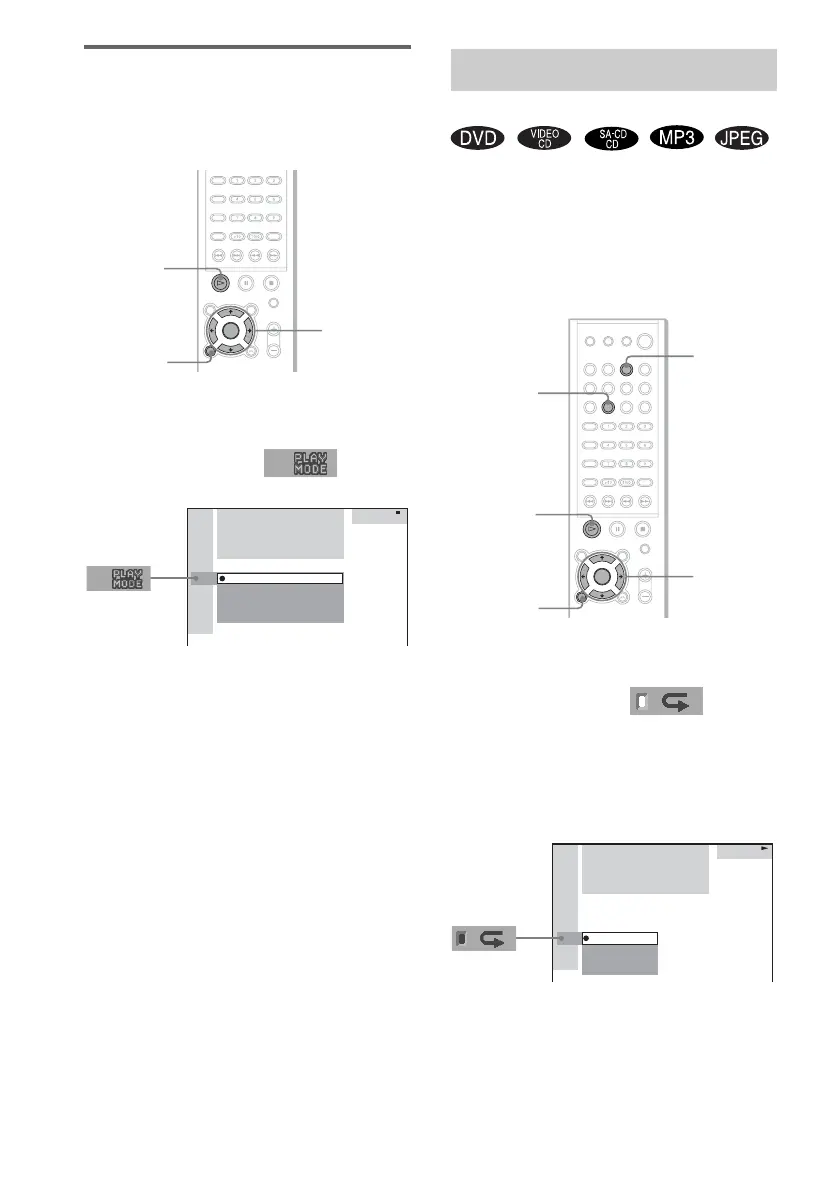
1 Press DVD DISPLAY.
The Control Menu appears.
2 Press X/x to select (PLAY
MODE), then press ENTER or c.
3 Select SHUFFLE or SHUFFLE (ALBUM)
using X/x and press ENTER.
SHUFFLE: Plays tracks on the disc in
random order.
SHUFFLE (ALBUM): Plays tracks from
selected album in random order.
4 Press H.
The selected Shuffle Play begins.
Note
Shuffle Play is cancelled when you eject the disc. The
play mode changes in the following sequence:
SHUFFLE t CONTINUE
SHUFFLE (ALBUM) t CONTINUE (ALBUM)
You can play all the titles/tracks/files or a single
title/chapter/track on a disc.
In Shuffle or Program Play mode, the system
repeats tracks in shuffled or programmed order.
You cannot perform Repeat Play during PBC
playback of VIDEO CDs (page 25).
1 Press DVD DISPLAY.
The Control Menu appears.
2 Press X/x to select
(REPEAT), then press ENTER or c.
If you do not select “OFF,” the “REPEAT”
indicator lights in green.
3 Select the Repeat Play setting, then
press ENTER.
DVD
DISPLAY
H
C/X/x/c/
ENTER
(
1 5
)
MP3
CONTINUE
CONTINUE(ALBUM)
SHUFFLE(ALBUM)
PROGRAM
SHUFFLE
HOME TOWN
ROCK BEST HIT
Playing Repeatedly
(Repeat Play)
CLEAR
DVD
DISPLAY
REPEAT
H
C/X/x/c/
ENTER
DVD
DVD
1 2
(
2 7
)
MAKING SCENE
1 8
(
3 4
)
T
1 : 3 2 : 5 5
ALL
TITLE
CHAPTER
OFF



 To Next Page