Getting Started
29
GB
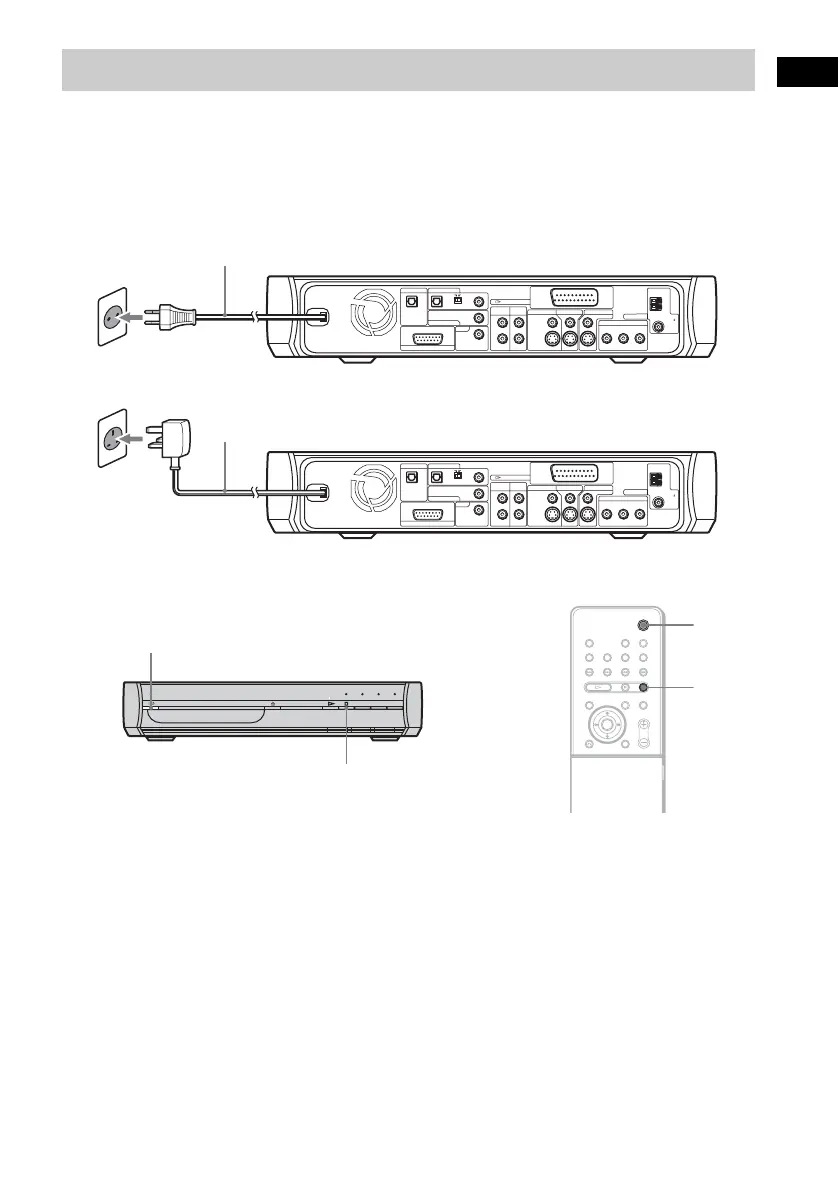
Before connecting the AC power cord (mains lead) of this system to a wall outlet (mains), connect the
speakers to the system (page 16).
Connect the AC power cord (mains lead) to a wall outlet (mains).
The AC plug in the illustration is European & Russian models.
To turn on the system
Press "/1.
To turn off the system
Press "/1. The system enters standby mode.
While playing a disc, do not turn off the system by pressing "/1. Doing so may cancel the menu
settings. When you turn off the system, first press x to stop playback and then press "/1.
Step 5: Connecting the AC Power Cord (Mains Lead)
COAXIAL
AM
VIDEO IN
S-VIDEO IN
S-VIDEO
VIDEO
AUDIO INAUDIO IN
L
R
DIGITAL IN
COAXIAL
DIGITAL IN
COAXAL
DIGITAL IN
OPTICAL
OPTICAL
COAXIAL
VIDEO 1 / SAT 1 VIDEO 2 / SAT 2
TV
COMPONENT VIDEO OUT
ANTENNA
VIDEO 1 /
SAT 1
VIDEO 1 / SAT 1
VIDEO 2 / SAT 2
SPEAKER
DIGITAL OUT
VIDEO 2 /
SAT 2
MONITOR OUT
FM
75
YP
B
/C
B
P
R
/C
R
OUTPUT
(
TO TV
)
COAXIAL
AM
VIDEO IN
S-VIDEO IN
S-VIDEO
VIDEO
AUDIO INAUDIO IN
L
R
DIGITAL IN
COAXIAL
DIGITAL IN
COAXAL
DIGITAL IN
OPTICAL
OPTICAL
COAXIAL
VIDEO 1 / SAT 1 VIDEO 2 / SAT 2
TV
COMPONENT VIDEO OUT
ANTENNA
VIDEO 1 /
SAT 1
VIDEO 1 / SAT 1
VIDEO 2 / SAT 2
SPEAKER
DIGITAL OUT
VIDEO 2 /
SAT 2
MONITOR OUT
FM
75
YP
B
/C
B
P
R
/C
R
OUTPUT
(
TO TV
)
AC power cord (mains lead)
The AC plug adaptor in the illustration is UK model.
AC power cord (mains lead)
"/1
x
"/1
x


 To Next Page