Recording a picture
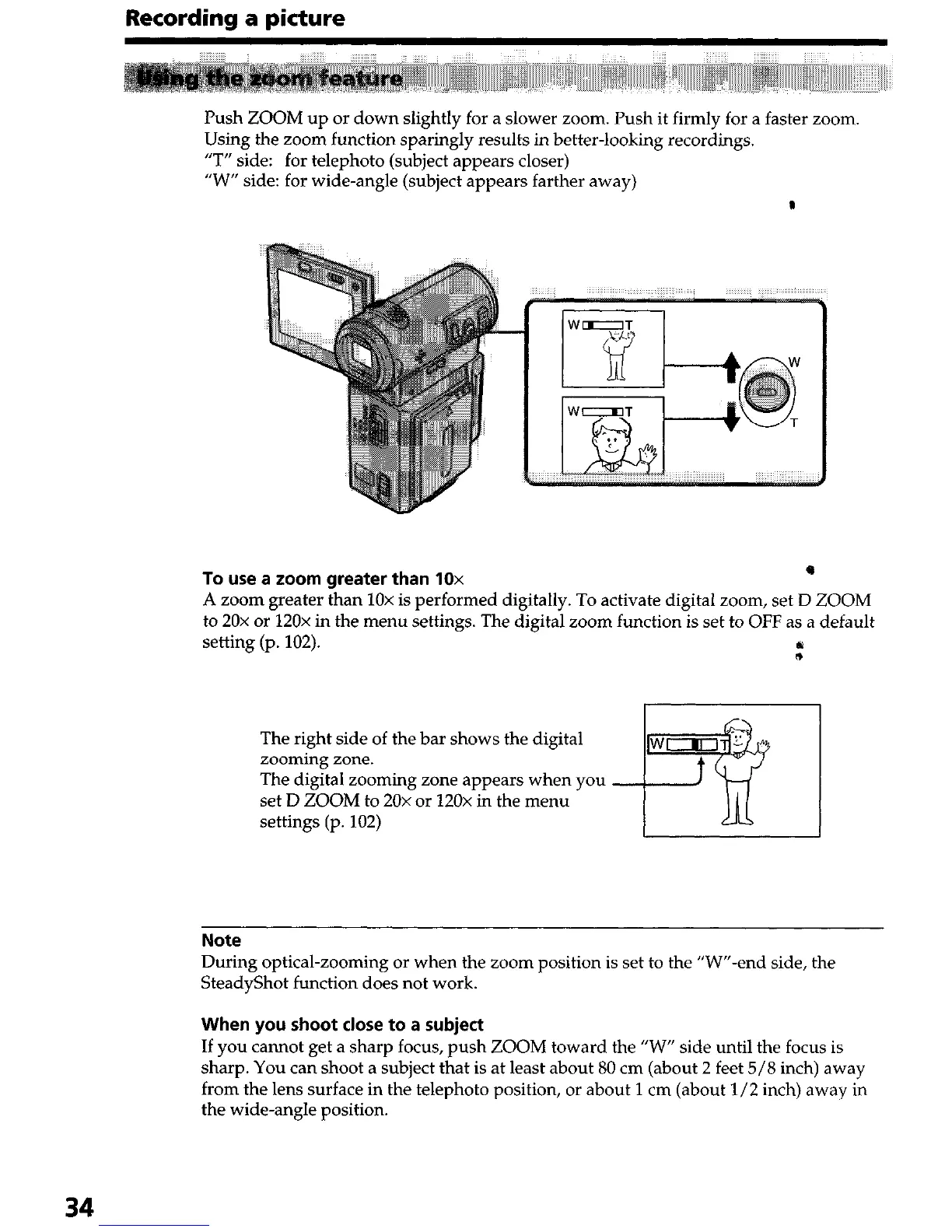
Using the zoom function sparingly results in better-looking recordings.
“T” side: for telephoto (subject appears closer)
“W” side: for wide-angle (subject appears farther away)
P
To use a zoom greater than 10x
0
A zoom greater than 10x is performed digitally. To activate digital zoom, set D ZOOM
to 20x or 120x in the menu settings. The digital zoom function is set to OFF as a default
setting (p. 102).
:
1
The right side of the bar shows the digital
zooming zone.
The digital zooming zone appears when you
set D ZOOM to 20x or 120x in the menu
settings (p. 102)
1
Note
During optical-zooming or when the zoom position is set to the “W’‘-end side, the
SteadyShot function does not work.
When you shoot close to a subject
If you cannot get a sharp focus, push ZOOM toward the “W” side until the focus is
sharp. You can shoot a subject that is at least about 80 cm (about 2 feet 5/S inch) away
from the lens surface in the telephoto position, or about 1 cm (about l/2 inch) away in
the wide-angle position.
34




 To Next Page