Recording a picture
cording
Recording with the self-timer starts automatically in 10 seconds. You can also use the
Remote Commander for this operation.
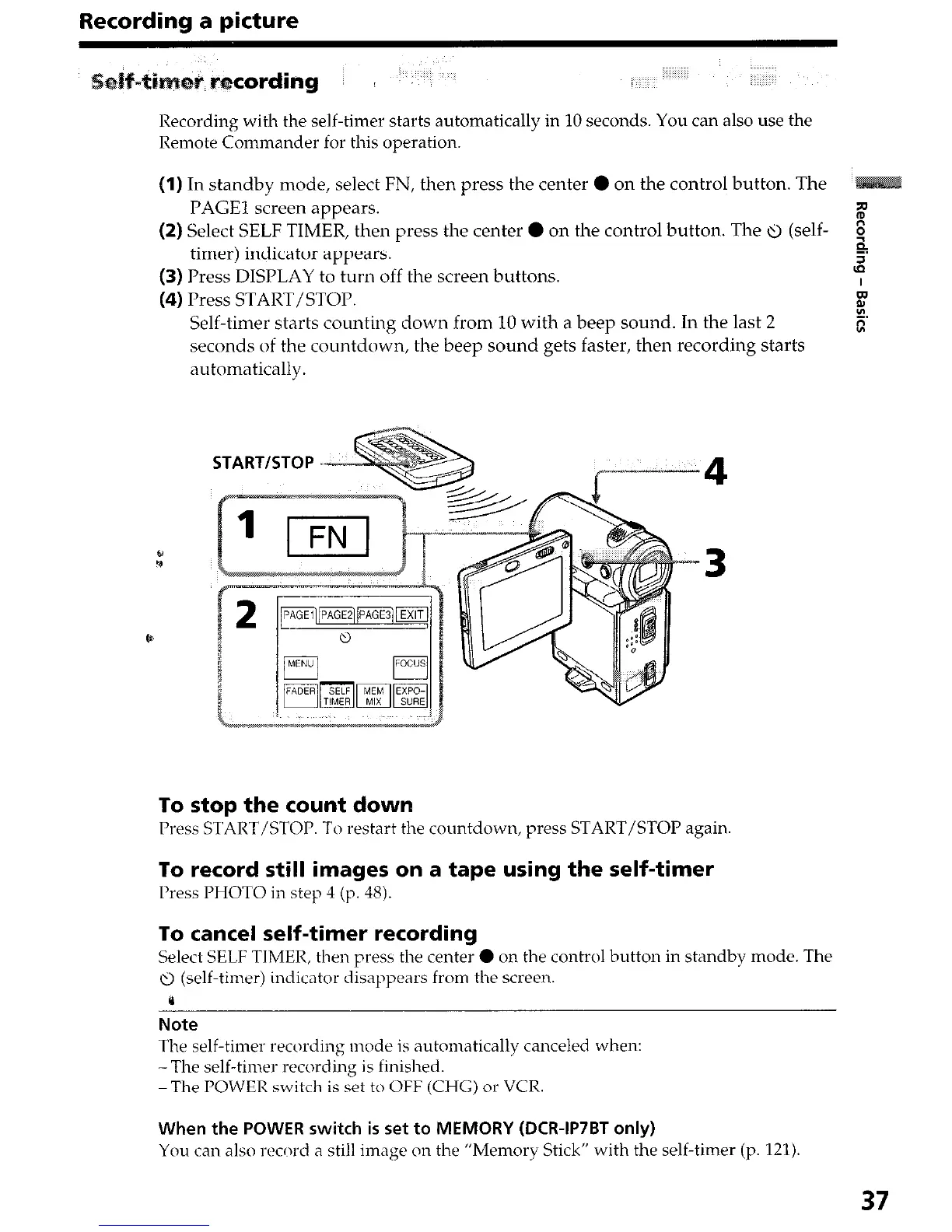
(1) In standby mode, select FN, then press the center 0 on the control button. The
PAGE1 screen appears.
%
(2) Select SELF TIMER, then press the center 0 on the control button. The u (self-
timer) indicator appears.
$
5
(3) Press DISPLAY to turn off the screen buttons.
(4) Press START/STOP.
Self-timer starts counting down from 10 with a beep sound. In the last 2
seconds of the countdown, the beep sound gets faster, then recording starts
automatically.
START/STOP =
4
To stop the count down
Press START/STOP. To restart the countdown, press START/STOP again
To record still images on a tape using the self-timer
Press PHOTO in step 4 (p. 48).
To cancel self-timer recording
Select SELF TIMER, then press the center 0 on the control button in standby mode. The
u (self-timer) indicator disappears from the screen.
0
Note
The self-timer recording mode is automatically canceled when:
-The self-timer recording is finished.
-The POWER switch is set to OFF (CHG) or VCR.
When the POWER switch is set to MEMORY (DCR-IP7BT only)
You can also record a still image on the “Memory Stick” with the self-timer (p. 121).
37




 To Next Page