Using the wide mode
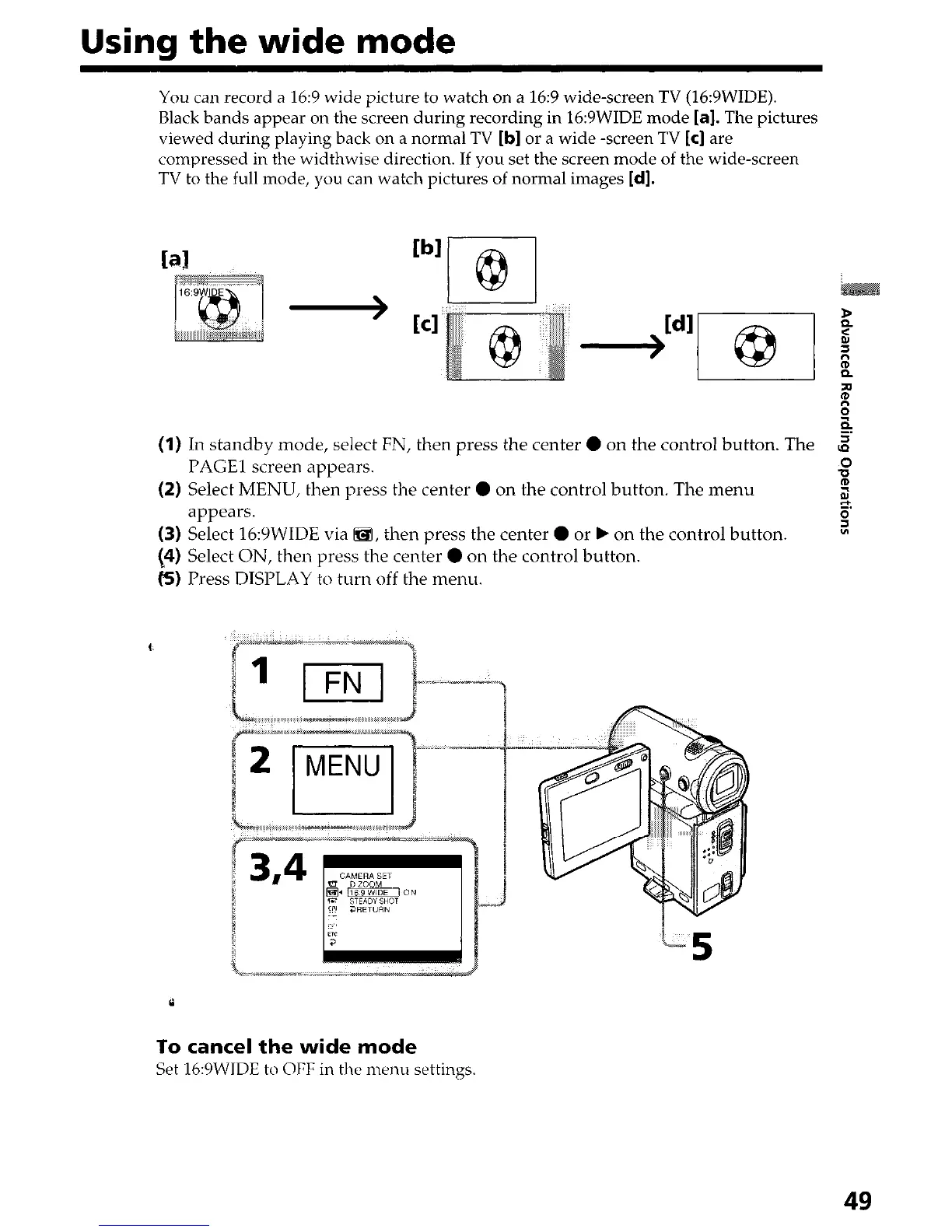
You can record a 16:9 wide picture to watch on a 16:9 wide-screen TV (16:9WIDE).
Black bands appear on the screen during recording in 16:9WIDE mode [a]. The pictures
viewed during playing back on a normal TV
[b]
or a wide -screen TV
[c]
are
compressed in the widthwise direction. If you set the screen mode of the wide-screen
TV to the full mode, you can watch pictures of normal images [d].
bl
r-@-l
(I)
In standby mode, select FN, then press the center 0 on the control button. The
2
PAGE1 screen appears.
00
(2) Select MENU, then press the center 0 on the control button. The menu
z
appears.
z
0
(3) Select 16:YWIDE via a, then press the center 0 or b on the control button.
[4) Select ON, then press the center
l
on the control button.
(5) Press DISPLAY to turn off the menu.
To cancel the wide mode
Set 16:9WIDE to OFF in the menu settings.
49






 To Next Page