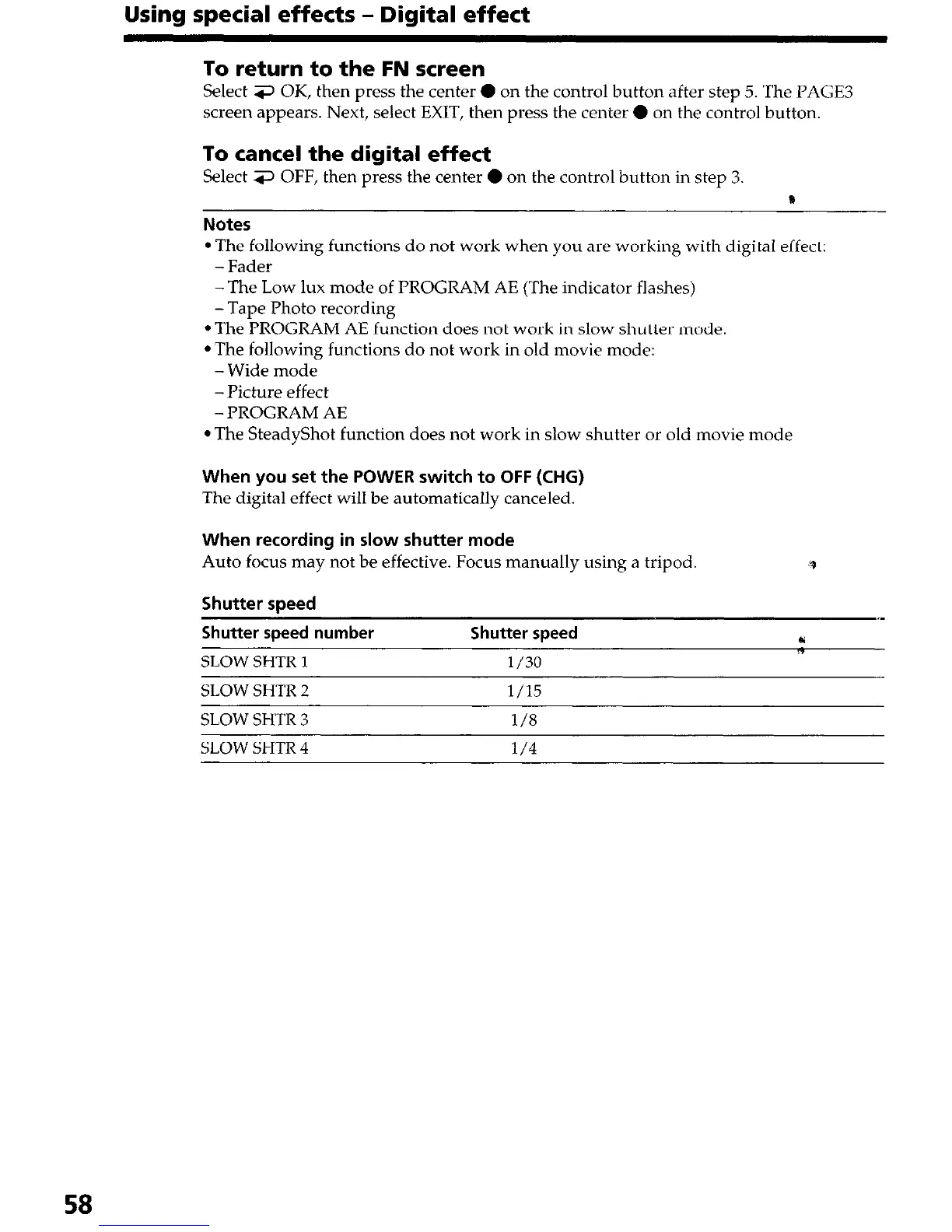
Using special effects - Digital effect
To return to the FN screen
Select 3 OK, then press the center 0 on the control button after step 5. The PAGE3
screen appears. Next, select EXIT, then press the center 0 on the control button.
To cancel the digital effect
Select 3 OFF, then press the center 0 on the control button in step 3.
0
Notes
l The following functions do not work when you are working with digital effect:
-Fader
-The Low lux mode of PROGRAM AE (The indicator flashes)
-Tape Photo recording
l The PROGRAM AE function does not work in slow shutter mode.
l The following functions do not work in old movie mode:
-Wide mode
-Picture effect
-PROGRAM AE
l The SteadyShot function does not work in slow shutter or old movie mode
When you set the POWER switch to OFF (CHG)
The digital effect will be automatically canceled.
When recording in slow shutter mode
Auto focus may not be effective. Focus manually using a tripod.
Shutter speed
Shutter soeed number Shutter soeed
SLOW SHTR 1 l/30
SLOW SHTR 2
l/15
SLOW SHTR 3
l/8
SLOW SHTR 4
l/4
58




 To Next Page