Using the PROGRAM AE function
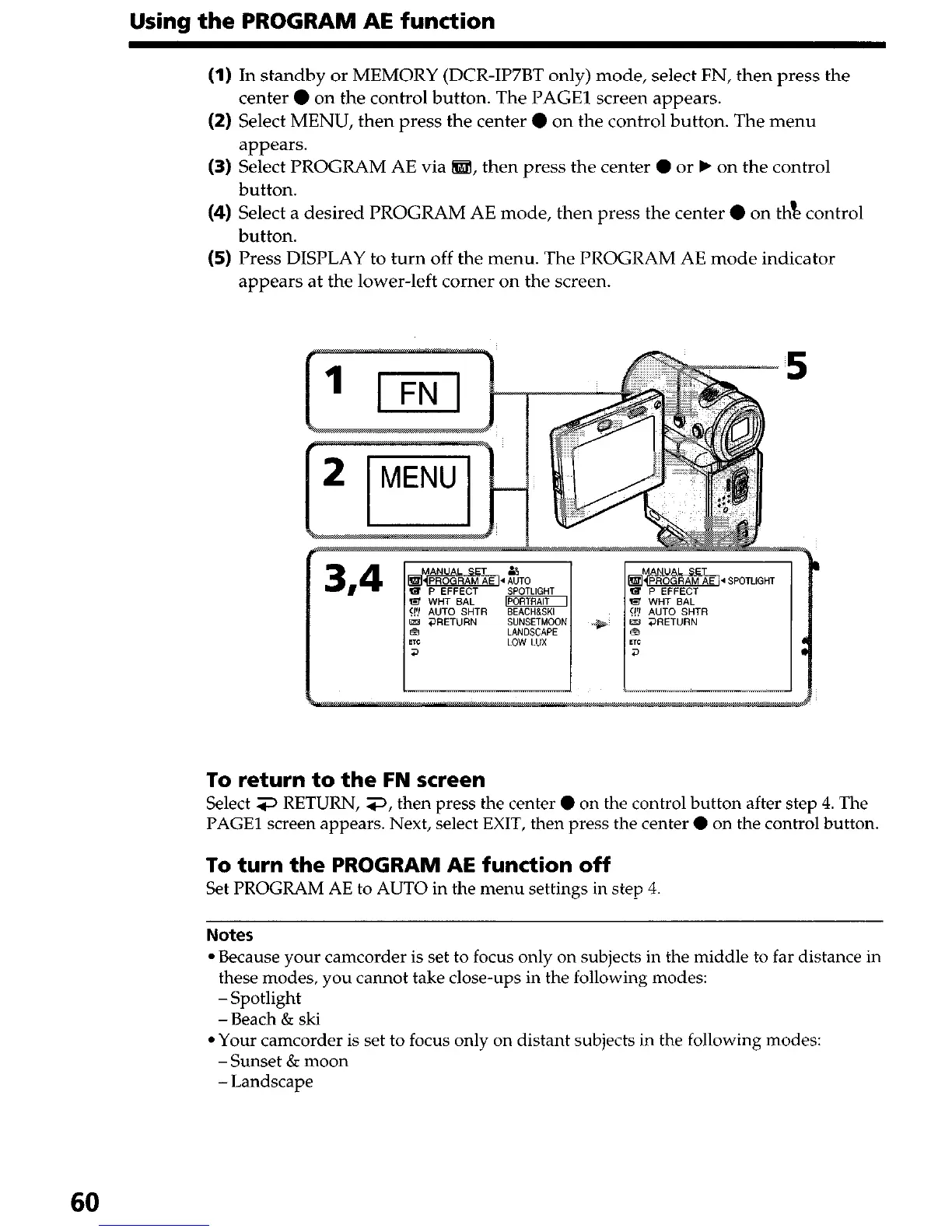
(1) In standby or MEMORY (DCR-IP7BT only) mode, select FN, then press the
center 0 on the control button. The PAGE1 screen appears.
(2) Select MENU, then press the center 0 on the control button. The menu
appears.
(3) Select PROGRAM AE via @ZI!, then press the center 0 or b on the control
button.
(4) Select a desired PROGRAM AE mode, then press the center 0 on thk control
button.
(5) Press DISPLAY to turn off the menu. The PROGRAM AE mode indicator
appears at the lower-left corner on the screen.
5
d
To return to the FN screen
Select 3 RETURN, 3, then press the center 0 on the control button after step 4. The
PAGE1 screen appears. Next, select EXIT, then press the center 0 on the control button.
To turn the PROGRAM AE function off
Set PROGRAM AE to AUTO in the menu settings in step 4
Notes
l Because your camcorder is set to focus only on subjects in the middle to far distance in
these modes, you cannot take close-ups in the following modes:
-Spotlight
-Beach & ski
l Your camcorder is set to focus only on distant subjects in the following modes:
-Sunset & moon
-Landscape
60





 To Next Page