Adjusting the exposure manually
You can adjust and set the exposure. Normally exposure is automatically adjusted.
Adjust the exposure manually in the following cases:
-To make a fine exposure adjustment
-To shoot a bright subject with a dark background
-To record dark pictures (e.g. night scenes) faithfully
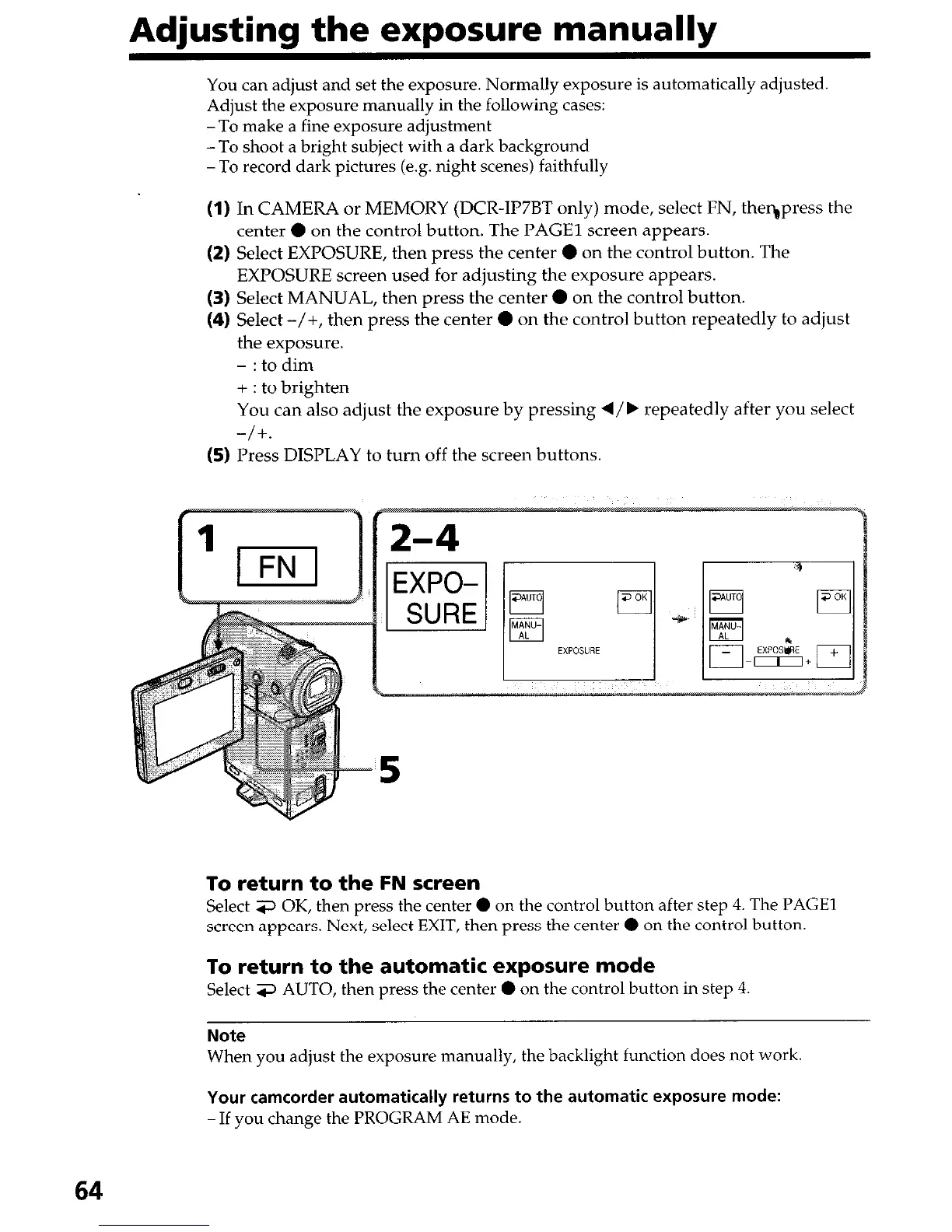
(1) In CAMERA or MEMORY (DCR-IP7BT only) mode, select FN, theqpress the
center 0 on the control button. The PAGE1 screen appears.
(2) Select EXPOSURE, then press the center 0 on the control button. The
EXPOSURE screen used for adjusting the exposure appears.
(3) Select MANUAL, then press the center 0 on the control button.
(4) Select -/+, then press the center 0 on the control button repeatedly to adjust
the exposure.
- : to dim
+ : to brighten
You can also adjust the exposure by pressing d/b repeatedly after you select
-/+.
(5) Press DISPLAY to turn off the screen buttons.
To return to the FN screen
Select 3 OK, then press the center 0 on the control button after step 4. The PAGE1
screen appears. Next, select EXIT, then press the center 0 on the control button.
To return to the automatic exposure mode
Select 3 AUTO, then press the center 0 on the control button in step 4.
Note
When you adjust the exposure manually, the backlight function does not work
Your camcorder automatically returns to the automatic exposure mode:
-If you change the PROGRAM AE mode.
64




 To Next Page