Searching for a scene - Multi-picture
search
Using the multi-picture search function, you can display thumbnails of all the
beginning scenes of moving pictures and still images recorded in the tape onto the
index screen, The recording date and title of each image or scene are also indicated.
Select the thumbnail you want to play back, then press the center 0 on the control
button, the camcorder starts searching for the image or scene and plays it back
automatically. You can also control this function using the Remote Commander.
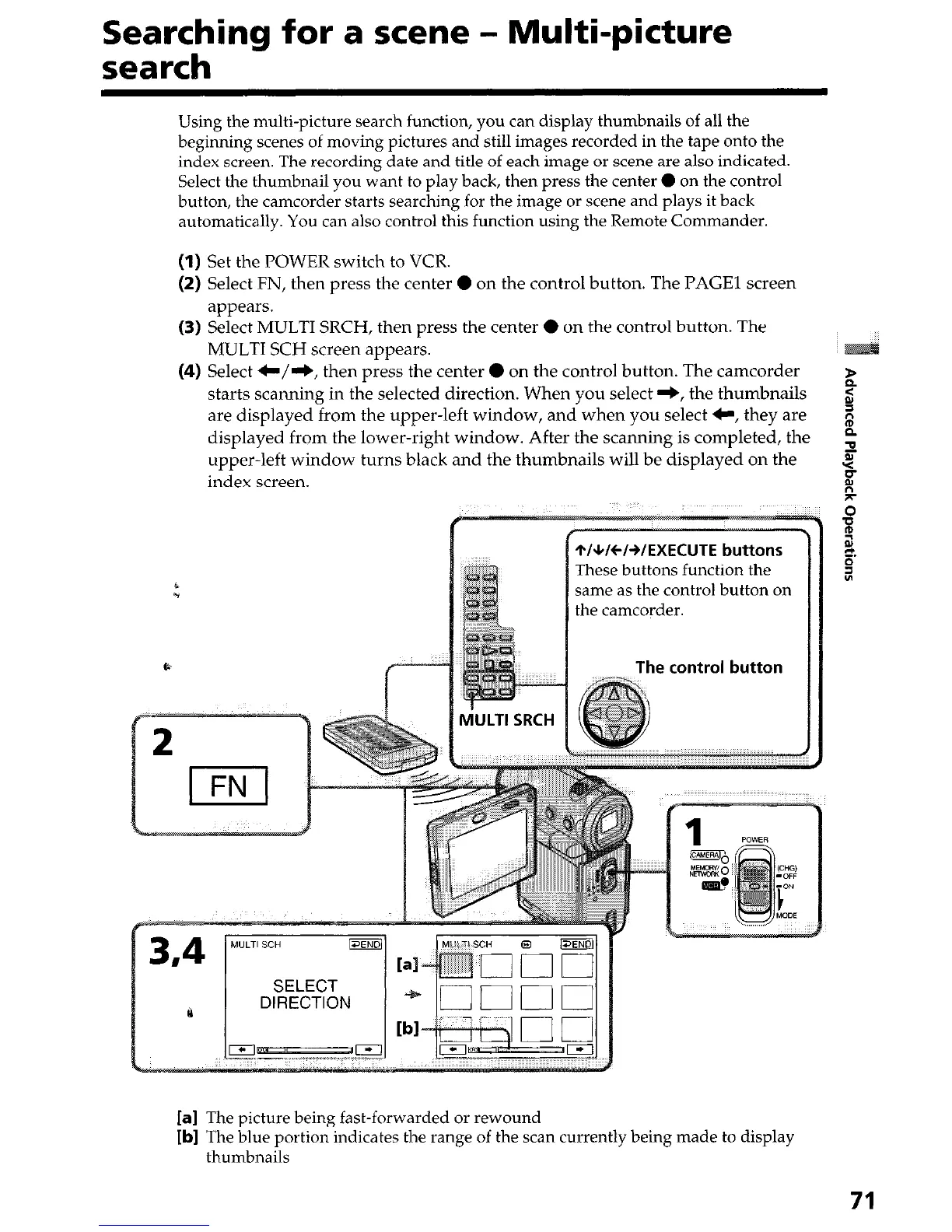
(1) Set the POWER switch to VCR.
(2) Select FN, then press the center 0 on the control button. The PAGE1 screen
appears.
(3) Select MULTI SRCH, then press the center 0 on the control button. The
MULTI SCH screen appears.
(4) Select C/e, then press the center 0 on the control button. The camcorder
starts scanning in the selected direction. When you select +, the thumbnails
2
2
are displayed from the upper-left window, and when you select C, they are z
displayed from the lower-right window. After the scanning is completed, the i
2
upper-left window turns black and the thumbnails will be&splayed on the
t
index screen.
M’ULTI SRCH
~IWCISIEXECUTE buttons
These buttons function the
same as the control button on
the camcorder.
The control button
[a] The picture being fast-forwarded or rewound
[b] The blue portion indicates the range of the scan currently being made to display
thumbnails











 To Next Page