Recording a program
You can record or edit a program from another VCR that has video/audio outputs. Use
your camcorder as a recorder.
q
Switching the video input jack of the AN connecting cable
The supplied A/V connecting cable is equipped with an S video plug and abide0 plug.
You have to select one of the jacks in the menu settings. The default setting is VIDEO. If
the setup is not necessary, go to “m Making a recording” on page 85.
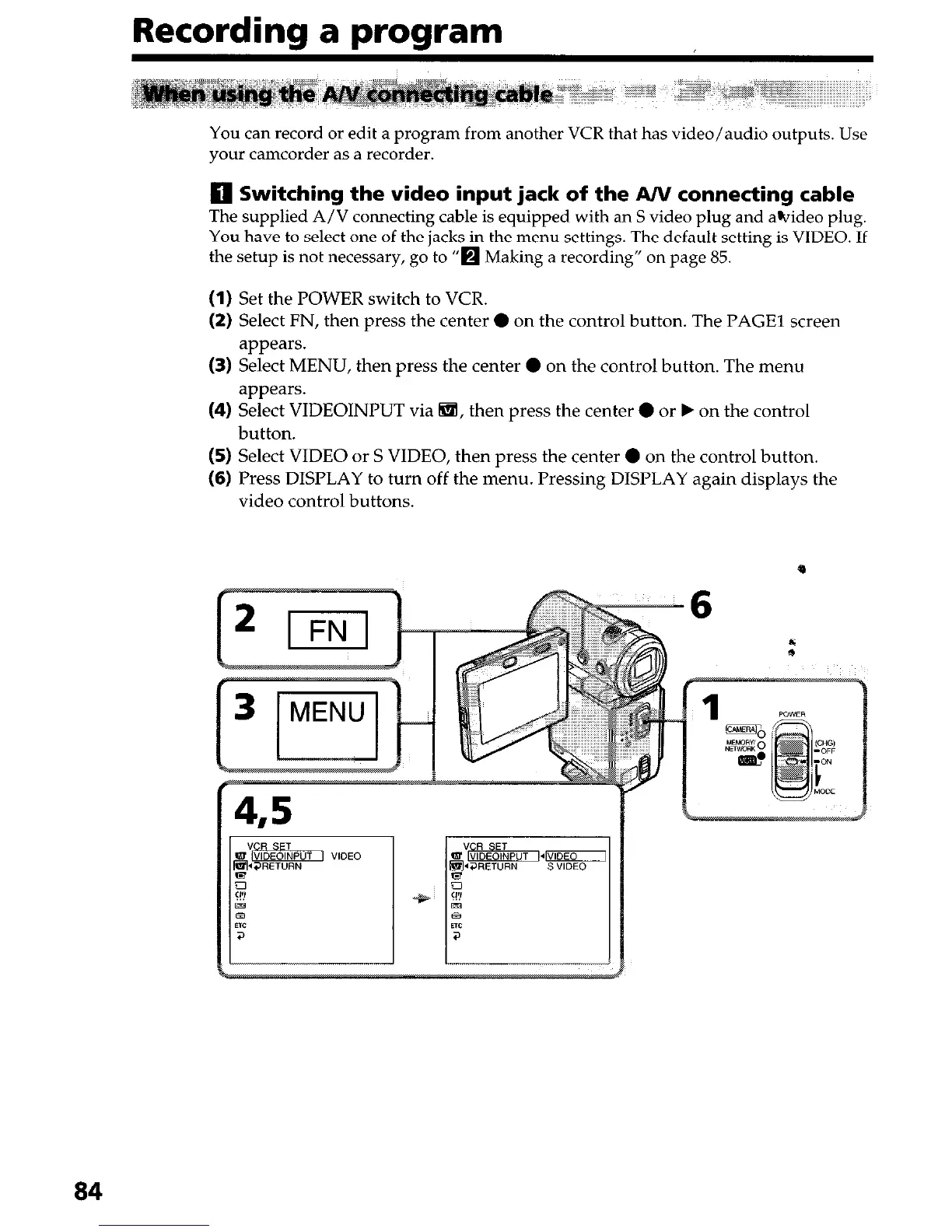
(I) Set the POWER switch to VCR.
(2) Select FN, then press the center 0 on the control button. The PAGE1 screen
appears.
(3) Select MENU, then press the center 0 on the control button. The menu
appears.
(4) Select VIDEOINPUT via 6!ii, then press the center 0 or b on the control
button.
(5) Select VIDEO or S VIDEO, then press the center 0 on the control button.
(6) Press DISPLAY to turn off the menu. Pressing DISPLAY again displays the
video control buttons.
84




 To Next Page