Recording a program
q
Making a recording
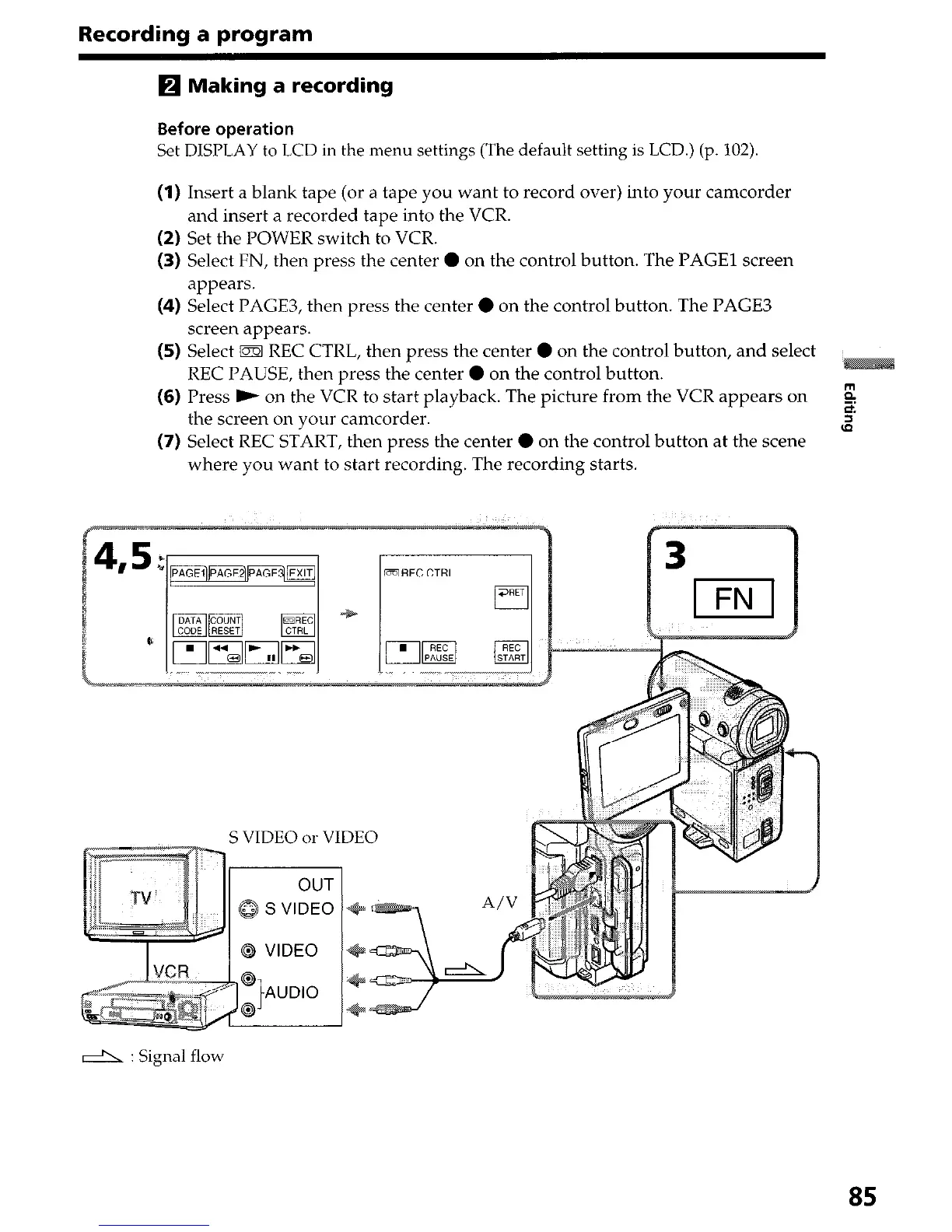
Before operation
Set DISPLAY to LCD in the menu settings (The default setting is LCD.) (p. 102).
(1) Insert a blank tape (or a tape you want to record over) into your camcorder
and insert a recorded tape into the VCR.
(2) Set the POWER switch to VCR.
(3) Select FN, then press the center 0 on the control button. The PAGE1 screen
appears.
(4) Select PAGE3, then press the center 0 on the control button. The PAGE3
screen appears.
(5) Select m REC CTRL, then press the center 0 on the control button, and select
REC PAUSE, then press the center 0 on the control button.
(6) Press ) on the VCR to start playback. The picture from the VCR appears on
the screen on your camcorder.
(7) Select REC START, then press the center 0 on the control button at the scene
where you want to start recording. The recording starts.
DREC CTRL
I
S VIDEO or VIDEO
d : Signal flow
85




 To Next Page