Introduction - Basic operations
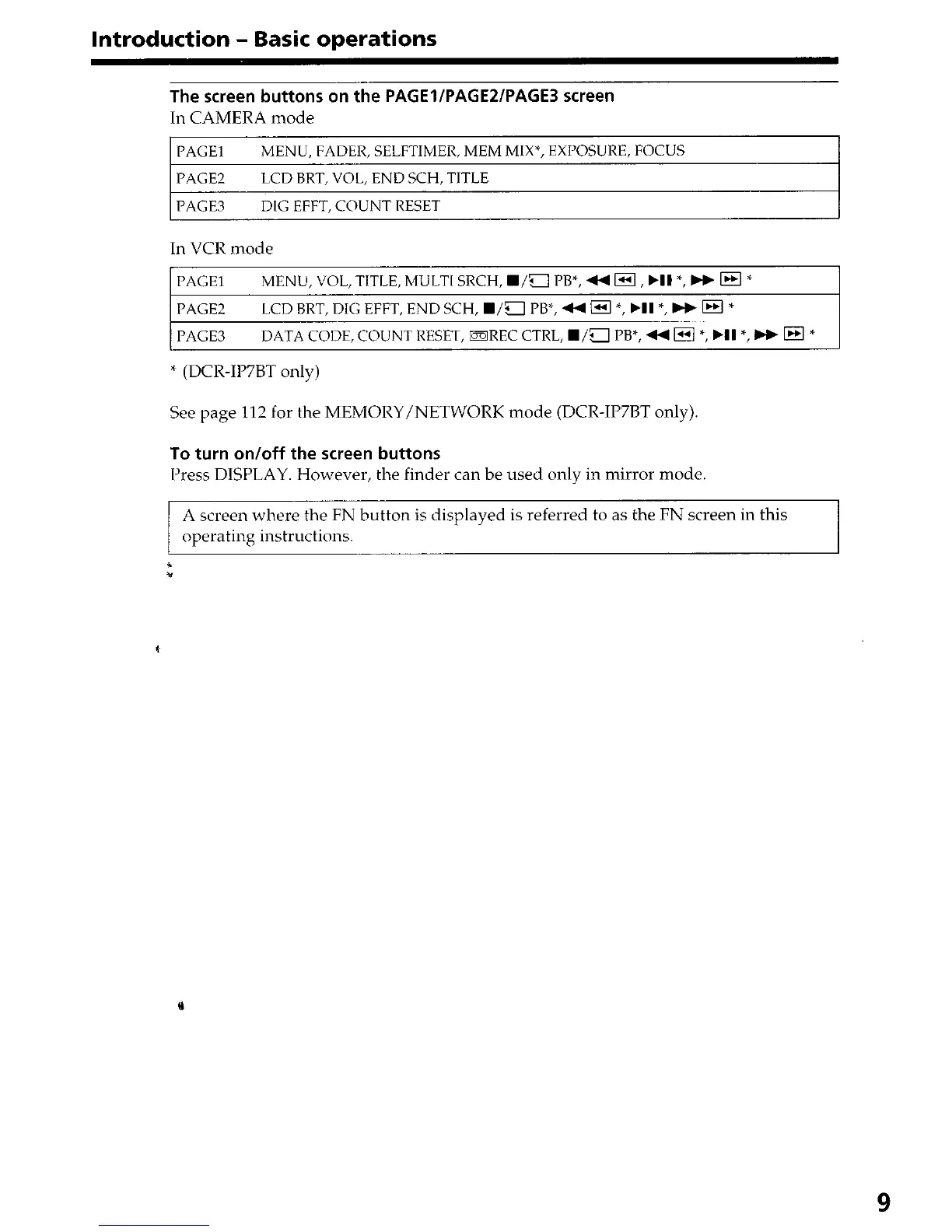
The screen buttons on the PAGElIPAGEZIPAGE3 screen
In CAMERA mode
1 PAGE1
MENU, FADER, SELFTIMER, MEM MIX*, EXPOSURE, FOCUS
I
PAGE2 LCD BRT, VOL, END SCH, TITLE
PAGE3 DIG EFFT, COUNT RESET
In VCR mode
PAGE1 MENU, VOL, TITLE, MULTI SRCH, W/a PB*, 44 m, .I1 *, W m *
PAGE2
LCD BRT, DIG EFFT, END SCH, B/a PB*, 44 = *, bII *, bb m *
PAGE3
DATA CODE, COUNT RESET, mREC CTRL, W/a PB*, 44 m *, .I1 *, bb @ *
* (DCR-IP7BT only)
See page 112 for the MEMORY/NETWORK mode (DCR-IP7BT only).
To turn on/off the screen buttons
Press DISPLAY. However, the finder can be used only in mirror mode.
A screen where the FN button is displayed is referred to as the FN screen in this
operating instructions.
9











 To Next Page