45
Playback
– Basics
Воспроизведение — Основные функции
Playing back a tape
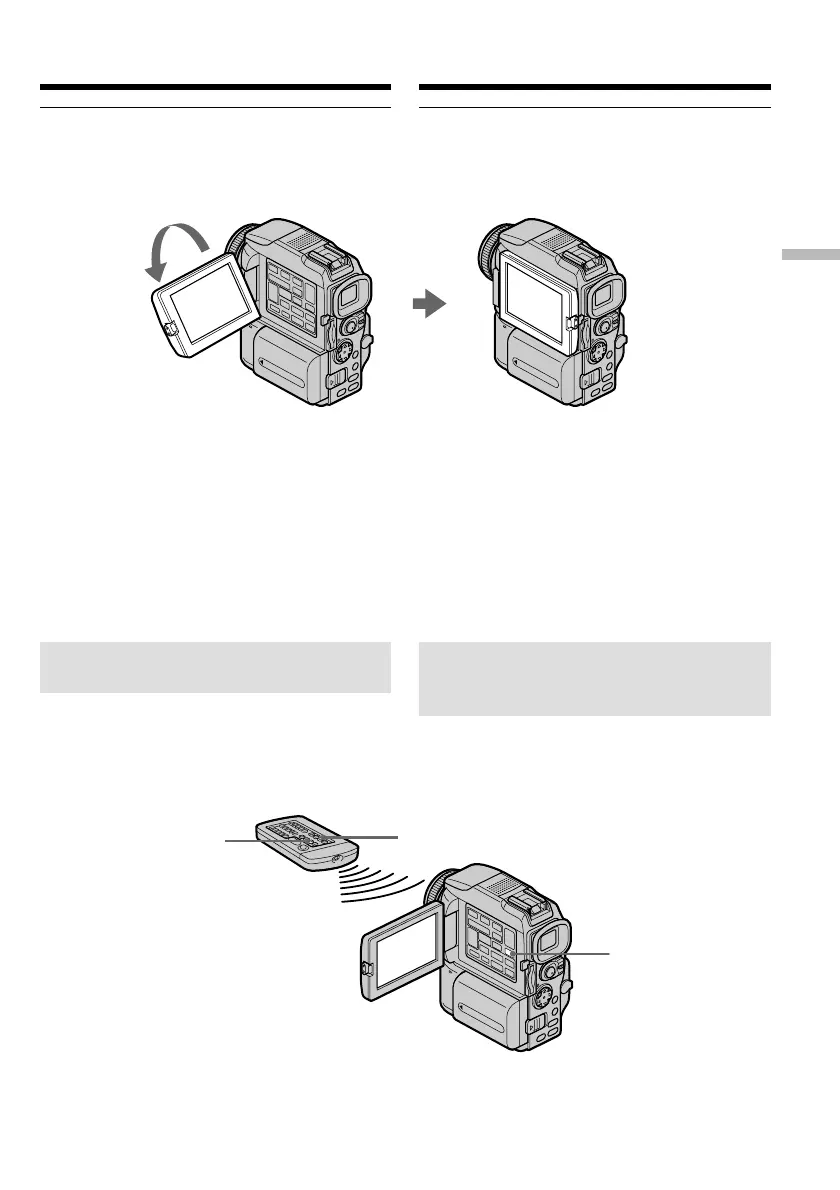
When monitoring on the LCD screen
You can turn the LCD panel over and move it
back to the camcorder body with the LCD screen
facing out.
If you leave the power on for a long time
Your camcorder gets warm. This is not a
malfunction.
When you open or close the LCD panel
Open or close the LCD panel vertically.
To display the screen indicators
– Display function
Press DISPLAY. The indicators appear on the
screen. To make the indicators disappear, press
DISPLAY again.
DISPLAY
DATA CODE
DISPLAY
Воспроизведение ленты
Во время контрольного просмотра на ЖК-
дисплее
Панель ЖК-дисплея можно перевернуть
дисплеем наружу.
Если питание остается включенным в
течение долгого времени
Видеокамера нагреется, что вполне
допустимо.
Как открывать и закрывать панель ЖК-
дисплея
Открывая и закрывая панель ЖК-дисплея,
смотрите за тем, чтобы она находилась в
вертикальном положении.
Отображение экранных
индикаторов
— Функция индикации
Нажмите кнопку DISPLAY. На дисплее
появятся индикаторы. Чтобы индикаторы
исчезли с дисплея, снова нажмите кнопку
DISPLAY.















 To Next Page