2-23
DCR-TRV345E/TRV350/TRV351/TRV355E/TRV356E
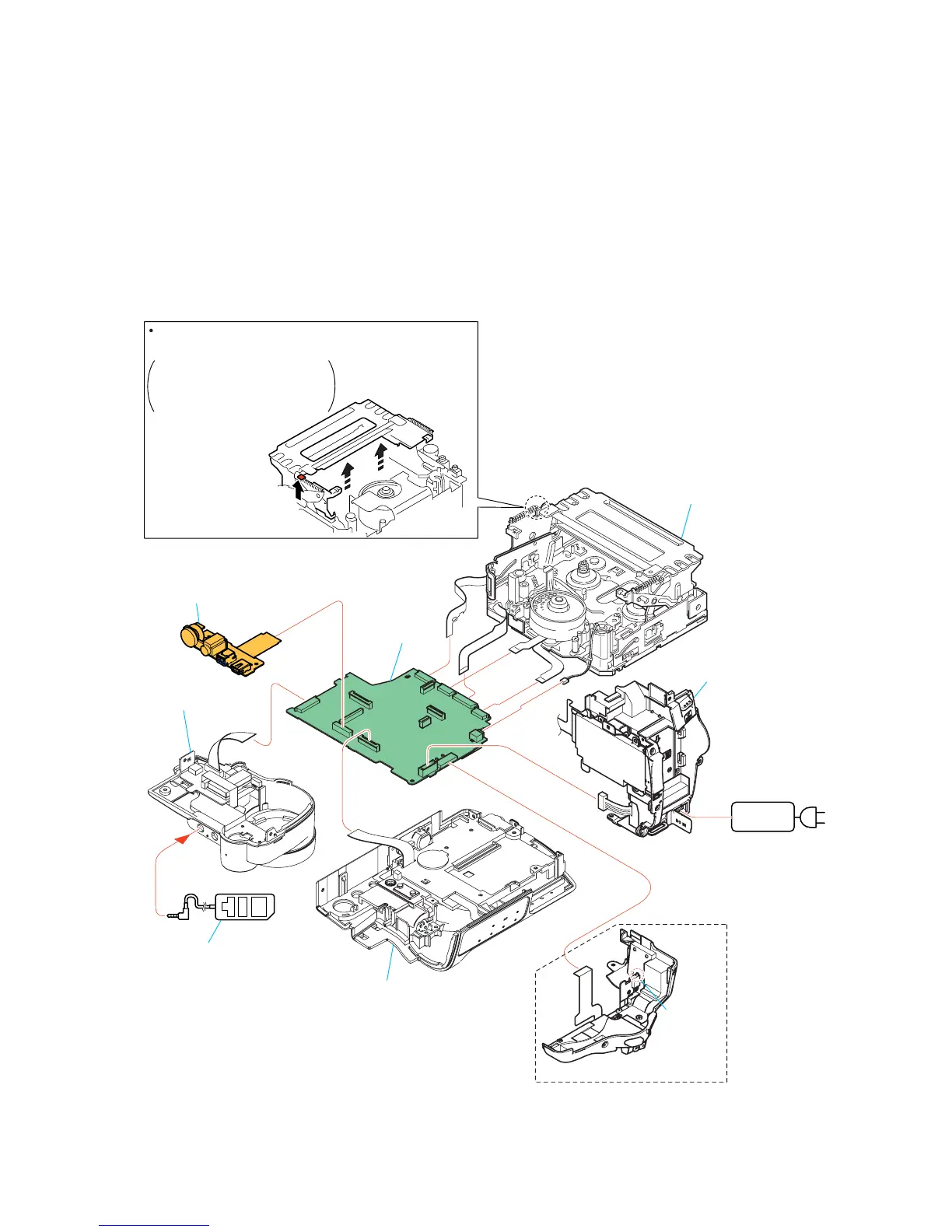
[SERVICE POSITION TO CHECK THE MECHANISM DECK]
Adjustment remote
commander (RM-95)
A
B
Cabinet (R) block assembly
Battery panel
block assembly
Mechanism deck
Control switch block
(SS-3000)
FP-577 flexible board
VC-305 board
Press the cassette compartment
in the direction of the arrow A
to move it up in the direction of
the arrow B.
How to move up the cassette
compartment manually
AC IN
AC power
adaptor
Eject switch
When exiting the "Forced VTR Power ON" mode, connect the control
switch block (SS-3000) to the CN711 of VC-305 board. Or, when
ejecting the cassette, connect the control switch block (SS-3000) to
the CN711 of VC-305 board. and press the EJECT switch.
Connection to Check the Mechanism deck
To check the mechanism deck, set the VTR to the "Forced VTR power ON" mode. (Or, connect the control switch block
(SS-3000) to the CN711 of VC-305 board and set the power switch to the "PLAYER" position.)
Operate the VTR function using the adjustment remote commander (with the HOLD switch set in the OFF position).
Setting the "Forced VTR Power ON" mode
1) Select page: 0, address: 01, and set data: 01.
2) Select page: D, address: 10, set data: 02 and
press the PAUSE button of the adjustment remote
commander.
Exiting the "Forced VTR Power ON" mode
1) Select page: 0, address: 01, and set data: 01.
2) Select page: D, address: 10, data: 00, and press the PAUSE
button of the adjustment remote commander.
3) Select page: 0, address: 01, and set data: 00.
F panel block
assembly





 To Next Page