38
GB
Customizing this product
Using menus
You can enjoy using this product more by making good use of menu operations.
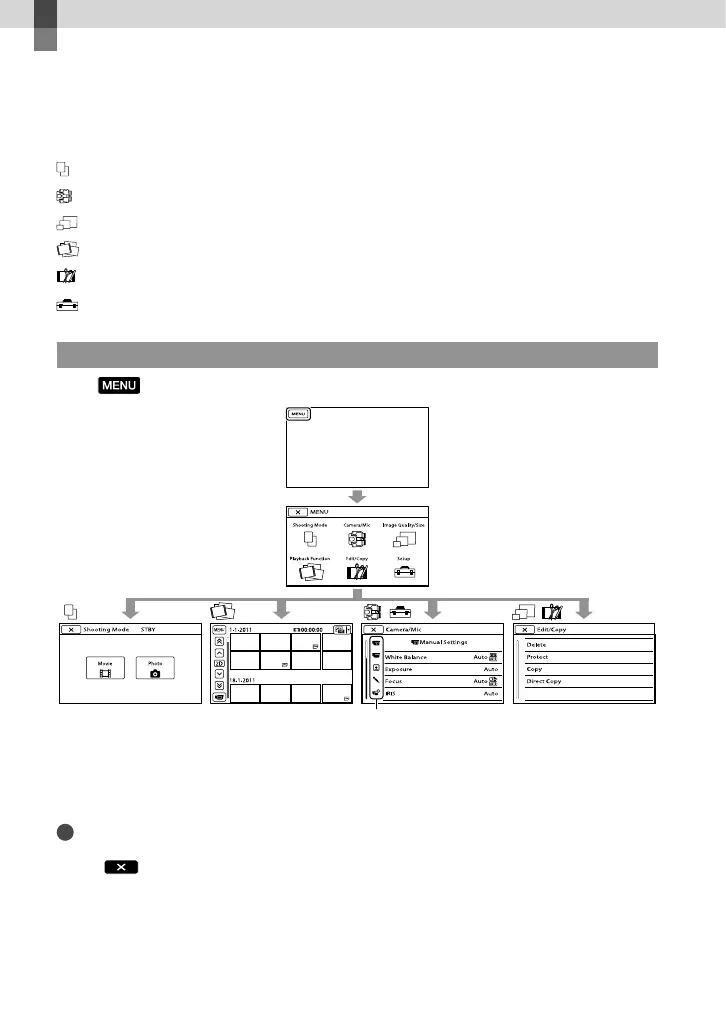
This product has various menu items under each of 6 menu categories.
Shooting Mode (Items for selecting a shooting mode) p. 39
Camera/Mic (Items for customized shooting) p. 39
Image Quality/Size (Items for setting up image quality or size) p. 40
Playback Function (Items for playback) p. 32
Edit/Copy (Items for editing) p. 40
Setup (Other setup items) p. 40
Operating menus
Select (MENU) using the ////Enter buttons and set the menu items.
The [Camera/Mic] and [Setup] menus have sub-categories. Select the sub-category icon, and
the screen changes to other sub-category menus.
Grayed out menu items or settings are not available.
Notes
You may not be able to set some menu items, depending on the recording or playback conditions.
Select
to finish setting the menu or to return to the previous menu screen.
Sub-category icons



 To Next Page