Turn
off
the iPod OFF,
or
press and hold
~II
You can fall asleep to the
sound
using the built-in
sleep
timer
that turns
off
the unit automatically after a
preset duration.
1 Press
SLEEP
while the unit is turned on.
SLEEP
appears in the display.
2 Press
SLEEP
to set the sleep timer
duration.
Each
time you press SLEEP, the duration
changes
as follows:
ANTENNA
AM
i-I
AUDIO IN
\'
Audio
connecting
cable
_~--.l
(supplied)
To
external
.-~
equipment
90
~
60
~
30
~
15
L-OFF...---J
Press
MEGA
Xpand.
"MEGA
Xpand"
appears in
the display. You can get the effect
of
expansion
of
the
sound field.
To
return to normal sound, press the
button again.
The
display returns to
clock
mode
five seconds
after you
have
finished setting the duration setting
and released
SLEEP,
and
then the sleep timer
starts.
The
unit will play for the duration you set, and
then shut off.
To
turn
off
the
unit
before
the
preset
time
Press
OFF.
To
use
both
sleep
timer
and
alarm
Other
useful
functions
To
get
the
MEGA
Xpand
effect
Setting
the
sleep
timer
To
return
to
the
radio
Press
RADIO
ON.
The frequency is shown
in
the display.
To
stop
listening
Press
OFF,
and stop playback
on
the
connected
unit.
2 Press
AUDIO
IN
to display
"AUDIO
IN".
3 Play the equipment connected to the
AUDIO
IN
jack.
4 Adjust the volUlne using
VOLUME.
To
return
to
the
iPod
Press
~/II.
You can fall asleep to the radio and also be
awakened
by the radio
or
buzzer
alarm at the preset time.
1 Set the alarm. (See "Setting the alarm".)
2 Set the sleep timer. (See "Setting the sleep
tilner".)
Connecting
external
equipment
To
listen
to
sound
1 Connect the
AUDIO
IN
jack
of
the unit to
the line out
jack
or
headphone
jack
of
the
external equipment using the audio
connecting cable (supplied).
Tuning
into
a
preset
station
1 Press
RADIO
ON
to turn on the radio.
2 Press one
of
the
PRESET
TUNING
buttons where the desired station is stored.
3 Adjust volume using
VOLUME.
To
set
the
alarm
time
The
dual alarm function allows you to set two alarm
programs
(ALARM
A and
ALARM
B).
The
alarm time can be set for
each
program
and
the
alarm
sound
is selectable from
RADIO,
BUZZER
or
iPod.
To
activate
the
alarm
After setting the alarm time, follow these steps:
To
activate the
ALARM
A, press
ALARM
SET
A to display
ALARM
A.
To
activate the
ALARM
B, press
ALARM
SET
B to display
ALARM
B.
Notes
•
The
alarm sounds at the set time even if the unit
is
on.
• Make sure the iPod is installed correctly after
setting the iPod alarm.
Notes
• Before setting the alarm, make sure to set the
clock
(see
"Setting
the
clock
and
date").
•
The
factory setting alarm time is
"AM
12:00".
• To set the radio alarm, first tune in to a station
(see
"Playing
the radio").
Setting
the
alarm
To
set
ALARM
A
1 Press
ALARM
SET
A for a few seconds.
2 Press
TIME
SET
+/-
to set the desired
hour, and press
ALARM
SET
A.
3 Press
TIME
SET
+/-
to set the desired
Ininute, and press
ALARM
SET
A.
4 Press
TIME
SET
+/-
to set the desired
alarnl
1110de
(RADIO,
BUZZER
or
iPod)
and press
ALARM
SET
A.
5 If you select the RADIO
or
iPod, press
TIME
SET
+/-
to set the wake up
volume and press
ALARM
SET
A.
To
set
ALARM
B, follow the
same
steps
above
using
ALARM
B instead
of
ALARM
A.
To
change
the display
between
ALARM
TIME A and
ALARM
TIME
B,
press TIME ZONE/ALARM
DISPLAY.
Notes
•
When
you use the radio alarm, the timed alarm
sounds with the last broadcasting station tuned to
before the
power
went off.
When
you set the radio
alarm, select the desired broadcasting station before
turning the
power
off.
•
The
ALARM
A (or B) indicator flashes in the
display when the alarm sounds.
•
If
a second alarm sounds during a first (or the
SNOOZE function is active), the second alarm takes
priority.
• The alarm function works as usual at the beginning
and end day
of
the daylight saving time (summer
time). While the Automatic
DST/Summer
Time
adjustment is set, as a result, if the alarm
is
set at a
time skipped when the daylight saving time (summer
time) begins, the alarm is skipped,
or
if
the alarm is
set at a time overlapped when the daylight saving
time (summer time) ends, the alarm sounds twice.
•
If
the
same
alarm time is set for both alarm
(ALARM
A and B), the
ALARM
A takes priority.
To
stop
the
Alarm
Press
OFF
to turn
off
[he alann.
The
alarm will
come
on sound again at the
same
time
the next day.
If
OFF is not pressed, the
buzzer
alarm sounds
continuously for about 2 minutes, and then it stops
automatically.
The
RADIO
and iPod
sound
continuously until OFF
is pressed.
To
doze
for
a
few
more
minutes
Press
SNOOZE/BRIGHTNESS.
The
sound
turns
off
but will automatically
come
on
again after about 5 minutes.
The
maximum
length
of
the snooze time is
40
minutes.
ALARMTIMEA
B.
n
n
BUZZER
AM •
LI
U
AM
12
fi
a
~H2
"." ",
LI LI
PM
Playing
the
radio
-Manual
Tuning
1 Press
RADIO
ON
to turn on the radio.
The
display
shows
the
band
and
frequency.
To
preset another station, repeat these steps.
To
change the preset station, tune into the desired
station and hold
down
the PRESET TUNING 1
to 5 button.
The
new station will replace the
previous station on the preset button.
You can preset up to
10
stations in
FM
(5
stations in
FM
I, 5 stations in FM2), and 5 stations in AM.
2 Press
RADIO
ON
repeatedly to select the
desired band.
Each press changes the
band
as follows:
C
FMl
---+
FM2
---+
AM J
To
turn
off
the radio, press OFF.
a few seconds after +
Presetting
a
Station
1 Follow steps 1 to 4 in "Playing the Radio"
and nlanually tune into the station you wish
to preset.
2 Press and hold the desired
PRESET
TUNING
button for more than two
seconds for registration.
After the preset has finished, the preset
number
appears
on
the display.
Example:
To
preset AM I
260
kHz
onto preset
2 button.
FM: Extend the
FM
wire
antenna
fully to
increase reception sensitivity.
AM: Connect the supplied
AM
loop antenna to
the unit. Rotate the
antenna
horizontally
for
optimum
reception.
Keep away iPod from the
AM
loop
antenna
or
the
FM
wire antenna, as this may lead to interference
of
reception.
FM
I and
FM2
are the
same
frequency bands.
3 Use
TUNING
+
or
- to tune into the
desired station.
The
FM
frequency advances
or
reverses in 0.1
MHz
channel steps and the AM frequency in 10
kHz channel steps.
4 Adjust volunle using
VOLUME.
Tip
If
the
FM
broadcast is noisy, press FM MODE on
the remote
commander
to turn
off
"STEREO"
in the
display.
The
radio
becomes
clearer although the sound
becomes
monaural.
Improving
the
Reception
Presetting
Your
Favourite
Station
-Preset
Tuning
~
(forward)
or
.....
(backward) while playing and
hold it until you find the point.
~
(forward)
or
.....
(backward)
in
pause and hold it
until you find the point.
MENU*
Press
Locate a point
while observing
the display
Locate a point
while listening to
the sound
Go
back to the
previous menu
Go
back to the
previous track
To
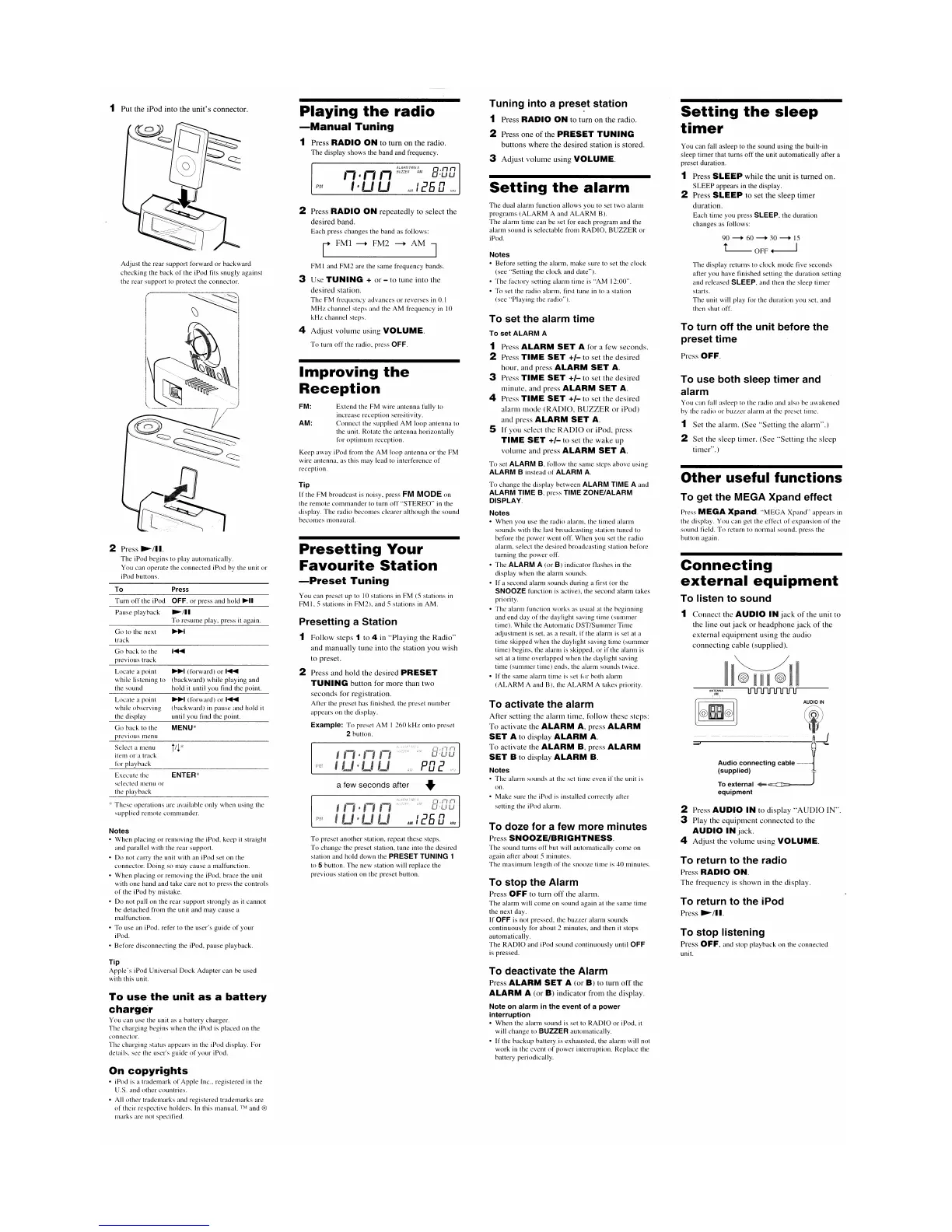
2 Press
~/II.
The iPod begins to play automatically.
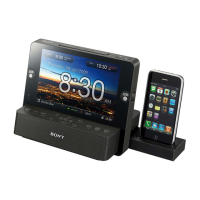
You can operate the connected iPod by the unit
or
iPod buttons.
Pause playback
~/II
To
resume play, press it again.
Select a menu
iI
~
*
item
or
a track
for playhack
Go
to the next
track
Adjust the rear support forward
or
backward
checking the back
of
the
iPod
fits snugly against
the rear support to protect the connector.
Execute the
ENTER*
selected menu
or
the playback
These
operations are available only when using the
supplied remote commander.
1 Put the iPod into the
unit's
connector.
Notes
• When placing
or
removing the iPod, keep
it
straight
and parallel with the rear support.
• Do not carry the unit with an iPod set on the
connector. Doing so may cause a malfunction.
•
When
placing
or
removing the iPod, brace the unit
with one hand and take care not to press the controls
of
the iPod by mistake.
•
Do
not pull on the rear support strongly as it cannot
be detached from the unit and may
cause
a
malfunction.
• To use an iPod. refer to the user's guide
of
your
iPod.
• Before disconnecting the iPod, pause playback.
Tip
Apple's
iPod Universal
Dock
Adapter can he used
with this unit.
To
use
the
unit
as
a
battery
charger
You can use the unit as a battery charger.
The charging begins when the iPod is placed on the
connector.
The charging status appears in the iPod display.
For
details. see the user's guide
of
your iPod.
To
deactivate
the
Alarm
Press
ALARM
SET
A (or
B)
to turn
off
the
ALARM
A (or
B)
indicator from the display.
Note
on
alarm
in
the
event
of
a
power
interruption
•
When
the alarm
sound
is set to
RADIO
or
iPod, it
will
change
to BUZZER automatically.
• If the
backup
battery is exhausted, the alarm will not
work in the event
of
power
interruption. Replace the
battery periodically.
On
copyrights
• iPod is a trademark
of
Apple Inc., registered in the
U.S. and other countries.
• All other trademarks and registered trademarks are
of
their respective holders. In this manual. ™ and ®
marks are not specified.


 To Next Page
 Loading...