38
GB
onnec
n
o o
er
ev
ces
Viewing images on a TV
• The [Video Out] setting is set to [NTSC] mode at the factory to let you enjoy optimum movie
image quality. When images do not appear or jittery on your TV, you may be using a PAL-only
TV. Try switching the [Video Out] setting to [PAL] (page 49).
Printing still images
If you have a PictBridge compliant printer, you can print images by the following
procedure.
First, set the camera to enable USB connection between the camera and the printer.
1
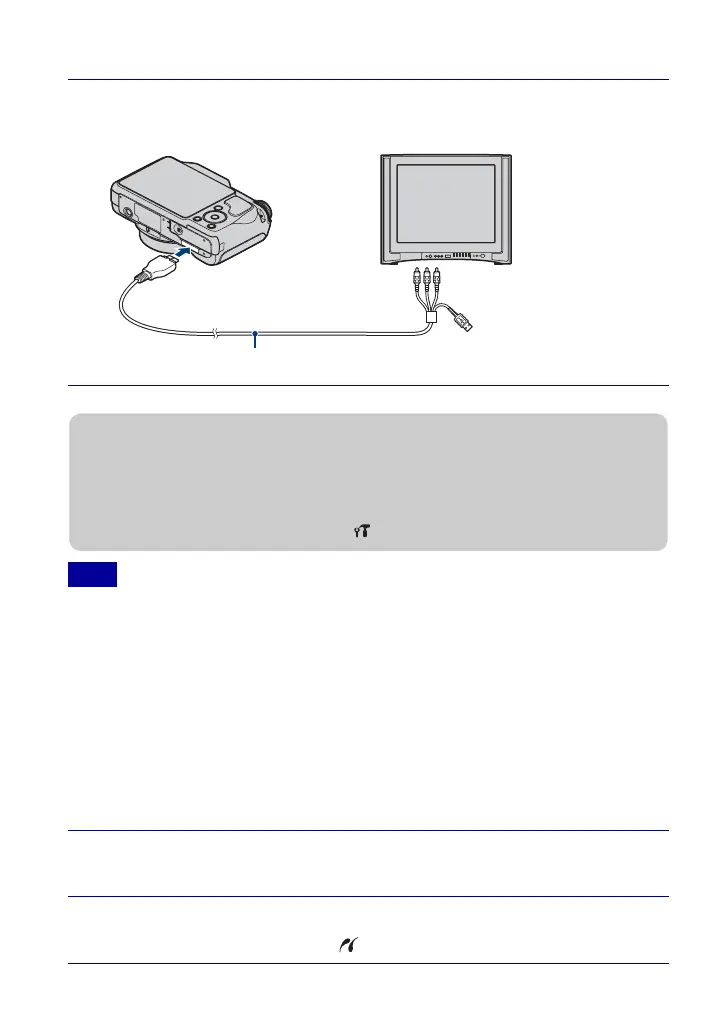
Connect the camera to the TV with the cable for multi-use
terminal (supplied).
Note
1
Connect the camera to the printer with the cable for multi-
use terminal (supplied).
2
Turn on the printer.
After the connection is made, the indicator appears.
To the multi
connector
To audio/video
input jacks
Cable for multi-use terminal
zViewing images on a HD (High Definition) TV
• You can view images recorded on the camera by connecting the camera to an HD (High
Definition) TV with the HD Output Adaptor Cable (sold separately). Use a Type2b-compliant
HD Output Adaptor Cable.
• Set [COMPONENT] to [HD(1080i)] under (Main Settings) on the setting screen.








 To Next Page