45
Using the menu
Using the menu
Using menu items
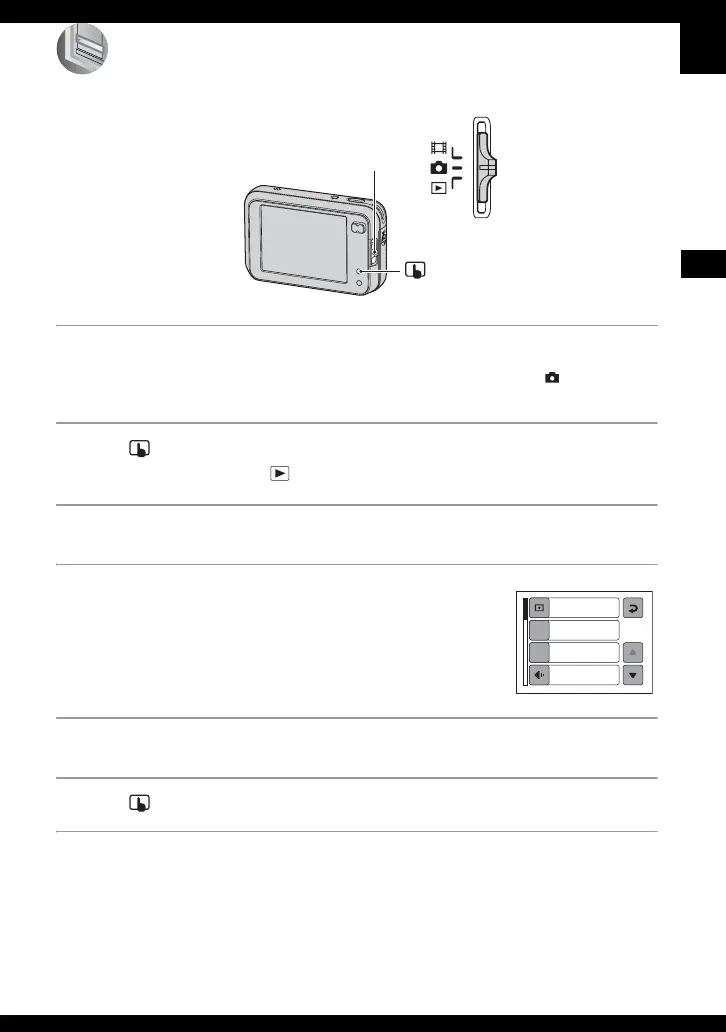
1 Turn on the power and set the mode switch.
Different items are available depending on the position of the mode switch and the (Camera) menu
settings.
2 Press (on-screen key) to display the touch panel buttons.
• When the mode switch is set to , skip this operation.
3 Touch [MENU] to display the menu.
4 Touch the item you want to set.
• If the desired item is invisible, press v/V until the
item appears on the screen.
5 Touch the setting.
6 Press (on-screen key) to turn off the menu.
• You cannot set items that are grayed out.
Mode switch
(on-screen key) button
Metering Mode
Multi
White Bal
Auto
ISO
Auto
P.Quality
Fine
WB
ISO






 To Next Page