33
Using the menu
For details on the operation
t
page 25
On the [Multi Burst]
• You can play back images shot with [Multi Burst] using the following procedure.
– To pause/resume: Press z on the control button.
– To play back frame-by-frame: Press b/B in pause mode. Press z to resume playback in series.
• You cannot use the following functions in the [Multi Burst] mode:
– Smart zoom
–Flash
– Inserting the date and time
– Dividing a series of images shot with [Multi Burst]
– Deleting a frame in a series of images shot with [Multi Burst]
– Setting the frame interval to a mode other than [1/30] when the mode dial is set to
– Setting the shutter speed to lower than 1/30 second when the mode dial is set to M
• When playing back a series of images shot with [Multi Burst] using a computer or a camera not equipped
with the Multi Burst function, the image is displayed as a single image with 16 frames.
• The image size of images shot in the [Multi Burst] mode is 1M.
• You may not be able to shoot images in the [Multi Burst] mode depending on the Scene mode (page 27).
On the [Burst]
• The flash is set to (No flash).
• When recording with the self timer, a series of a maximum of five images is recorded.
• When the mode dial is set to M, you cannot set the shutter speed in the [Burst] mode to 1/6 second or
slower.
• When the battery level is low, or when the “Memory Stick” is full, the [Burst] stops.
• You may not be able to shoot images in the [Burst] mode depending on the Scene mode (page 27).
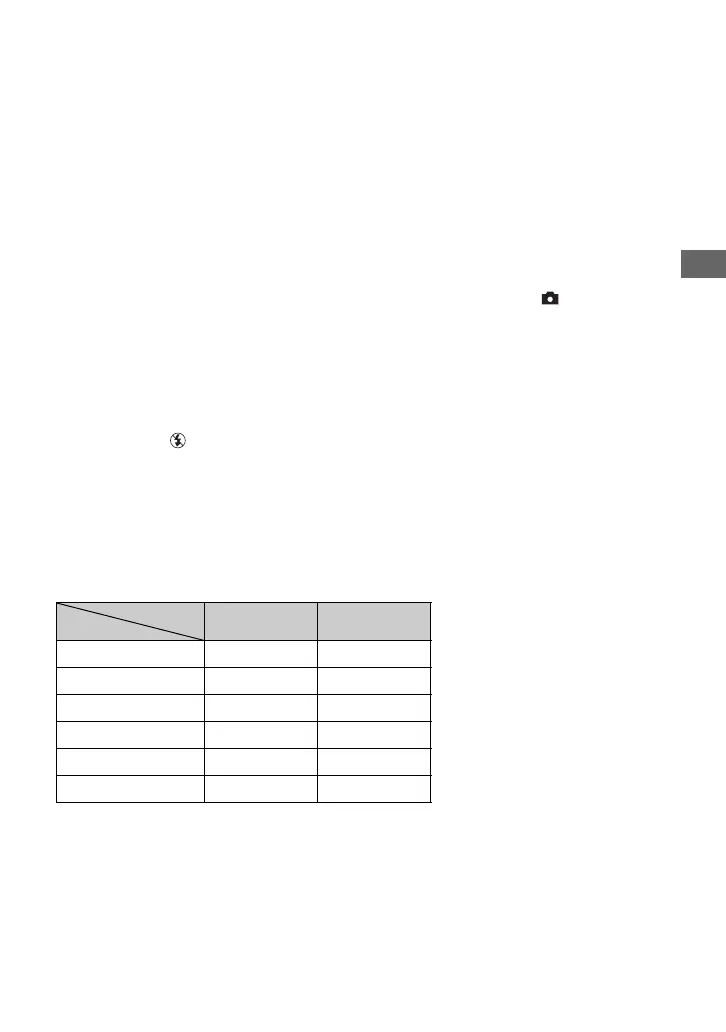
The maximum number of continuous shots
(Units: images)
Quality
Size
Fine Standard
7M 5 8
3:2 5 8
5M 6 11
3M 9 17
1M 22 41
VGA(E-Mail) 85 100








 To Next Page