14
Identifying parts
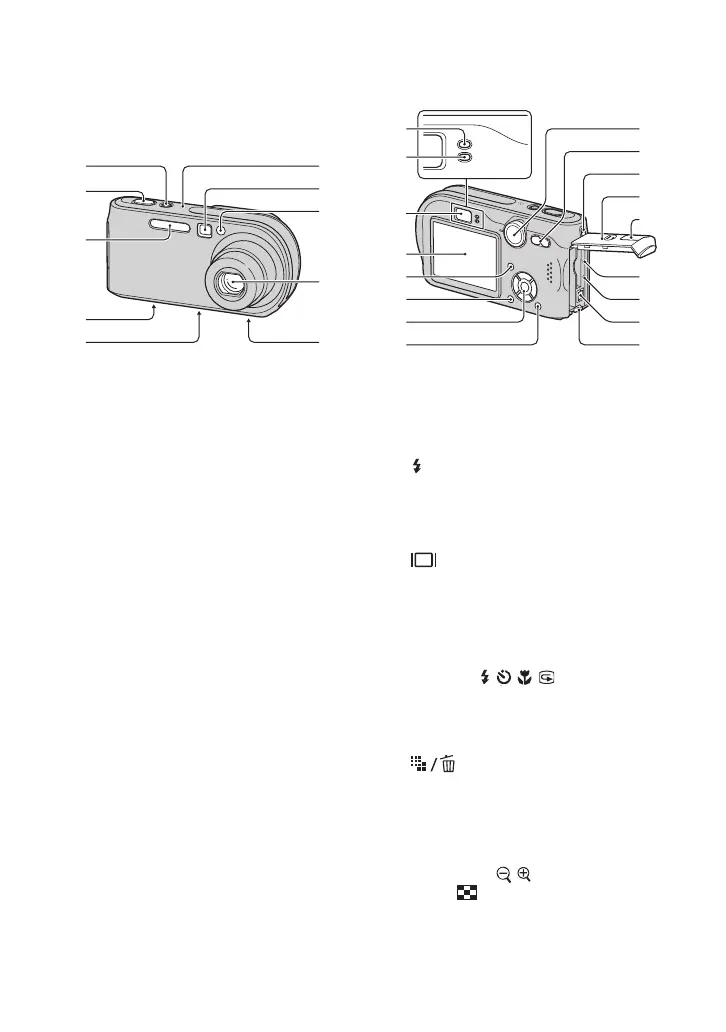
See the pages in parentheses for details of
operation.
A POWER button/lamp (
t step 2 in
“Read This First”)
B Shutter button (
t step 5 in “Read This
First”)
C Flash (
t step 5 in “Read This First”)
D Multi connector (bottom) (56)
E Tripod receptacle (bottom)
• Use a tripod with a screw length of less than
5.5 mm (7/32 inch). You will be unable to
firmly secure the camera to tripods having
longer screws, and may damage the camera.
F Microphone
G Finder window (
t step 5 in “Read This
First”)
H Self-timer lamp (
t step 5 in “Read
This First”)/AF illuminator (46)
I Lens
J Speaker (bottom)
A AE/AF lock lamp (green) (
t step 5 in
“Read This First”)
B /Charge lamp (orange) (
t step 1 in
“Read This First”)
C Finder (
t step 5 in “Read This First”)
D LCD screen
E (Display/LCD on/off) button (20)
F MENU button (25)
G Control button
Menu on: v/V/b/B/
z (t step 2 in
“Read This First”)
Menu off: /// (
t step 5 in
“Read This First”)
Mode dial “M”: Shutter speed/aperture
value (24)
H (Image Size/Delete) button
(
t step 4 and 6 in “Read This First”)
I Mode dial (23)
J For shooting: Zoom (W/T) button
(
t step 5 in “Read This First”)
For viewing: / (Playback zoom)
button/ (Index) button (
t step 6 in
“Read This First”)
K Hook for wrist strap (
t “Read This
First”)
2
4
5
3
7
8
9
q;
1
2
4
5
6
7
9
q;
qa
qs
qd
qf
qg
qh
j
3



 To Next Page
 Loading...