37
Using the menu
For details on the operation
t
page 25
Protects images against accidental erasure.
To protect images in single-image mode
1 Display the image you want to protect.
2 Press MENU to display the menu.
3 Select [-] (Protect) with b/B on the control button, then press z.
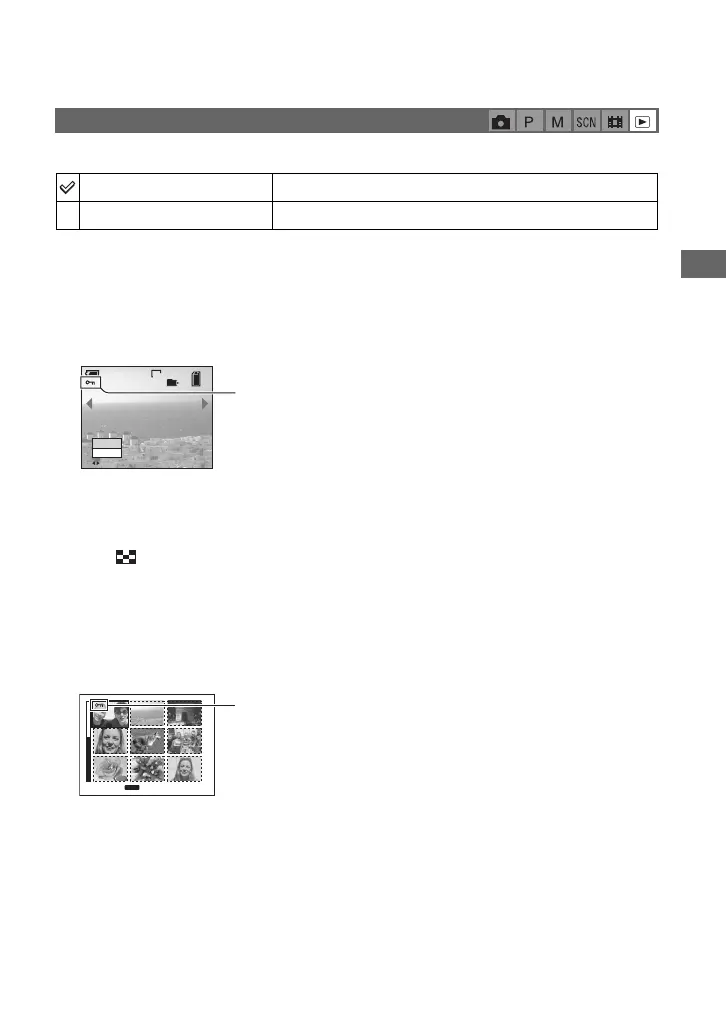
The image is protected and the - (protect) indicator appears on the image.
4 To protect other images, select the desired image with b/B, then press z.
To protect images in index mode
1 Press (index) to display the index screen.
2 Press MENU to display the menu.
3 Select [-] (Protect) with b/B on the control button, then press z.
4 Select [Select] with v/V, then press z.
5 Select the image you want to protect with v/V/b/B, then press z.
A green - indicator appears on the selected image.
6 Repeat step 5 to protect other images.
7 Press MENU.
8 Select [OK] with B, then press z.
The - indicator turns white. The selected images are protected.
• To protect all images in the folder, select [All In This Folder] in step 4, and press z. Select [On] with B,
then press z.
- (Protect)
Protect (-)
See the following procedure.
Exit
Exits the Protection function.
60min
VGA
101
2/9
Protect
Exit
BACK/NEXT
-
TO NEXT
MENU
•
SELECT
- (green)









 To Next Page