EasyManua.ls Logo

Sony DSC-W55 - Indicators on the Screen

Sony DSC-W55
64 pages
Print Icon
To Next Page IconTo Next Page
To Previous Page IconTo Previous Page
Loading...
19
GB
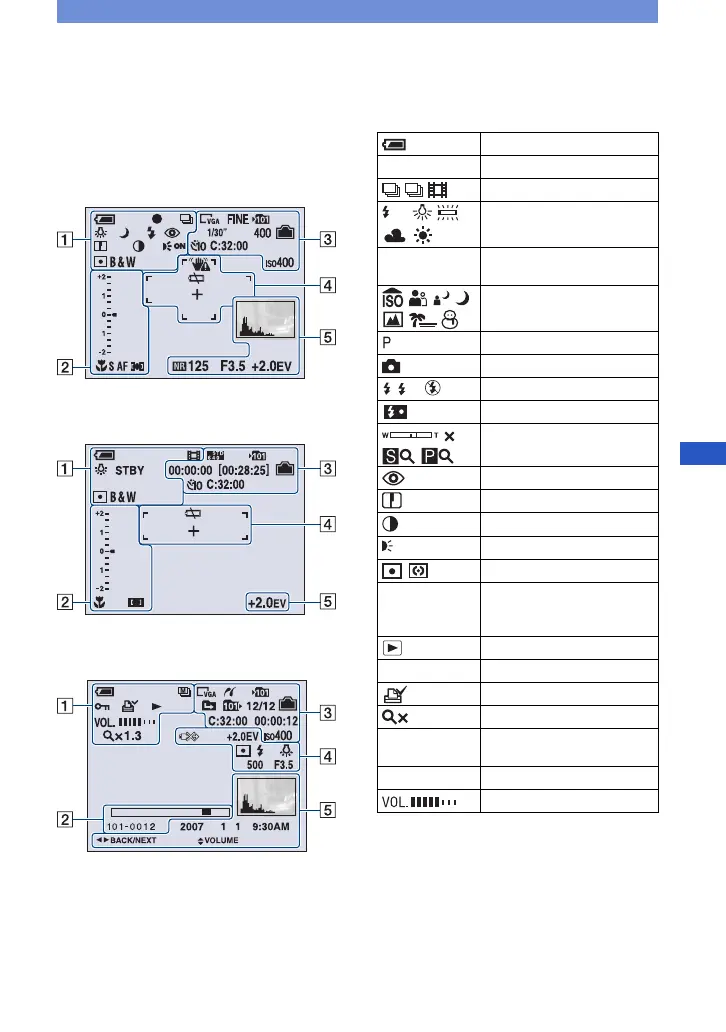
Indicators on the screen
Everytime you press the DISP (Screen
display switch) button, the display data and
indicator is turned on and off (page 16).
[ When shooting still images
[ When shooting movies
[ When playing back
A
Battery remaining
z AE/AF lock
Recording mode
White balance
STBY
REC
Standby/Recording a movie
Mode dial (Scene
Selection)
Mode dial (Program Auto)
Camera mode
Flash mode
Flash charging
Zoom scaling
Red-eye reduction
Sharpness
Contrast
AF illuminator
Metering mode
RICH
NATURAL
SEPIA B&W
Color mode
Playback mode
- Protect
Print order (DPOF) mark
Zoom scaling
Step
12/16
Frame by frame playback
N Playback
Volume
M
WB
SL
1.3
ON
1.3

Table of Contents

Other manuals for Sony DSC-W55

Related product manuals