GB
22
Viewing
x
Setting items
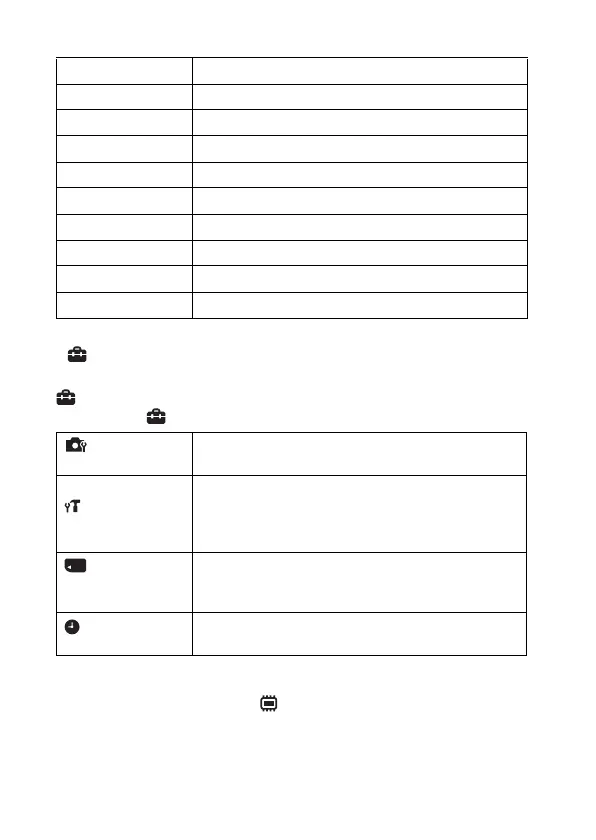
If you press the MENU button while shooting or during playback,
(Settings) is provided as a final selection. You can change the default
settings on the (Settings) screen.
*1 [Eye-Fi] is displayed only when a compatible memory card is inserted to the
camera.
*2 If a memory card is not inserted, (Internal Memory Tool) will be displayed
and only [Format] can be selected.
Easy Mode Increase the text size on the screen for ease of use.
Beauty Effect Retouch a face on a still image.
Retouch Retouch an image using various effects.
Delete Delete an image.
Slideshow Select a method of continuous playback.
View Mode Select the display format for images.
Protect Protect the images.
Print (DPOF) Add a print order mark to a still image.
Rotate Rotate a still image.
In-Camera Guide Search the camera’s functions according to your needs.
Shooting Settings
AF Illuminator/Grid Line/Disp. Resolution/Digital
Zoom/Red Eye Reduction/Blink Alert/Write Date
Main Settings
Beep/Panel Brightness/Language Setting/Display color/
Demo Mode/Initialize/Function Guide/Video Out/USB
Connect Setting/USB Power Supply/LUN Setting/
Download Music/Empty Music/Eye-Fi
*1
/Power Save
Memory Card
Tool
*2
Format/Create REC.Folder/Change REC.Folder/Delete
REC.Folder/Copy/File Number
Clock Settings
Area Setting/Date & Time Setting
Downloaded from www.vandenborre.be



 To Next Page