GB
18
• Continuous shooting is possible for approximately 29 minutes at one time at the
camera’s default settings and when the temperature is approximately 25°C (77°F).
When movie recording is finished, you can restart recording by pressing the
shutter button again. Recording may stop to protect the camera depending on the
ambient temperature.
x
Selecting next/previous image
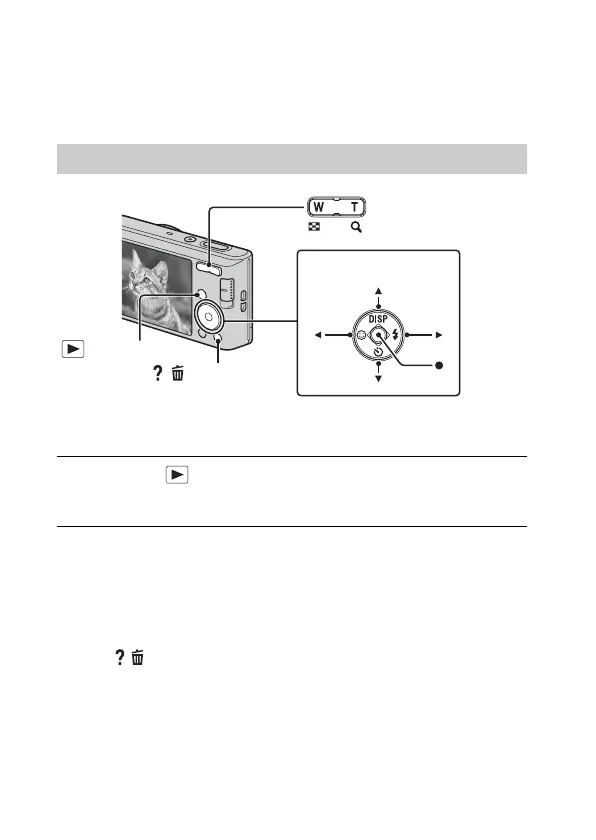
Select an image by pressing B (next)/b (previous) on the control button. Press
z in the center of the control button to view movies.
x
Deleting an image
1 Press / (Delete) button.
2 Select [This Image] with v on the control button, then press z.
x
Returning to shooting images
Press the shutter button halfway down.
Viewing images
1
Press the (Playback) button.
• When images on a memory card recorded with other cameras are played
back on this camera, the registration screen for the data file appears.
Control button
W: zoom out
T: zoom in
Select images: B (next)/b (previous)
Set: z
/ (Delete)
(Playback)
Downloaded from www.vandenborre.be



 To Next Page