GB
24
x
Installing “PlayMemories Home” on a computer
x
Viewing “PlayMemories Home Help Guide”
For details on how to use “PlayMemories Home”, refer to the “PlayMemories
Home Help Guide”.
1
Using the Internet browser on your computer, go to the
following URL, then click [Install] t [Run].
www.sony.net/pm
2
Follow the instructions on
the screen to complete the
installation.
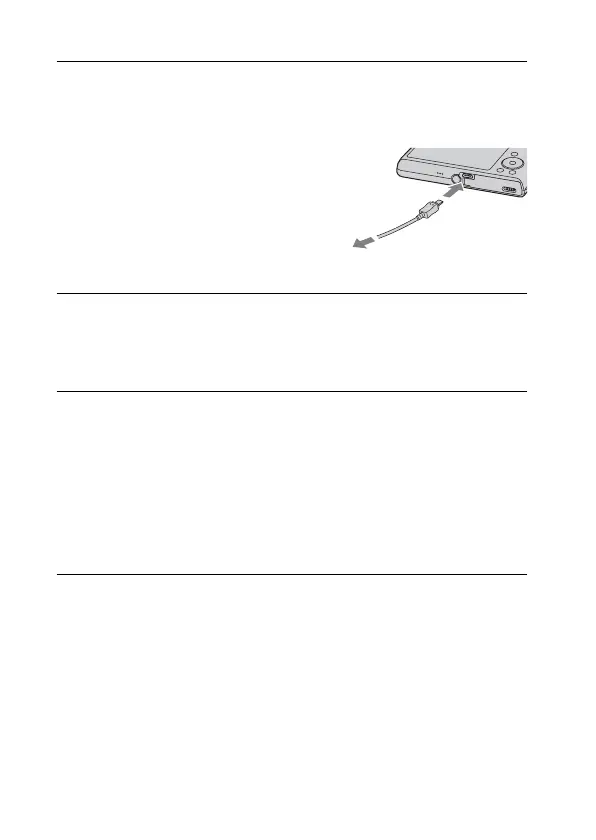
• When the message to connect the
camera to a computer is displayed,
connect the camera and computer
using the dedicated USB cable
(supplied).
1
Double-click the [PlayMemories Home Help Guide] icon
on the desktop.
• To access the “PlayMemories Home Help Guide” from the start menu:
Click [Start] t [All Programs] t [PlayMemories Home] t
[PlayMemories Home Help Guide].
• For details on “PlayMemories Home”, you can also see the “Cyber-shot
User Guide” (page 2) or the following PlayMemories Home support
page (English only):
http://www.sony.co.jp/pmh-se/
To the USB / A/V
OUT terminal
To a USB jack
Downloaded from www.vandenborre.be



 To Next Page