EasyManua.ls Logo

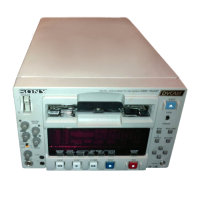
Sony DSR-25 - User Manual

Sony DSR-25
238 pages
Print Icon
To Next Page IconTo Next Page
Loading...
SERVICE MANUAL
AUDIO Phono jack
Output level: 2 Vrms (full bit) (47
kohms, unbalanced)
Output impedance: less than
10 kohms
PHONES Stereo minijack, 8 ohms loading
Remote control
CONTROL S IN Stereo minijack
LANC Stereo mini-minijack
LCD screen
Picture 5.1 cm (2 type)
Total dot number 123 200 (560 × 220)
General
Power requirements
100 to 240 V AC, 50/60 Hz
Power consumption
16W (during playback)
Operating temperature
5 °C to 40 °C (41 °F to 104 °F)
Storage temperature
–20 °C to +60 °C
(–4 °F to +140 °F)
System
Recording format DVCAM/DV (SP) format, rotating
2-head helical scan, digital
component recording
Video signal EIA STANDARD, NTSC color
system
CCIR STANDARD, PAL colour
system
Video
Quantization 8-bit
Sampling frequency
NTSC:
13.5 MHz (4:1:1 Component)
PAL:
13.5 MHz (4:2:0 Component)
Audio
Quantization 12-bit (non-linear) or 16-bit
(linear)
Sampling frequency
32 kHz (12-bit recording) or
48 kHz (16-bit recording)
Usable cassettes Standard-DVCAM cassettes and
Mini-DVCAM cassettes
Recording time Standard cassette
DVCAM:
184 minutes (PDV184)
180 minutes (DV270)
DV: 270 minutes (PDV184/
DV270)
Mini cassette
DVCAM: 40 minutes (PDVM40/
DVM60)
DV: 60 minutes (PDVM40/
DVM60)
(We recommend that you use
DVCAM cassettes.)
Clock
System Quartz locked, digital display
Power back-up Back-up duration: up to two weeks
(after an 8-hour charge)
Inputs
VIDEO BNC type, 1 Vp-p (75 ohms,
unbalanced)
S VIDEO Mini DIN 4-pin
Luminance signal: 1 Vp-p
(75 ohms, unbalanced)
Chrominance signal:
0.286 Vp-p (NTSC)
(75 ohms unbalanced)
0.3 Vp-p (PAL)
(75 ohms unbalanced)
AUDIO Phono jack, –10/–2/+4 dBu,
Impedance more than 47 kohms,
unbalanced
Maximum input level:
–10:+18 dBu (about 6 Vrms)
–2: +24 dBu (about 12.5 Vrms)
+4: +30 dBu (about 25 Vrms)
DV IN/OUT 4-pin jack (i.LINK)
Outputs
VIDEO BNC type, 1 Vp-p (75 ohms,
unbalanced)
S VIDEO Mini DIN 4-pin
Luminance signal: 1.0 Vp-p
(75 ohms, unbalanced)
Chrominance signal:
0.286 Vp-p (NTSC)
(75 ohms unbalanced)
0.3 Vp-p (PAL)
(75 ohms, unbalanced)
SPECIFICATIONS
– Continued on next page –
DSR-25
RMT-DS5
US Model
Canadian Model
AEP Model
UK Model
E Model
Australian Model
New Zealand Model
R MECHANISM
Ver 1.1 2003. 05
DIGITAL VIDEO CASSETTE RECORDER


Table of Contents

Questions and Answers

  • L
    Linda CollierAug 15, 2025
    What to do if the cassette cannot be inserted into my Sony DSR-25?
    • R
      Richard RussellAug 15, 2025
      If you cannot insert a cassette into your Sony VCR, it could be due to several reasons. If there is moisture condensation on the head drum, leave the unit powered on for over an hour. Ensure that you are inserting the cassette straight; if not, eject it and reinsert it correctly. Also, check if another cassette is already loaded; if so, remove it before attempting to insert a new one.
  • T
    Travis NormanAug 18, 2025
    Why is there no picture via the DV jack on my Sony DSR-25?
    • S
      shaneburtonAug 18, 2025
      If you're not getting a picture via the DV jack on your Sony VCR, make sure the INPUT SELECT selector is set to DV.
  • P
    Patricia GloverAug 21, 2025
    Why is there noise on the screen of my Sony VCR?
    • K
      Kayla Murphy DDSAug 21, 2025
      If you're getting noise on the screen while using your Sony VCR, it could be due to a few reasons. First, try removing the current cassette and inserting a new one, as the loaded tape might be damaged. Another potential cause is dirty video heads; clean them using the cleaning cassette provided with your unit. Also, confirm that the unit is compatible with the tape format. This unit can play back only tapes recorded in the DVCAM format or in the SP mode of the DV format. A tape recorded in the LP mode of the DV format cannot be played back on this unit.
  • M
    mark74Aug 25, 2025
    Why is the audio noisy on my Sony DSR-25?
    • L
      Lisa FisherAug 25, 2025
      If you're experiencing noisy audio with your Sony VCR, it could be due to a damaged tape. Try removing the current cassette and inserting a new one. Alternatively, the video heads might be dirty, so try cleaning them using the supplied cleaning cassette.
  • Q
    qcolemanAug 27, 2025
    Why are EE pictures and EE sound not outputting on my Sony DSR-25?
    • P
      Peter KingAug 27, 2025
      If your Sony VCR isn't outputting EE pictures and EE sound, check the DISPLAY SET menu and ensure that EE/PB SEL is set to EE. Also, verify that the INPUT SELECT selector setting matches the signal input.
  • K
    Kimberly DavisAug 30, 2025
    Why can't I do audio dubbing on my Sony DSR-25 VCR?
    • R
      Richard JoyceAug 30, 2025
      If you're unable to perform audio dubbing on your Sony VCR, it might be because you're trying to dub onto a DV-formatted tape. Audio dubbing is only possible on DVCAM-formatted tapes recorded in the 32 kHz audio mode (4-channel). Also, ensure you are using channels 3/4 for dubbing, as channels 1/2 cannot be used for this purpose.
  • C
    Christopher AlexanderSep 2, 2025
    Why does my Sony DSR-25 start recording/playback by itself?
    • T
      Thomas LoveSep 3, 2025
      If your Sony VCR starts recording or playing back by itself even when the KEY INH switch is set to ON, check the TIMER selector. If it's set to REPEAT or REC, set it to OFF.
  • C
    Curtis StrongSep 5, 2025
    Why does my Sony DSR-25 turn on automatically when plugged in?
    • J
      jeremiah65Sep 5, 2025
      If your Sony VCR turns on automatically whenever you connect it to an AC outlet, check the TIMER selector and set it to OFF. Additionally, verify the AC ON MODE setting in the OTHERS menu and set it to STBY.
  • B
    Brian JonesSep 8, 2025
    How to record using the Remote Control Unit on Sony DSR-25?
    • A
      Alex HughesSep 8, 2025
      Even if the settings on the unit are correct, to record using the Remote Control Unit, press the PLAY button while holding the REC button down.
  • J
    Jeffrey SmithSep 12, 2025
    Why is there no picture on the LCD monitor of my Sony DSR-25 VCR?
    • D
      David BrownSep 12, 2025
      If there is no picture on the LCD monitor of your Sony VCR, check if the CHARACTER DISPLAY (LCD) selector has been set to ON (BLACK BACK) and set it to ON. Also, with an analog connection, ensure that the NTSC/PAL select switch is set to the appropriate position for the device you are using.

Sony DSR-25 Specifications

General IconGeneral
Video FormatDVCAM, DV
InputsComposite, S-Video
OutputsComposite, S-Video
DisplayLCD display
Remote ControlYes
Tape SpeedDV: 18.8 mm/s
Audio Channels2 channels (stereo)

Related product manuals