17
*1 When the unit is turned off.
*2 When FM is received.
Using optional
equipment
Auxiliary audio
equipment
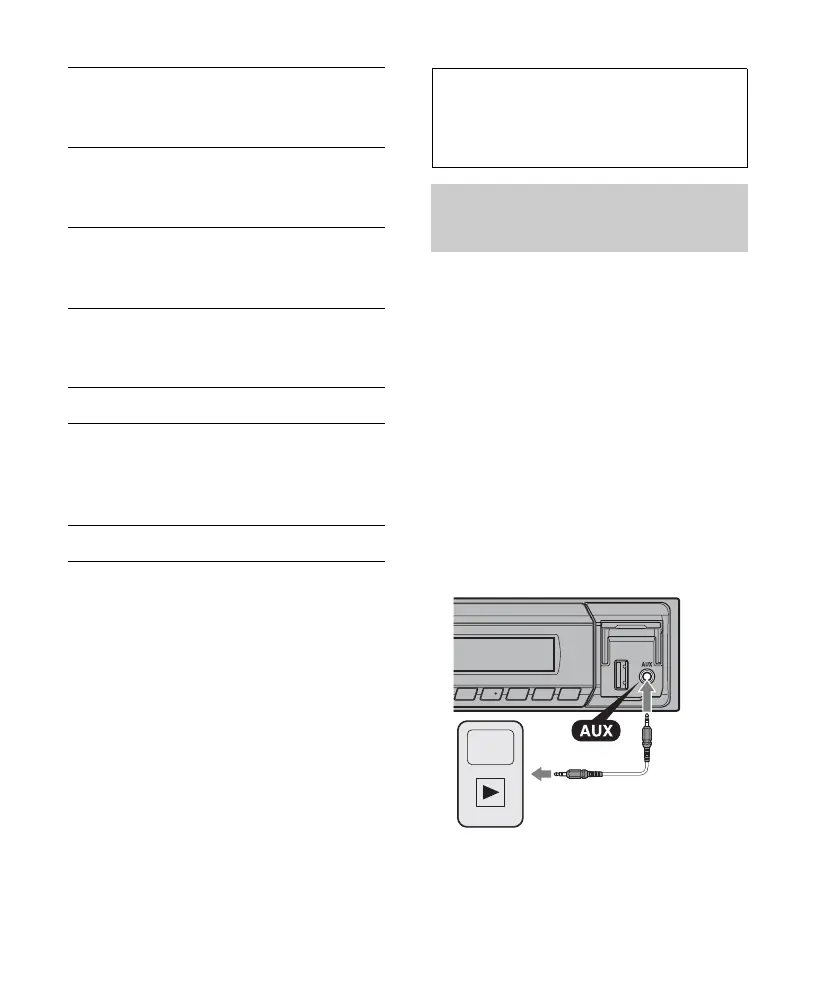
By connecting an optional portable audio
device to the AUX input jack (stereo mini
jack) on the unit and then simply selecting
the source, you can listen on your car
speakers.
Connecting the portable audio device
1 Turn off the portable audio device.
2 Turn down the volume on the unit.
3 Connect the portable audio device to the
unit with a connecting cord (not supplied)*.
* Be sure to use a straight type plug.
DEMO
(Demonstration)
Activates the demonstration: “ON,”
“OFF.”
DIMMER
Changes the display brightness: “ON,”
“OFF.”
AUTO SCR (Auto Scroll)
Scrolls long items automatically: “ON,”
“OFF.”
REGIONAL*
2
Restricts reception to a specific region:
“ON,” “OFF” (page 11).
REPEAT (page 13)
LOUDNESS
Reinforces bass and treble for clear
sound at low volume levels: “ON,”
“OFF.”
BTM (page 10)



 To Next Page