Fuse replacement ( )
When replacing the fuse, be sure to use one matching
the amperage rating stated on the original fuse. If the
fuse blows, check the power connection and replace
the fuse. If the fuse blows again after replacement,
there may be an internal malfunction. In such a case,
consult your nearest Sony dealer.
Mounting the unit in a Japanese
car (
)
You may not be able to install this unit in some makes
of Japanese cars. In such a case, consult your Sony
dealer.
Note
To prevent malfunction, install only with the supplied screws ʗ.
How to detach and attach the
front panel (
)
Before installing the unit, detach the front panel.
Ǻ-A To detach
Before detaching the front panel, be sure to press and
hold OFF. Press
and pull it off towards you.
Ǻ-B To attach
Engage part ʭ of the front panel with part ʮ of the
unit, as illustrated, and push the left side into position
until it clicks.
Warning if your car’s ignition has
no ACC position
Be sure to set the Auto Off function. For details, see
the supplied Operating Instructions.
The unit will shut off completely and automatically in
the set time after the unit is turned off, which prevents
battery drain.
If you do not set the Auto Off function, press and hold
OFF until the display disappears each time you turn
the ignition off.
English
Precautions
ˎ
Choose the installation location carefully so that the
unit will not interfere with normal driving operations.
ˎ
Avoid installing the unit in areas subject to dust, dirt,
excessive vibration, or high temperatures, such as in
direct sunlight or near heater ducts.
ˎ
Use only the supplied mounting hardware for a safe
and secure installation.
Mounting angle adjustment
Adjust the mounting angle to less than 45°.
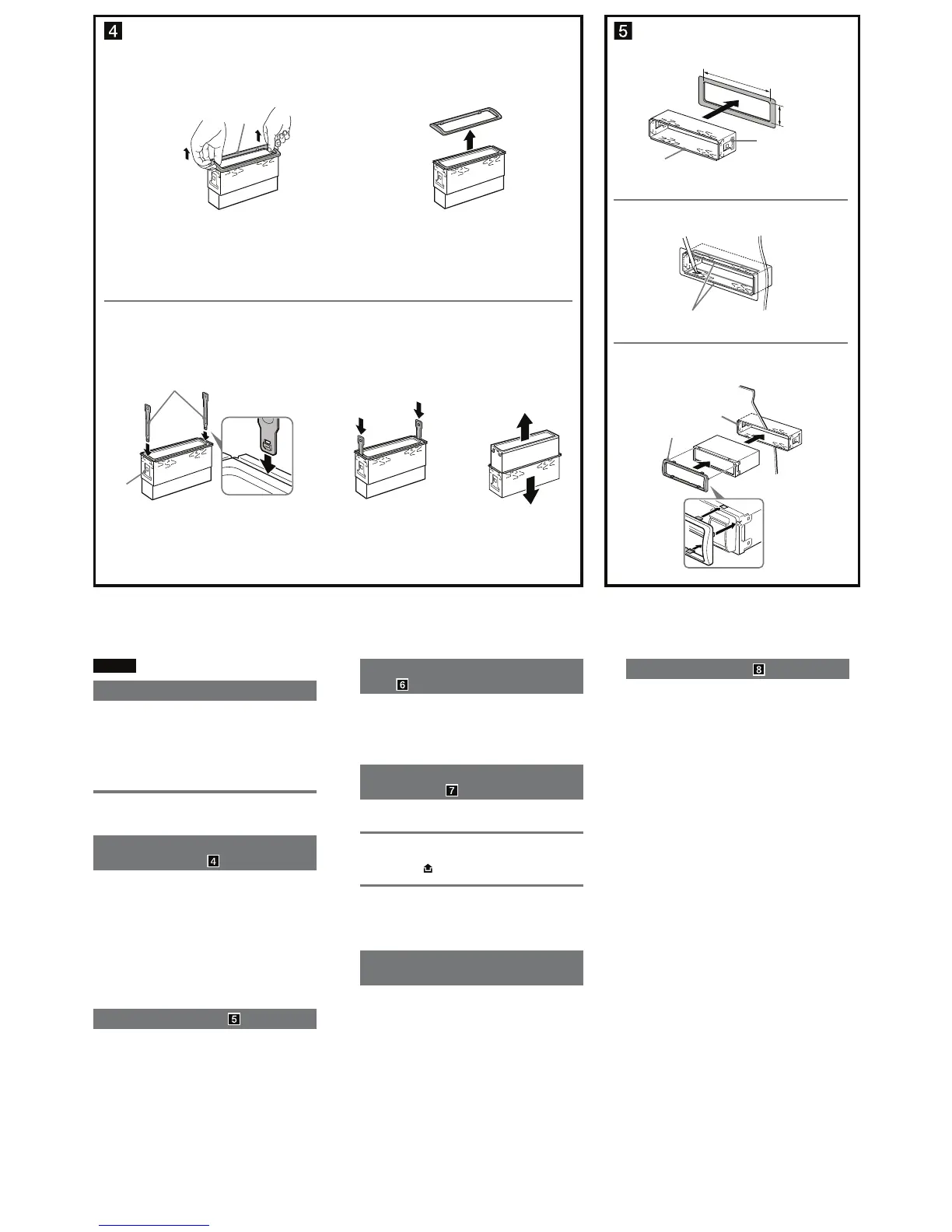
Removing the protection collar
and the bracket (
)
Before installing the unit, remove the protection
collar ʖ and the bracket ʓ from the unit.
1 Remove the protection collar ʖ.
Pinch both edges of the protection collar ʖ, then
pull it out.
2 Remove the bracket ʓ.
ɞ Insert both release keys ʕ together between
the unit and the bracket ʓ until they click.
ɟ Pull down the bracket ʓ, then pull up the unit
to separate.
Mounting example ( )
Installation in the dashboard
Notes
ˎ
Before installing, make sure that the catches on both sides of the
bracket ʓ are bent inwards 2 mm (
3
/32 in). If the catches are straight
or bent outwards, the unit will not be installed securely and may
spring out (Ǹ-1).
ˎ
Bend these claws outward for a tight fit, if necessary (Ǹ-2).
ˎ
Make sure that the 4 catches on the protection collar ʖ are
properly engaged in the slots of the unit (Ǹ-3).
1
2
ʖ
q
qq
ʕ
ʓ
Face the hook inwards.
Tournez le crochet vers
l’intérieur.
ʖ
ʓ
Dashboard
Tableau de bord
Claws
Griffes
2
3
1
Unit: mm (in)
Unité : mm (po)
ʓ
Catch
Loquet
182 (7
1
/4)
53 (2
1
/8)


 To Next Page