EasyManua.ls Logo

Sony DTC-700 - Advanced Playback Functions

Sony DTC-700
56 pages
Print Icon
To Next Page IconTo Next Page
To Previous Page IconTo Previous Page
Loading...
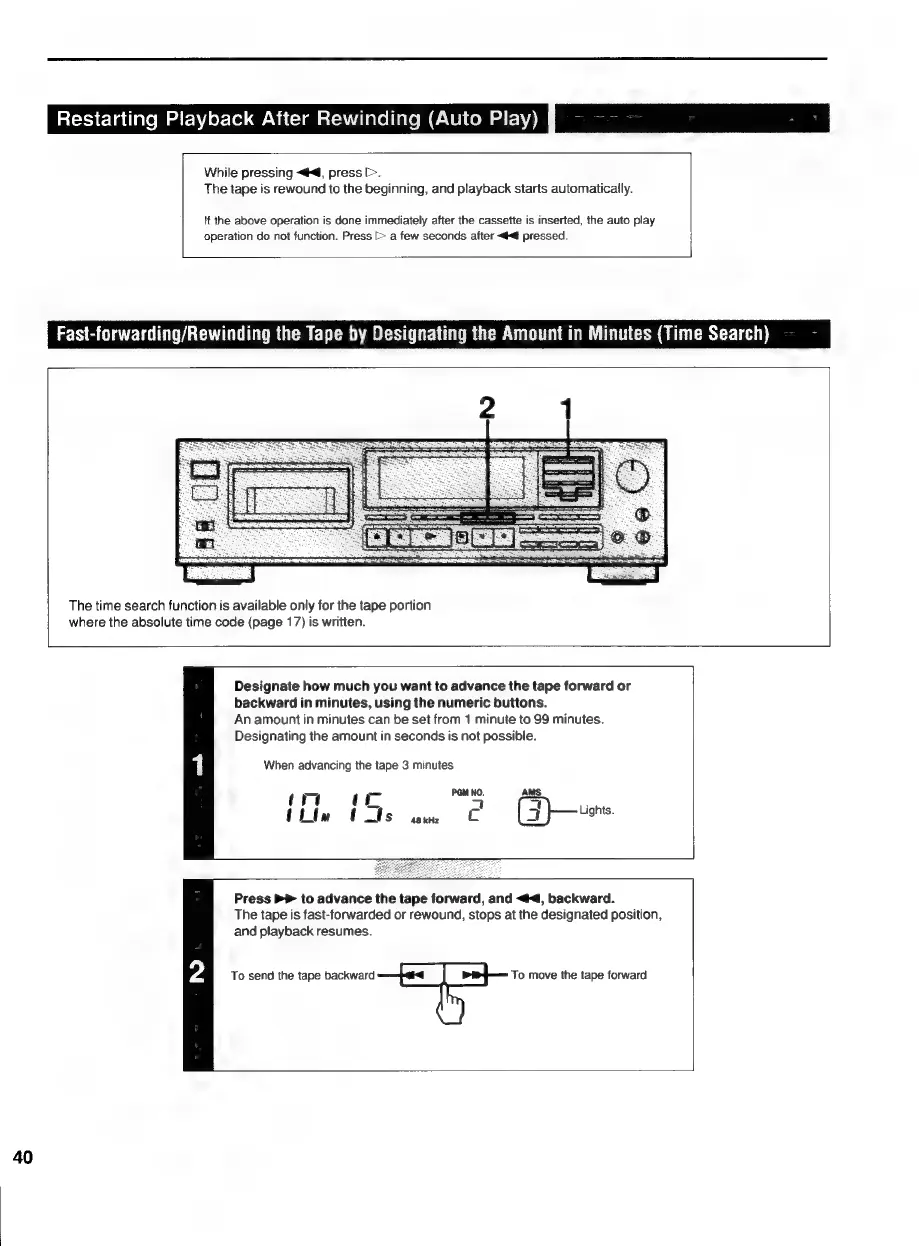
Restarting
Playback
After
Rewinding
(Auto
Play)
a
en
While
pressing
«#4,
press
>.
The
tape
is
rewound
to
the
beginning,
and
playback
starts
automaticaily.
\f
the
above
operation
is
done
immediately
after
the
cassette
is
inserted,
the
auto
play
operation
do
not
function.
Press
[>
a
few
seconds
after
<4
pressed.
Fast-forwarding/Rewinding
the
Tape
by
Designating
the
Amount
in
Minutes
(Time
Search)
The
time
search
function
is
available
only
for
the
tape
portion
where
the
absolute
time
code
(page
17)
is
written.
Designate
how
much
you
want
to
advance
the
tape
forward
or
backward
in
minutes,
using
the
numeric
buttons.
An
amount
in
minutes
can
be
set
from
1
minute
to
99
minutes.
Designating
the
amount
in
seconds
is
not
possible.
When
advancing
the
tape
3
minutes
AMS
mote
mS
=
(htm
t
Is
48
kHz
Cc
(suo
Press
>
to
advance
the
tape
forward,
and
<4,
backward.
The
tape
is
fast-forwarded
or
rewound,
stops
at
the
designated
position,
and
playback
resumes.
To send
the
tape
backward
To
move
the
tape
forward
40

Related product manuals