EasyManua.ls Logo

Sony DTC-700 - Locating Selections with Start IDs; Start ID Search Functions

Sony DTC-700
56 pages
Print Icon
To Next Page IconTo Next Page
To Previous Page IconTo Previous Page
Loading...
44
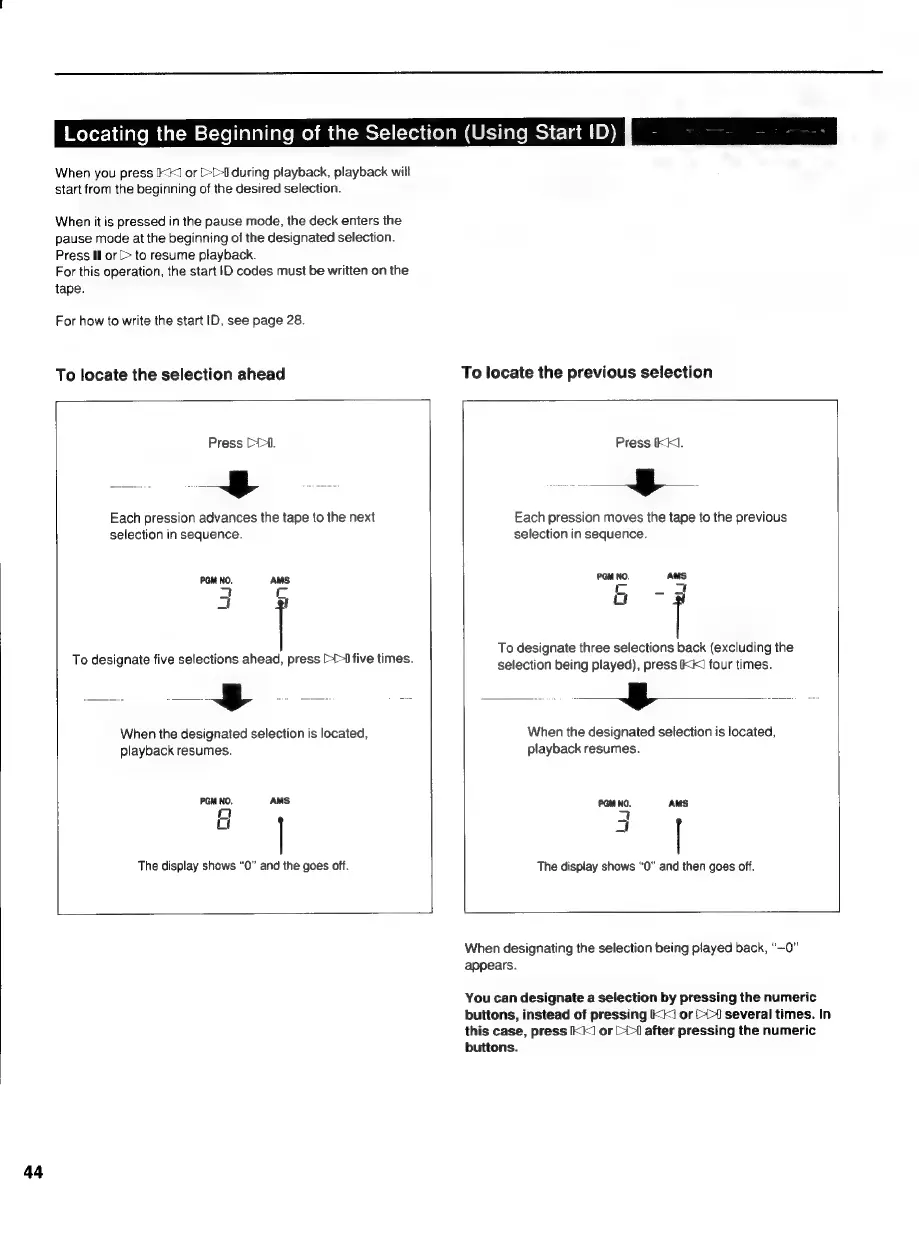
Locating
the
Beginning
of
the
Selection
(Using
Start
ID)
x
ot
When
you
press
IK]
or
>>
during
playback,
playback
will
start
from
the
beginning
of
the
desired
selection.
When
it
is
pressed
in
the
pause
mode,
the
deck
enters
the
pause
mode
at
the
beginning
of
the
designated
selection.
Press
Il
or
(>
to
resume
playback.
For
this
operation,
the
start
ID
codes
must
be
written
on
the
tape.
For
how
to
write
the
start
ID,
see
page
28.
To
locate
the
selection
ahead
To
locate
the
previous
selection
Press
DY.
=~,
oa
ae
Each
pression
advances
the
tape
to
the
next
selection
in
sequence.
PGM
NO.
AMS
a
Cc
am]
t
To
designate
five
selections
ahead,
press
>>I
five
times.
ot
=
When
the
designated
selection
is
located,
playback
resumes.
PGM
NO.
AMS
mt]
;
The
display
shows
“0”
and
the
goes
off.
Press
IKK].
Each
pression
moves
the
tape
to
the
previous
selection
in
sequence.
PGM
NO.
AMS
Cc
-d
ut
To
designate
three
selections
back
(excluding
the
selection
being
played),
press
IKK
four
times.
yy
ra
When
the
designated
selection
is
located,
playback
resumes.
The
display
shows
“0”
and
then
goes
off.
When
designating
the
selection
being
played
back,
“~0”
appears.
You
can
designate
a
selection
by
pressing
the
numeric
buttons,
instead
of
pressing
KK!
or
[1
several
times.
In
this
case,
press
KI
or
(>
after
pressing
the
numeric
buttons.

Related product manuals