EasyManua.ls Logo

Sony DTC-700 - Music Scan Function; Operating Music Scan

Sony DTC-700
56 pages
Print Icon
To Next Page IconTo Next Page
To Previous Page IconTo Previous Page
Loading...
Listening
to
the
Beginning
of
Each
Selection
Successively
Music
Scan
(Using
Start
ID)
For
this
operation,
the
start
ID
codes
must
be
written
on
the
tape.
For
how
to
write
the
start
ID
codes,
see
page
28.
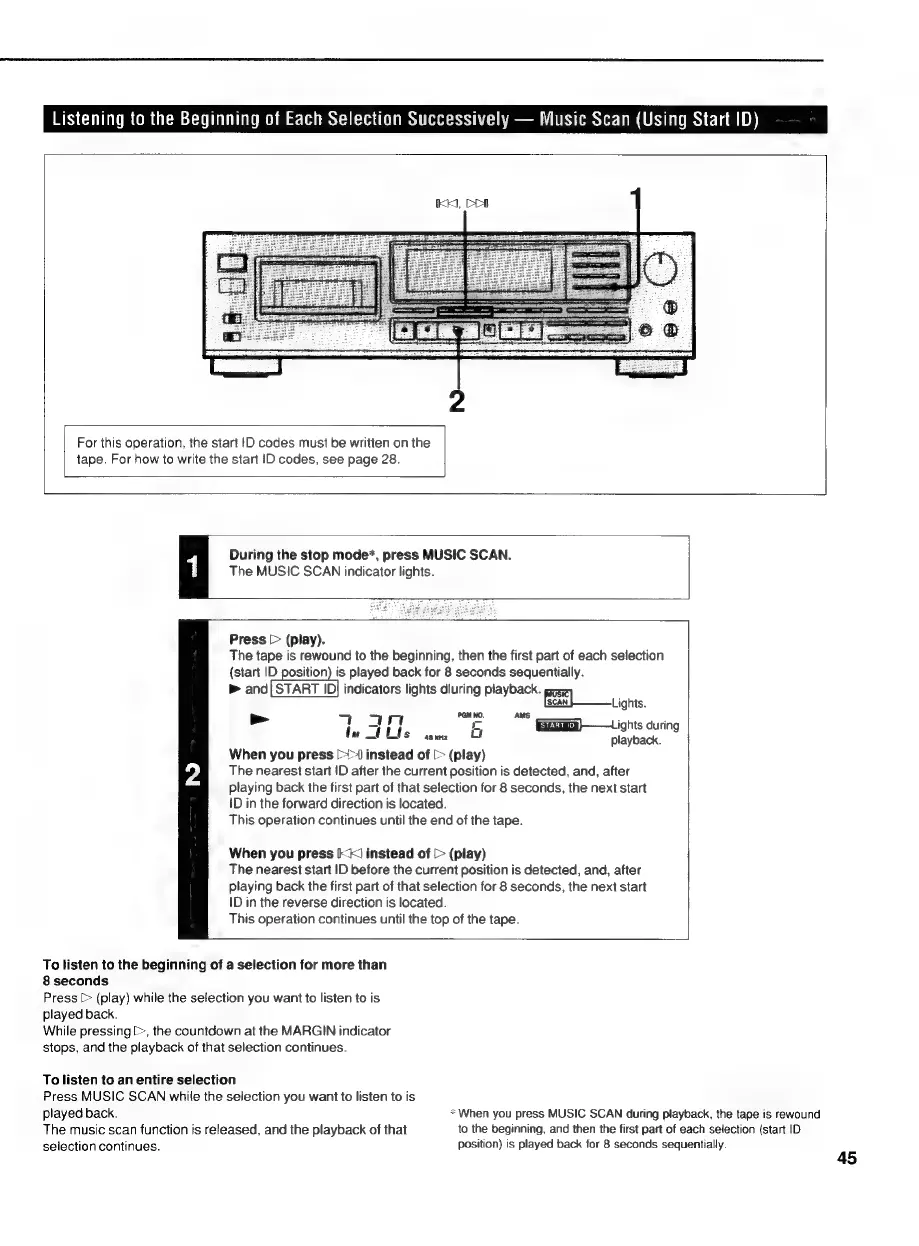
During
the
stop
mode*,
press
MUSIC
SCAN.
The
MUSIC
SCAN
indicator
lights.
Press
[>
(play).
The
tape
is
rewound
to
the
beginning,
then
the
first
part
of
each
selection
(start
ID
position)
is
played
back
for
8
seconds
sequentially.
&
and
feMaETID
IDj
indicators
lights
dluring
playback.
gir
Ge]
tights.
>
7
4
He
5
ma
Giga)
ights
during
=
sents
playback.
When
you
press
[>>
instead
of
[>
(play)
The
nearest
start
ID
after
the
current
position
is
detected,
and,
after
playing
back
the
first
part
of
that
selection
for
8
seconds,
the
next
start
{D
in
the
forward
direction
is
located.
This
operation
continues
until
the
end
of
the
tape.
When
you
press
Ik)
instead
of
[>
(play)
The
nearest
start
ID
before
the
current
position
is
detected,
and,
after
playing
back
the
first
part
of
that
selection
for
8
seconds,
the
next
start
ID
in
the
reverse
direction
is
located.
This
operation
continues
until
the
top
of
the
tape.
To
listen
to
the
beginning
of
a
selection
for
more
than
8
seconds
Press
[>
(play)
while
the
selection
you
want
to
listen
to
is
played
back.
While
pressing
[>,
the
countdown
at
the
MARGIN
indicator
stops,
and
the
playback
of
that
selection
continues.
To
listen
to
an
entire
selection
Press
MUSIC
SCAN
while
the
selection
you
want
to
listen
to
is
played
back.
*When
you
press
MUSIC
SCAN
during
playback,
the
tape
is
rewound
The
music
scan
function
is
released,
and
the
playback
of
that
to
the
beginning,
and
then
the
first
part
of
each
selection
(start
ID
selection
continues.
Position)
is
played
back
for
8
seconds
sequentially.

Related product manuals