EasyManua.ls Logo

Sony DTC-700 - RMS Play (Random Music Sensor); Programming and Executing RMS Play

Sony DTC-700
56 pages
Print Icon
To Next Page IconTo Next Page
To Previous Page IconTo Previous Page
Loading...
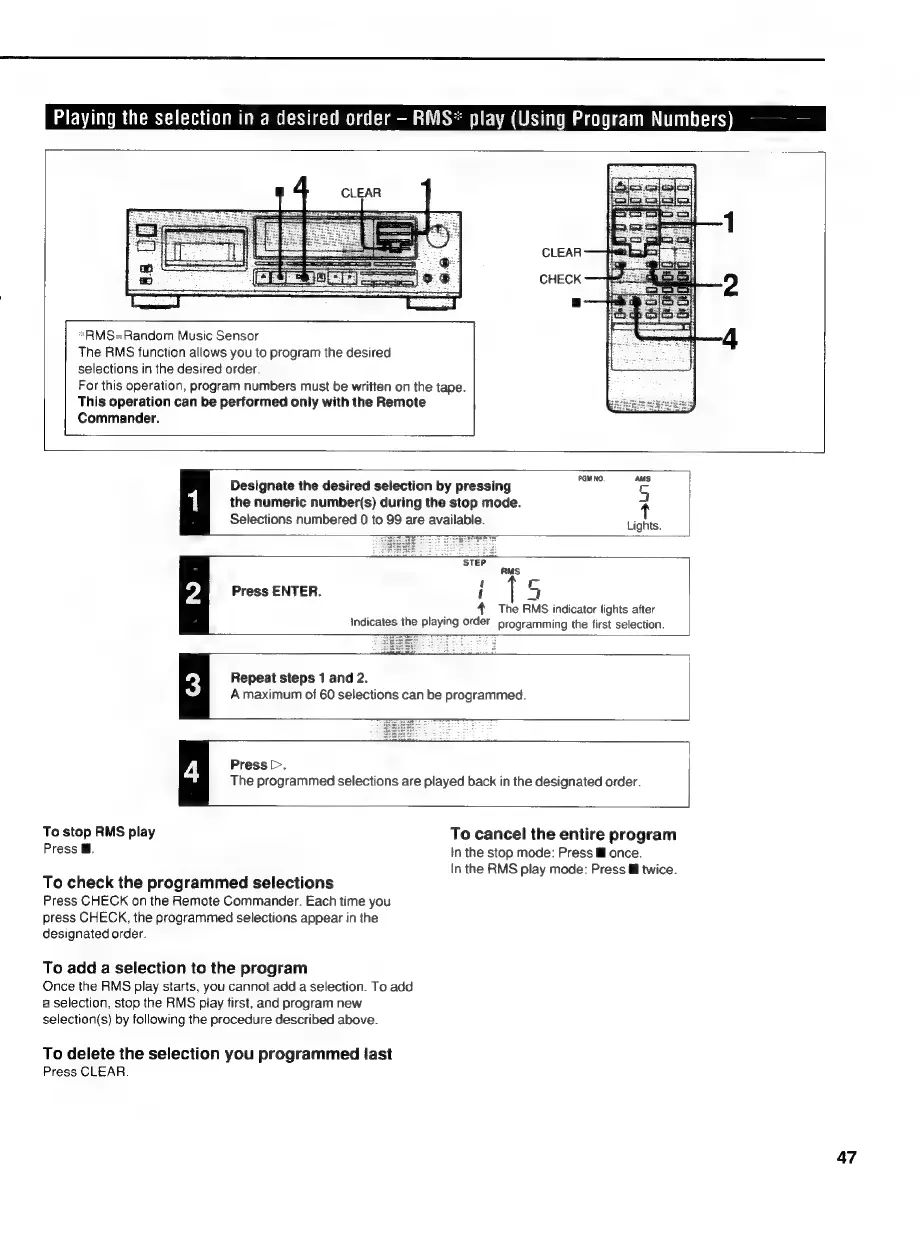
Playing
the
selection
in
a
desired
order
RMS*
play
(Using
Program
Numbers)
CLEAR
CHECK
*sRMS=Random
Music
Sensor
The
RMS
function
allows
you
to
program
the
desired
selections
in
the
desired
order.
For
this
operation,
program
numbers
must
be
written
on
the
tape.
This
operation
can
be
performed
only
with
the
Remote
Commander.
PGM
NO.
AMS
Designate
the
desired
selection
by
pressing
s
|
the
numeric
number(s)
during
the
stop
mode.
Selections
numbered
0
to
99
are
available.
Lights.
Press
ENTER.
{
7
,
The
RMS
indicator
lights
after
Indicates
the
playing
order
programming
the
first
selection.
Repeat
steps
1
and
2.
A
maximum
of
60
selections
can
be
programmed.
Press.
The
programmed
selections
are
played
back
in
the
designated
order.
To
stop
RMS
play
To
cancel
the
entire
program
Press
@.
In
the
stop
mode:
Press
ll
once.
In
the
RMS
play
mode:
Press
&
twice.
To
check
the
programmed
selections
Press
CHECK
on
the
Remote
Commander.
Each
time
you
press
CHECK,
the
programmed
selections
appear
in
the
designated
order.
To
add
a
selection
to
the
program
Once
the
RMS
play
starts,
you
cannot
add
a
selection.
To
add
a
selection,
stop
the
RMS
play
first,
and
program
new
selection(s)
by
following
the
procedure
described
above.
To
delete
the
selection
you
programmed
last
Press
CLEAR.
47

Related product manuals