EasyManua.ls Logo

Sony DTC-700 - Controls Overview; Cassette Loading and Mode Selection

Sony DTC-700
56 pages
Print Icon
To Next Page IconTo Next Page
To Previous Page IconTo Previous Page
Loading...
a\o
o}a/o
=)
==)
[anes
(aac
me
me
fe
ae:
ooo
CS
Capes
ooo
1]
=
ojo
i24)
Ot
OF
Ot Ot
So
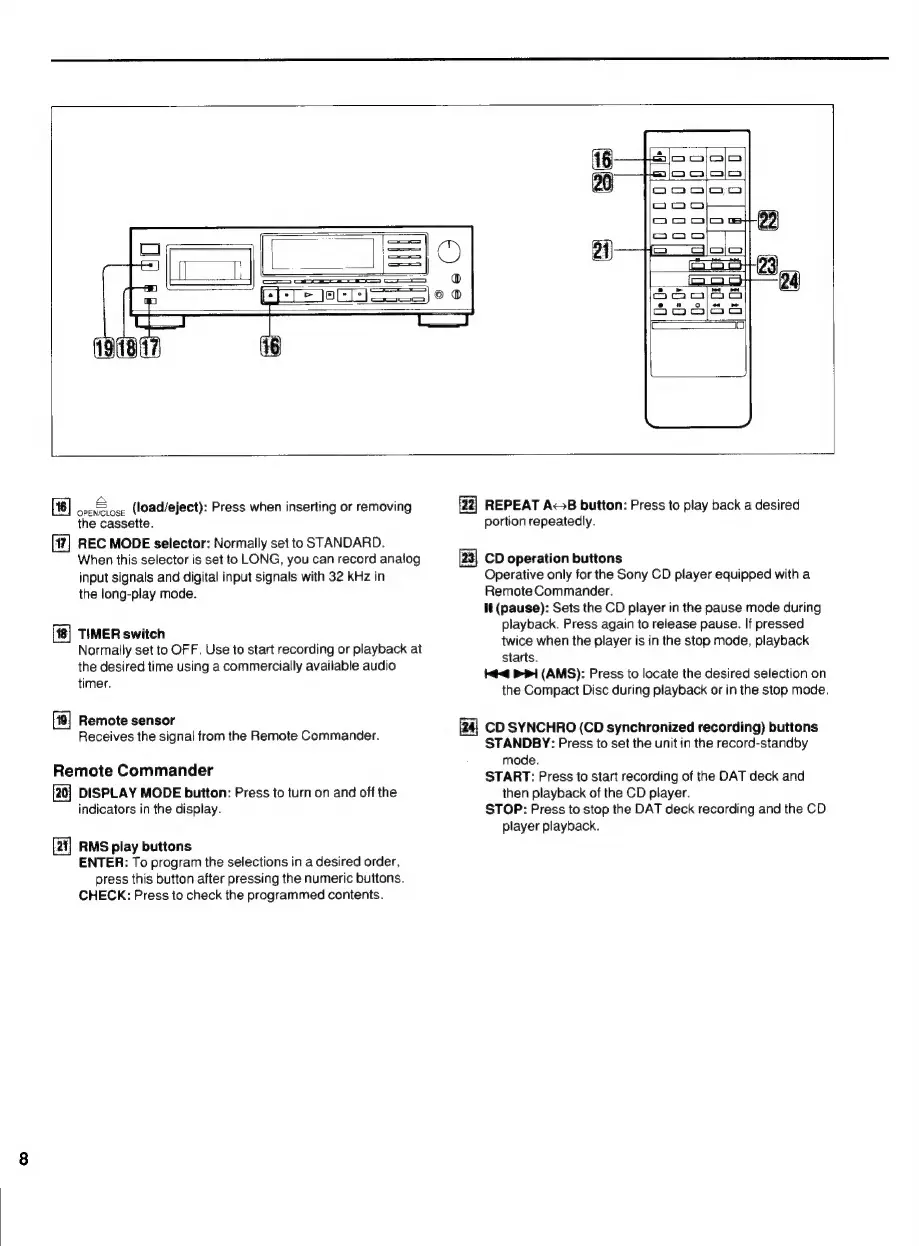
(load/eject):
Press
when
inserting
or
removing
the
cassette.
REC
MODE
selector:
Normally
set
to
STANDARD.
When
this
selector
is
set
to
LONG,
you
can
record
analog
input
signals
and
digital
input
signals
with
32
kHz
in
the
long-play
mode.
TIMER
switch
Normally
set
to
OFF.
Use
to
start
recording
or
playback
at
the
desired
time
using
a
commercially
available
audio
timer.
[19]
Remote
sensor
Receives
the
signal
from
the
Remote
Commander.
Remote
Commander
[20]
DISPLAY
MODE
button:
Press
to
turn
on
and
off
the
indicators
in
the
display.
[2]
RMS
play
buttons
ENTER:
To
program
the
selections
in
a
desired
order,
press
this
button
after
pressing
the
numeric
buttons.
CHECK:
Press
to
check
the
programmed
contents.
fz]
REPEAT
A~>B
button:
Press
to
play
back
a
desired
portion
repeatedly.
CD
operation
buttons
Operative
only
for
the
Sony
CD
player
equipped
with
a
Remote
Commander.
It
(pause):
Sets
the
CD
player
in
the
pause
mode
during
playback.
Press
again
to
release
pause.
If
pressed
twice
when
the
player
is
in
the
stop
mode,
playback
starts.
<4
PPI
(AMS):
Press
to
locate
the
desired
selection
on
the
Compact
Disc
during
playback
or
in
the
stop
mode.
CD
SYNCHRO
(CD
synchronized
recording)
buttons
STANDBY:
Press
to
set
the
unit
in
the
record-standby
mode.
START:
Press
to
start
recording
of
the
DAT
deck
and
then
playback
of
the
CD
player.
STOP:
Press
to
stop
the
DAT
deck
recording
and
the
CD
player
playback.

Related product manuals