EasyManua.ls Logo

Sony DTC-700 - Page 9

Sony DTC-700
56 pages
Print Icon
To Next Page IconTo Next Page
To Previous Page IconTo Previous Page
Loading...
Remote
Commander
Operation
Each
button
on
the
Remote
Commander
functions
in
the
same
way
as
those
having
the
same
name
on
the
front
panel.
However,
the
following
operations
cannot
be
performed
using
the
Remote
Commander.
Use
the
front
panel
controls
instead.
Turning
the
power
on
and
off
Selecting
digital
(optical/coaxial)/analog
input
source
Adjusting
the
recording
level
and
headphones
level
Setting
the
timer
recording/playback
Selecting
the
recording
mode
(standard
or
long)
The
following
operations
can
be
performed
only
with
the
Remote
Commander.
¢
Activating
CD
synchronized
recording
using
a
Sony
CD
player
and
controlling
the
CD
player
¢
Locating
the
desired
selection
on
the
Compact
Disc
or
setting
the
CD
player
in
the
pause
mode
(possible
only
when
a
Sony
CD
player
is
used.)
e
Repeat
play
(A-B)
«
RMS*
play
*RMS:
Random
Music
Sensor
Installing
Batteries
P|
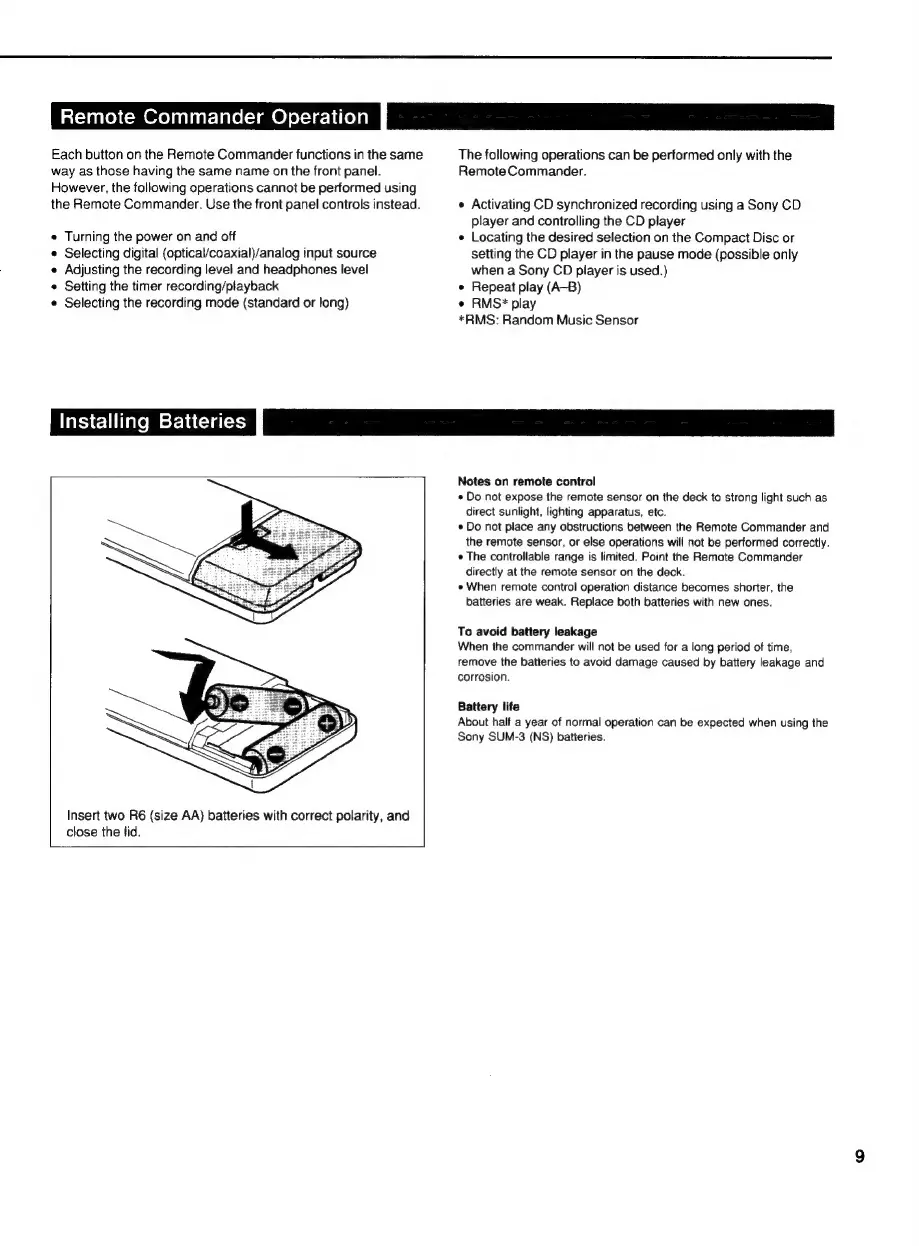
Insert
two
R6
(size
AA)
batteries
with
correct
polarity,
and
close
the
lid.
Notes
on
remote
control
«
Do
not
expose
the
remote
sensor
on
the
deck
to
strong
light
such
as
direct
sunlight,
lighting
apparatus,
etc.
*
Do
not
place
any
obstructions
between
the
Remote
Commander
and
the
remote
sensor,
or
else
operations
will
not
be
performed
correctly.
¢
The
controllable
range
is
limited.
Point
the
Remote
Commander
directly
at
the
remote
sensor
on
the
deck.
e
When
remote
control
operation
distance
becomes
shorter,
the
batteries
are
weak.
Replace
both
batteries
with
new
ones.
To
avoid
battery
leakage
When
the
commander
will
not
be
used
for
a
long
period
of
time,
remove
the
batteries
to
avoid
damage
caused
by
battery
leakage
and
corrosion.
Battery
life
About
half
a
year
of
normal
operation
can
be
expected
when
using
the
Sony
SUM-3
(NS)
batteries.

Related product manuals