53
Using Various Functions with the Control Menu
STANDARD
C
0 1 : 3 2 : 5 5
VIDEO EQUALIZER
PICTURE
BRIGHTNESS
COLOR
SHARPNESS
Select: Cancel:
ENTER RETURN
C
0 1 : 3 2 : 5 5
PICTURE
Adjust: Cancel:
ENTER RETURN
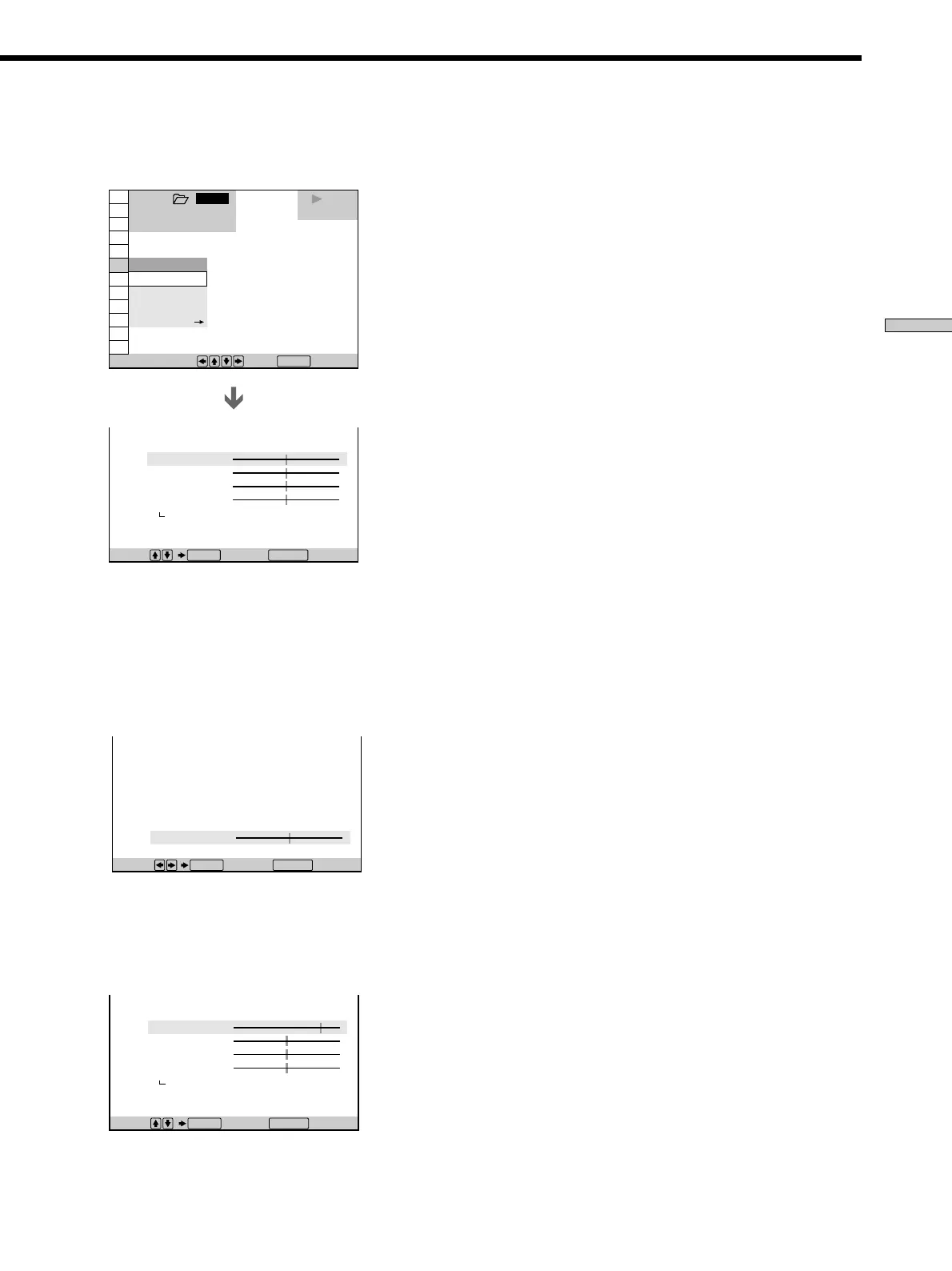
1 Select “MEMORY/” in “VIDEO EQ.”
The video control display appears.
2 Select the picture item you want to adjust using
>/., then press ENTER.
The adjustment bar of the selected item appears.
To cancel adjusting the picture halfway, press
ˆRETURN.
3 Adjust the selected picture item using ?//, then
press ENTER.
The setting is stored in memory.
4 To adjust other items, repeat Steps 2 and 3.
To exit the video control display
Press ˆRETURN.
zTo reset the picture items
Select “STANDARD” in “MEMORY/.”
Note
Only one setting of the picture items you adjusted in
“MEMORY/” can be stored. When you adjust the items, new
setting erases the setting adjusted before.
1 8
(
3 4
)
1 2
(
2 7
)
C
0 1 : 3 2 : 5 5
VIDEO EQUALIZER
PICTURE
BRIGHTNESS
COLOR
SHARPNESS
STANDARD
DVD
PLAY
CINEMA
MEMORY
STANDARD
STANDARD
DYNAMIC
1 2 3
ALL
1 2
(
2 7
)
1 8
(
3 4
)
DVD
Select: Cancel:
ENTER RETURN
To select, press , then .
ENTER



 To Next Page