16
Charging the battery pack
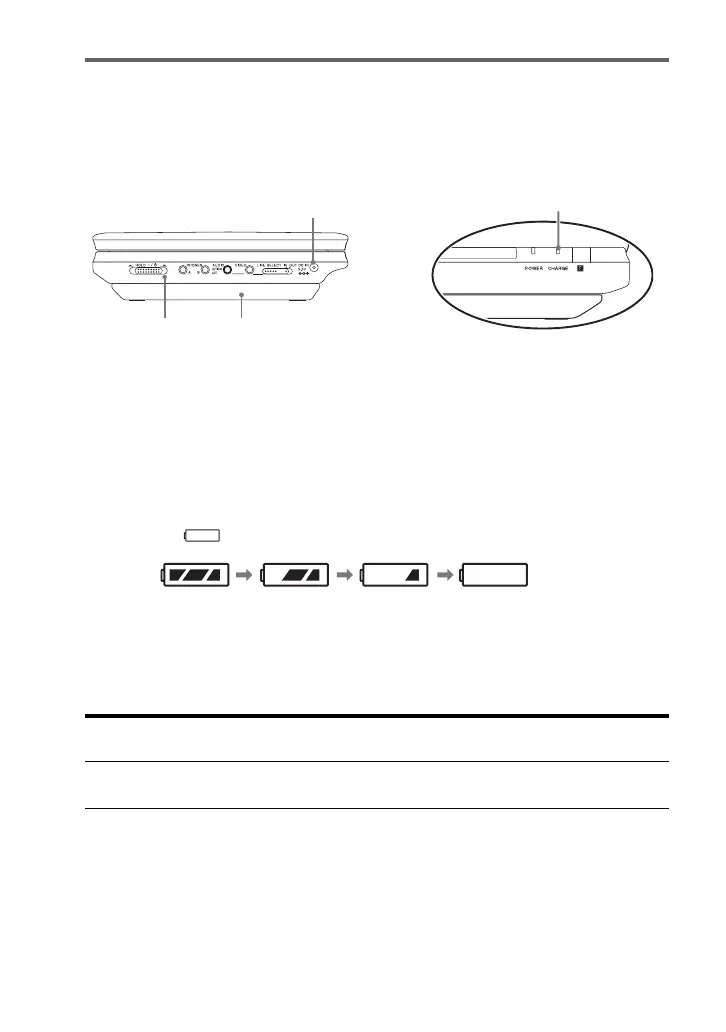
1 Attach the battery pack to the player (page 14).
2 Connect the AC adaptor to the player, and then connect the mains lead into a
mains (page 13).
When charging begins, the CHARGE indicator turns on.
When charging ends, the CHARGE indicator turns off.
3 After charging is finished, disconnect the mains lead from the mains and
remove the AC adaptor.
To check the battery level
When the player is stopped, a battery indicator is displayed on the screen. Recharge the
battery, when is displayed or the CHARGE indicator flashes.
The battery indicator is not displayed when a DVD, VIDEO CD or JPEG file are being
played. Stop the player and check the battery level.
Charging time and maximum playing time
* This is the indication of the longest continuous playback on the following conditions.
– normal temperature (20°C)
– Headphone Use
– Set Backlight Adjustment to the Minimum
– Set “Digital Output” to “Off” in “Audio Setup.”
Battery condition may reduce operating time.
Charging time (with the player
turned off)
Playing time (with the display
turned on)
Approx.
5 hours
Approx.
5 hours*
CHARGE indicator
DC IN 9.5V jack
Player Battery pack
Full Exhausted


 To Next Page