30
Searching for a
Particular Point on a
Disc (Search, Scan, Slow Play,
Repeat Play, Random Play)
You can quickly locate a particular point
on a disc by monitoring the picture or
playing back slowly.
Notes
• Depending on the disc, you may not be able
to perform some of the operations
described.
• For DATA CDs/DATA DVDs, you can
search for a particular point only on an MP3
audio track.
Locating a point quickly
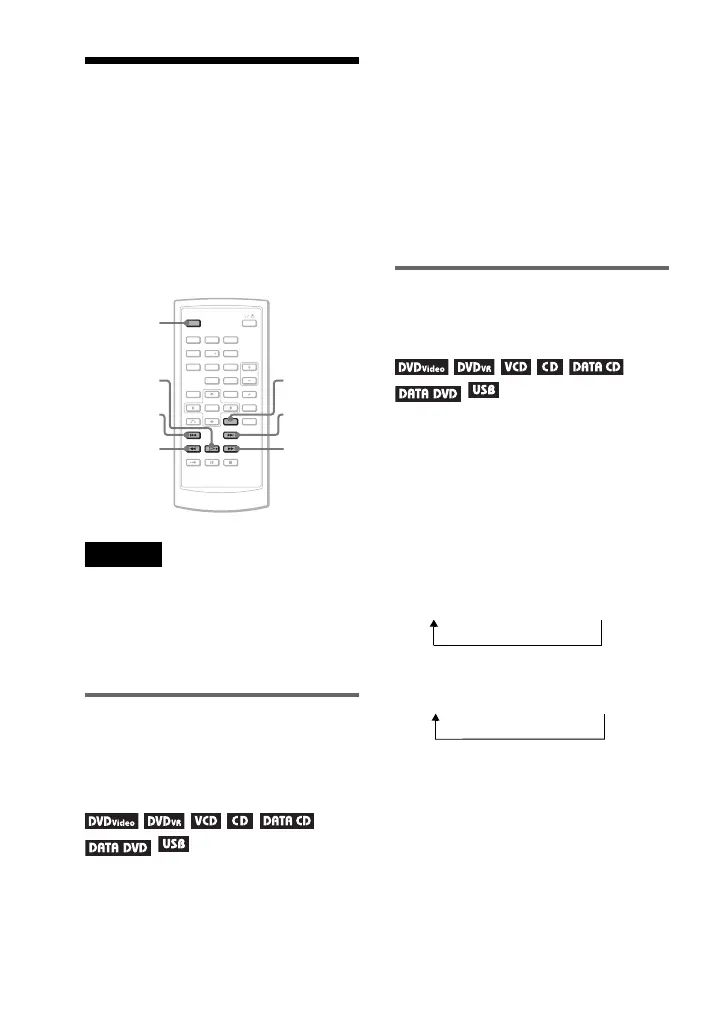
using the ./> PREV
(previous)/NEXT buttons
(Search)
During playback, press > or . to
go to the next or previous chapter/track/
scene.
z Hints
When you know the title or chapter number,
you can search directly by entering these
numbers using the number buttons.
• While playing a DVD VIDEO, you can
search for a title or chapter using the number
buttons and ENTER. Press C/c to switch
between title and chapter.
• While playing CDs/VIDEO CDs, you can
search for a track using the number buttons
and ENTER.
Locating a point quickly by
playing a disc in fast forward
or fast reverse (Scan)
Press m or M to fast reverse or fast
forward during playback. To return to
normal play, press H.
Each time you press m or M during
scan, the scan speed changes.
With each press the indication changes
as shown below.
◆ Playback direction
◆ Opposite direction
The “3M”/“3m” playback speed is
faster than “2M”/“2m” and the
“2M”/“2m” playback speed is faster
than “1M”/“1m.”
z Hint
C/c on the player works the same as m/M
on the remote, and ENTER on the player
works the same as H on the remote. This
function is effective when you play back a
DVD.
123
456
78
0
9
Mm
>
OPTIONS
H
.
DISPLAY
H t 1M t 2M t 3M
H t 1m t 2m t 3m


 To Next Page