DVP-FX950
4-169-965-22(1)
master page=rightC:\Documents and
Settings\QA2\Desktop\Feiyu_20091223_FC950_update_from930\GB\4169965211\4
169965211DVPFX950CEK\01US05PLY1-CEK.fm
Playback
19
GB
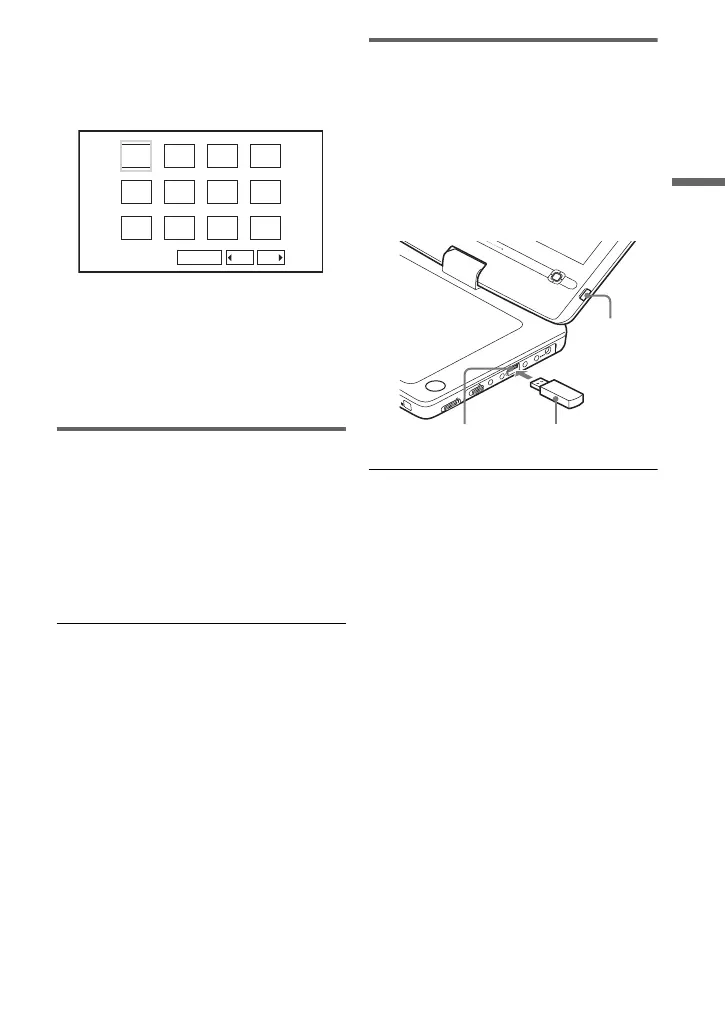
To display the list of thumbnails
Press MENU.
The image files in the album appear in 12
sub-screens.
• To go to the previous or next list of
thumbnails, select “bPrev” or
“NextB” at the bottom of the screen,
and press ENTER.
• To exit the list of thumbnails, press
MENU.
Playing a Slide Show
1 Press MENU.
The list of thumbnails appears.
2 Press C/X/x/c to select “Slide
Show” at the bottom of the screen,
and press ENTER.
A slideshow starts.
To stop slideshow
Press x to return to the list of files.
Press MENU to return to the list of
thumbnails.
To pause slideshow
Press X.
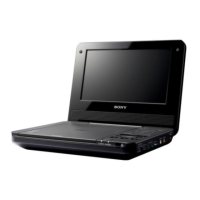
Playing data on a USB device
You can playback DATA files on a USB
device.
1 Press INPUT SELECT repeatedly to
select “USB.”
2 Connect a USB device to the USB
jack.
To disconnect a USB device
1 Press INPUT SELECT to deselect
“USB.”
2 Disconnect the USB device.
About supported Sony USB devices
The following Sony USB Memory Stick
reader/writer and USB flash drive “Micro
Vault” are supported: MSAC-US40,
USM-J series, USM-JX series, USM-J/B
series, USM-L series, and USM-LX series.
b
• Do not disconnect the USB device while its
access indicator is flashing. Doing so may
cause data corruption or loss of data.
• USB devices which can connect to the player
are flash memory and multiple card readers.
Other devices (digital still camera, USB hub,
etc.) cannot be connected. When an
unsupported device is connected, an error
message appears.
1234
5678
910
Slide Show
11 12
Prev Next
OPERATE
OFF
ON
OPEN
HOLD
PHONES
AUDIO
VIDEO
IN/
OUT
IN/
OUT
DC IN
9.5V
AB
OPTIONS
DISPLAY
RETURN
MENU
INPUT SELEC
T
INPUT
SELECT
USB device
USB jack
01US01COV.book Page 19 Thursday, May 13, 2010 1:49 PM













 To Next Page