DVP-FX950
4-169-965-22(1)
master page=Right_2C:\Documents and
Settings\QA2\Desktop\Feiyu_20091223_FC950_update_from930\GB\4169965211\4
169965211DVPFX950CEK\01US02WAR-CEK.fm
7
GB
S DC IN 9.5V jack (page 11, 12)
Connect the AC power adaptor or car
battery adaptor.
T INPUT SELECT button (page 14)
Each time you press the button, the
LCD screen image switches as
follows:
• Disc mode (default): When playing
an inserted disc.
• USB mode: When playing DATA
files on a connected USB device.
Appears “USB” on the LCD screen
when you select this mode.
• Line In mode: When inputting a
playback signal from connected A/V
equipment. Appears “Line In” on the
LCD screen when you select this
mode.
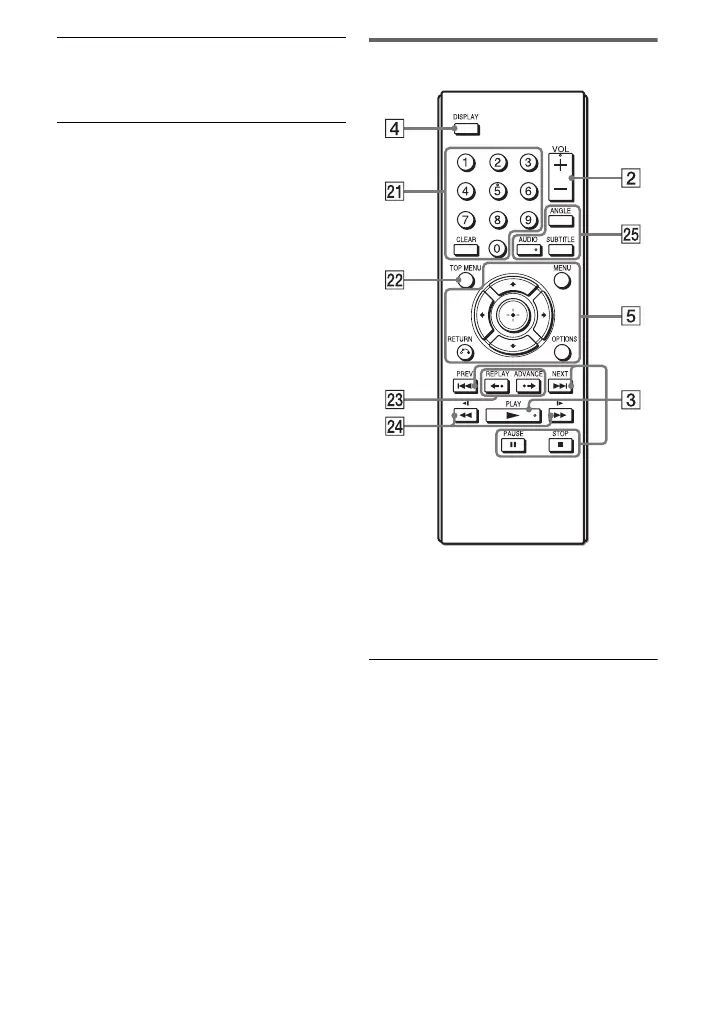
Remote
The VOL +, number 5, N and AUDIO
buttons have a tactile dot. Use the tactile
dot as a reference when operating the
player.
U Number buttons
Enters the title/chapter numbers, etc.
• When playing a DVD VIDEO or CD
or VIDEO CD: Search directly by
entering the title/chapter/track
number using the number buttons,
and press ENTER. (Only when
“PBC” is set to “Off” for VIDEO
CD.)
To switch a title or chapter, press C/
c.
CLEAR button
Clears the entry field.
,continued
01US01COV.book Page 7 Thursday, May 13, 2010 1:49 PM













 To Next Page