DVP-FX96
4-266-600-22(1)
5
master page=Right_2G:\Project_2010_Aug\Feiyu_20101111_FX96\6_Target\4266600111\4266600111DV
PFX96U8\01US\01US02WAR-CEK.fm
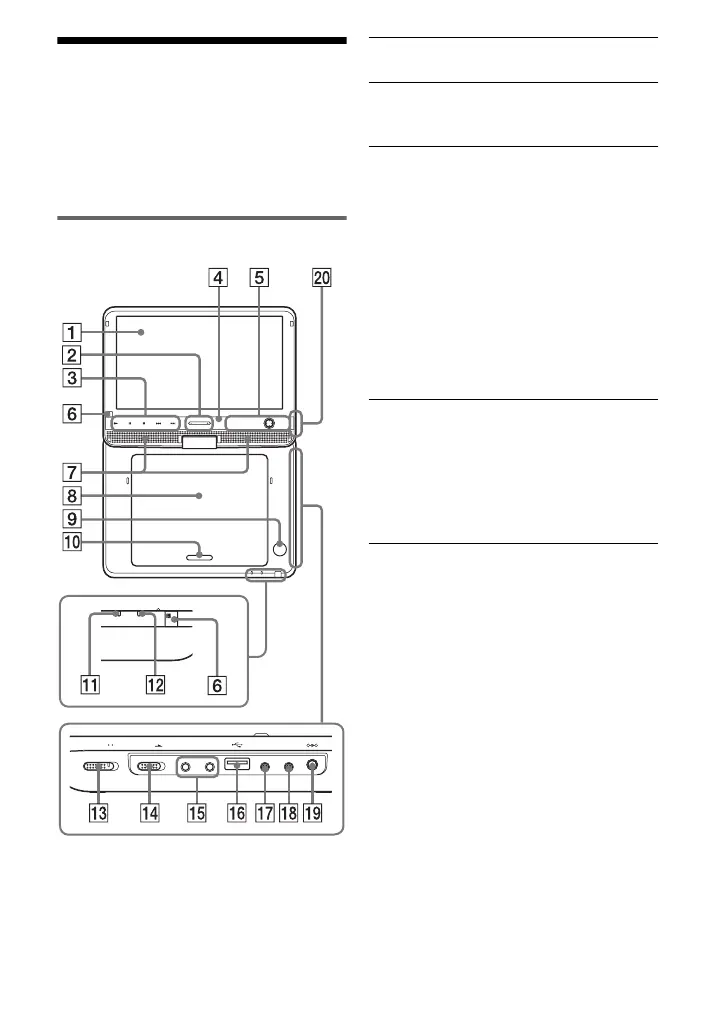
Guide to Parts and
Controls
The available functions of the player and
remote differ depending on the disc or the
situation.
Player
The VOLUME+ and N (play) buttons
have a tactile dot. Use the tactile dot as a
reference when operating the player.
A LCD panel (page 7)
B VOLUME (sound volume) +/–
Adjusts the volume.
C N (play) (page 11)
Starts or re-starts playback.
X (pause) (page 11)
Pauses or re-starts playback.
x (stop) (page 11)
Stops playback.
./> (previous/next)
Skips to the previous/next chapter,
track, or file.
D SOUND
Switches among 4 different sound
modes each time pressed.
This function is available only for the
sound output from the player’s
speaker.
E DISPLAY
Displays the playback information.
• When playing a DVD, changes the
playback mode (page 12).
MENU
Displays the DVD VIDEO’s menu.
• When playing a CD or VIDEO CD
(PBC function is off), switches to
Repeat Play (page 12) or Random
Play.
• When playing a JPEG file, plays a
slideshow (page 14).
RETURN
Returns to the previous display.
C/X/x/c
Moves the highlight to select a
displayed item.
PUSH CLOSE
OPEN
OPTIONSDISPLAYSOUND RETURNMENU
VOLUME
CHARGEPOWER
HOLD
A PHONES B
AUDIO
IN/OUT
VIDEO
IN/OUT
DC IN 9.5V
POWER OFF ON
,continued
01US01COV.book Page 5 Wednesday, May 25, 2011 9:54 AM













 To Next Page